Active Text Time Watch face
Malith Wimalarathna- EveryoneAge rating
- PersonalizationCategory
- Jul 22, 2026Updated
- $2.99Price
Links to the official Google Play listing of com.mpw.active.text.time. Last checked on Nov 24, 2026.
About this app
Word clock watch face: time written in words with color rings, AOD & themes
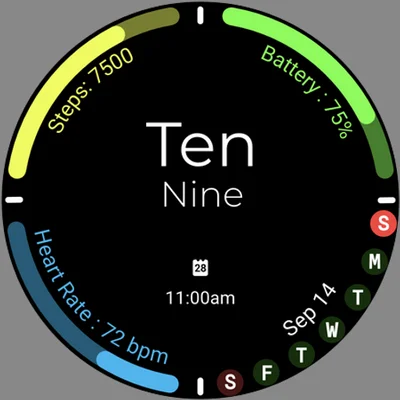
Active Text Time is a word clock watch face for Wear OS. Instead of digits, it spells out the time, so 10:09 reads "Ten Nine" across the center of your watch.
Colorful progress rings around the dial add a sporty touch and show your stats at a glance. Choose from several color themes to change the look of the rings and text.
Features
• Time written in words
• Colorful progress rings around the dial
• Date display
• Battery level
• Multiple color themes
• Always-On Display (AOD) mode
• Dark background suited to AMOLED screens
A different way to read the time
The text layout is clean and easy to read, and gives your watch a look that stands out from standard digital faces.
How to apply
1. Install from Google Play and select your watch as the install device.
2. On your watch, long-press the current watch face and swipe to Active Text Time.
3. Tap Customize to change colors and complications.
Compatibility
Made for Wear OS 3 and newer smartwatches, including Samsung Galaxy Watch 4 and later, Google Pixel Watch, TicWatch and Fossil Gen 6. Not compatible with Apple Watch or Tizen watches.
Data safety
What Malith Wimalarathna declares on Google Play about the data this app collects and shares.
- No data shared with third partiesLearn more about how developers declare sharing
- No data collectedLearn more about how developers declare collection
Developer contact
- Emailmalithmpw@gmail.com
- Privacy policysites.google.com
- AddressGurugala Imbulana Ruwanwella 71313 Sri Lanka
Information
- Offered by
- Malith Wimalarathna
- Category
- Personalization
- Updated
- Jul 22, 2026
- Released
- Sep 29, 2025
- Age rating
- Everyone
- Price
- $2.99
- Package name
- com.mpw.active.text.time