"Be Prepared" Weather Dial
BarefootDials- EveryoneAge rating
- PersonalizationCategory
- Aug 25, 2026Updated
- $2.49Price
Links to the official Google Play listing of com.barefootdials.be_prepared. Last checked on Nov 21, 2026.
About this app
Hourly Weather & Health Data at a Glance
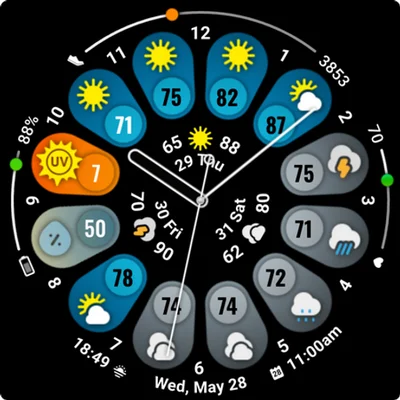
With an hourly weather forecast directly on your wrist, you're always one step ahead. Leaving the office and wondering if you need a jacket? Planning a bike ride and don't want to get caught in the rain? Or do you want to know if you need to protect your skin while gardening or doing sports? A glance at your wrist gives you the answer instantly.
All Important Data at a Glance
This watch face neatly organizes your health and device data around the edges:
Left Edge: Watch's current battery status.
Top Edge: Daily step counter.
Right Edge: Your current heart rate.
Bottom Edge: At the 6 o'clock position, you'll find the date display, flanked by two user-definable complications.
The Centerpiece: The Weather Functions
The core of the design is dedicated to the detailed weather forecast:
At the position of the hour hand, you will always find the current temperature and the corresponding weather icon. From there, moving clockwise, you'll see the hourly forecast for the next nine hours. This allows you to see at a glance how the weather will develop throughout the day.
The two positions to the left of the hour hand are reserved for two particularly important values: the UV Index and the rain probability in percent. This keeps you perfectly prepared for both sunshine and showers.
Tapping the center of the watch face toggles a three-day forecast, providing a clearer view over the time display when needed.
This watch face requires at least Wear OS 5.0.
Phone App Functionality:
The companion app for your smartphone is solely for assisting with the installation of the watch face onto your watch. Once the installation is successfully completed, the app is no longer needed and can be safely uninstalled.
Note: The appearance of user-changeable complication icons may vary depending on the watch manufacturer.
The weather data is sourced directly from your watch's operating system, which requires location services to be enabled. As a rule of thumb: if your watch's standard weather widget functions correctly, this watch face will too.
After activating the watch face, please allow a moment for the initial data to load.
Note for Google Pixel Watch users: Occasionally, there may be delays in updating the hourly forecast. A special icon on the watch face will indicate this status.
Data safety
What BarefootDials declares on Google Play about the data this app collects and shares.
- No data shared with third partiesLearn more about how developers declare sharing
- No data collectedLearn more about how developers declare collection
What’s new
Aug 25, 2026
Version 1.0.1 Watch Face Companion, Maintenance update.
Watch Face: Fixes a bug that prevented hiding the central three-day forecast.
Developer contact
- Emailinfo@barefootdials.com
- Privacy policybarefootdials.com
- AddressC/ Vall, 132 07620 Llucmajor España
Information
- Offered by
- BarefootDials
- Category
- Personalization
- Updated
- Aug 25, 2026
- Released
- Jun 6, 2025
- Age rating
- Everyone
- Price
- $2.49
- Package name
- com.barefootdials.be_prepared