Big Digital Clock Watch Face
RADU GHEORGHE TURCU- EveryoneAge rating
- PersonalizationCategory
- Nov 1, 2024Updated
- $0.99Price
Links to the official Google Play listing of com.turcuradu.bigdigitalclockwatchface. Last checked on Nov 21, 2026.
About this app
Cool Simple Watch Face with multiple colors and features
⏰ Big Digital Clock Watch Face ⏰
Experience the elegance and clarity of the Big Clock Watch Face – a perfect blend of style and functionality, tailored for those who appreciate a bold and easy-to-read display. This watch face is designed to give you all the essential info at a glance, making it both practical and visually appealing. 💯
Key Features
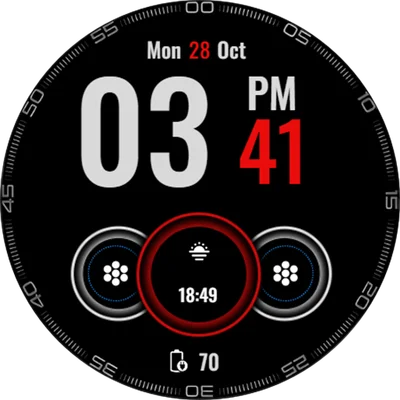
🕒 Large Digital Clock with AM/PM Format: Bold time display in 12-hour format, easy to read at a glance.
📅 Full Date Display: Stay informed with the complete day and date displayed at the top.
🎨 11 Color Schemes: Choose from 11 different color themes to match your mood and style.
🔋 Battery Indicator: Keep track of your watch battery with a convenient battery icon and percentage.
⚙️ 2 Customizable Shortcuts: Set your favorite apps or functions for quick access.
🌦️ Complicated Widget: An advanced widget in the center to display key information such as weather, steps, or more.
Additional Highlights
Minimalist & Stylish Design: Clean layout with bold fonts for easy readability.
Customizable Colors: Personalize your watch face to make it truly yours.
Whether you’re on the go or just want an eye-catching design, this Big Clock Watch Face combines function and form in one striking display! 🌟
-----------------------------------------------------------------------------------------------------------------
Watch face installation notes on smart watch:
Phone app serves only as a placeholder to make it easier to install & find the watch face on your Wear OS watch. You have to select your watch device from the install dropdown menu.
If you download the helper directly with the phone , you need to open application and touch on the display or the download button. -> will start to install on the watch.
A wear os watch need to be connected.
If not working in that way , you can copy that link into your phone chrome browser and click on arrow down from right , and you choose the watch face to install.
..............................................
After installation you need to set that watch face to your screen , from wear OS app , go down at downloaded watch faces and you will find it.
If you have problems , please contact me on raduturcu03@gmail.com
Try to see others designs in my google profile.
Data safety
What RADU GHEORGHE TURCU declares on Google Play about the data this app collects and shares.
- No data shared with third partiesLearn more about how developers declare sharing
- No data collectedLearn more about how developers declare collection
Developer contact
- Emailraduturcu03@gmail.com
- Privacy policye-droid.net
- AddressStr. Eduard Albert Bielz, Nr. 89d, Bl. b1, Sc. f, et.1, Ap. 60 550031 Sibiu Romania
Information
- Offered by
- RADU GHEORGHE TURCU
- Category
- Personalization
- Updated
- Nov 1, 2024
- Released
- Nov 1, 2024
- Age rating
- Everyone
- Price
- $0.99
- Package name
- com.turcuradu.bigdigitalclockwatchface