Bleed: Digital Watch Face
Felsh Watch Faces- EveryoneAge rating
- PersonalizationCategory
- Nov 13, 2026Updated
- $2.49Price
Links to the official Google Play listing of com.felsh.wf.bleed. Last checked on Nov 19, 2026.
About this app
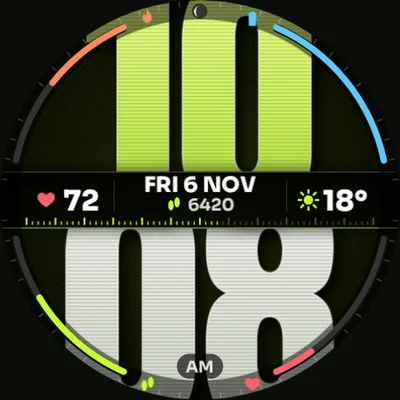
Giant digits bleed off the round screen, with a band of live data.
Bleed is a bold digital watch face. The hour and minute digits are so big that the round screen cuts them off, hours on top and minutes below. Between them sits a dark band that keeps your data in view.
• Data band between the digits: heart rate, date and steps, weather, plus a seconds track
• 4 progress arcs on the rim: calories (an estimate based on your steps), battery, steps and heart-rate zone
• Moon phase at 12 o'clock
• 7 customisable complication slots for any data you like
• 6 themes: Volt, Ember, Ice, Rose, Royal, Mono
• Options: seconds track on or off, line texture on or off
• Always-on mode: the giant digits become clean outlines that are easy on the battery
Built with the Watch Face Format for smooth, battery-friendly performance.
Requires Wear OS 5 or newer (API 34+). Works on Wear OS 5+ smartwatches such as recent Samsung Galaxy Watch and Google Pixel Watch models. Not for Tizen or Apple watches.
How to install: open the listing on your phone and choose your watch as the install device, or install it from the Play Store on the watch.
To customize: long-press the watch face, then tap Customize.
Data safety
What Felsh Watch Faces declares on Google Play about the data this app collects and shares.
- No data shared with third partiesLearn more about how developers declare sharing
- This app may collect these data typesApp activity
- Data is encrypted in transit
- Data can’t be deleted
What’s new
Nov 13, 2026
New phone app. It checks that your watch is connected, sends the watch face to your watch in one tap, and shows simple steps if something doesn't work.
Developer contact
- Websitekplese.github.io
- Emailhushwave.app@gmail.com
- Privacy policykplese.github.io
- AddressSolinska ul. 16 10360, Sesvete Croatia
Information
- Offered by
- Felsh Watch Faces
- Category
- Personalization
- Updated
- Nov 13, 2026
- Released
- Nov 6, 2026
- Age rating
- Everyone
- Price
- $2.49
- Package name
- com.felsh.wf.bleed