CELEST2000 Minimalist Watch
CELEST WatchesContains ads
- EveryoneAge rating
- PersonalizationCategory
- Aug 5, 2026Updated
- $1.99Price
Links to the official Google Play listing of com.watchfacestudio.celest_ad2000. Last checked on Nov 25, 2026.
About this app
Minimalist world map watch face with day, date, battery & 2 complications.
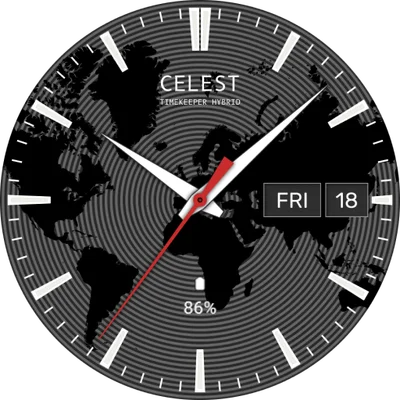
A world map, drawn quietly enough to live under the hands. CELEST2000 Minimalist Watch sets the continents in silhouette across a dark dial finished with fine concentric rings, so the map reads as texture rather than decoration and the time stays the first thing you see.
Baton markers hold the hours with longer ones at the quarters, sword-shaped hands carry the reading, and a slim red seconds hand supplies the only color on the dial. A day window and a date window sit together at 3 o'clock, and the battery percentage sits below center at 6. Beyond that, this minimalist watch face gives you 2 circular complication placement options for your own data, 4 marker variations to change the character of the hour track, and 9 color variations.
⌚ Features
- World map silhouette over a finely ringed dark dial
- Baton hour markers with longer markers at the quarters
- Day and date windows at 3 o'clock
- Battery percentage below center
- Sword hands with a slim red seconds hand
🎨 Customization
- 9 color variations
- 4 marker variations
- 2 circular complication placement options for your own data
A quietly detailed world map watch face for people who want texture on the dial and the time still first.
✅ Compatible Devices
- Google Pixel Watch/2/3/4/5
- OnePlus Watch 2/2R/3/4
- Oppo Watch X2/X3
- Samsung Galaxy Watch 4/4 Classic/5/5 Pro/6/6 Classic/7/8/8 Classic/9/FE/Ultra (2024)/(2025)/Ultra 2
- Xiaomi Watch 2/2 Pro/5
🎁 BOGO Promotion: https://celest-watches.com/bogo/
✨ Explore the complete CELEST collection in one place — including all Wear OS, HUAWEI, and Apple Watch faces, along with our apps and tools — with the CELEST Catalog app: https://play.google.com/store/apps/details?id=com.celestwatches.catalog
🔧 Installation Help
Having trouble? We've got you covered:
- Use the dropdown menu next to "Install" on your phone to select your watch model or install directly from your watch's Play Store app.
- Updating weather data (if the watch face shows weather) may take time after installation but switching to another watch face and switching back or restarting both the watch and phone usually helps.
- Check out our installation and troubleshooting guide: https://celest-watches.com/installation-troubleshooting/
- Contact us at info@celest-watches.com for quick support
📞 Support & Community
📧 Support: info@celest-watches.com
📱 Follow @celestwatches on Instagram and subscribe to our newsletter to get notified of new releases and deals: https://celest-watches.com/newsletter/
Data safety
What CELEST Watches declares on Google Play about the data this app collects and shares.
- No data shared with third partiesLearn more about how developers declare sharing
- No data collectedLearn more about how developers declare collection
What’s new
Aug 5, 2026
Updated to target Android 16 (API 36).
Developer contact
- Websitecelest-watches.com
- Emailinfo@celest-watches.com
- Privacy policycelest-watches.com
- AddressBudapest ERZSEBET UTCA 32 04. 5 em. 28 a. 1041 Hungary
Information
- Offered by
- CELEST Watches
- Category
- Personalization
- Updated
- Aug 5, 2026
- Released
- Mar 6, 2022
- Age rating
- Everyone
- Price
- $1.99
- Package name
- com.watchfacestudio.celest_ad2000