CELEST5425 Analog Watch
CELEST WatchesContains ads
- EveryoneAge rating
- PersonalizationCategory
- Aug 5, 2026Updated
- $1.99Price
Links to the official Google Play listing of com.watchfacestudio.celest5425. Last checked on Nov 16, 2026.
About this app
Analog watch face with weekday, battery & 24-hour dials, date & 2 variants.
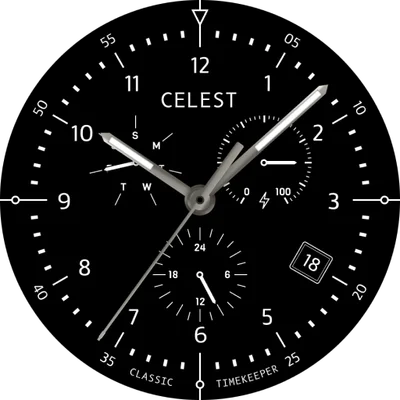
Three registers and two numeral rings, arranged so none of them fight. CELEST5425 Analog Watch carries the hours on an inner ring and the minutes on an outer one numbered 05 through 55, which lets you read either to the exact value without crowding the dial.
Inside that, a weekday dial sits left of center, a battery gauge arcs across the upper right marked from 0 to 100, and a 24-hour dial sits below. A date window is set at 4 o'clock. Sword hands and a thin seconds hand carry the main reading over the top of all of it. This analog watch face comes in two color variants, dark and light.
⌚ Features
- Inner ring for the hours, outer ring numbered 05 to 55 for the minutes
- Weekday dial left of center
- Battery gauge arcing across the upper right
- 24-hour dial below center
- Date window at 4 o'clock
🎨 Customization
- Two color variants: dark and light
- No complication slots: the register layout stays as designed
A data-dense analog watch face for people who want three working registers and a dial that still reads at a glance.
✅ Compatible Devices
- Google Pixel Watch/2/3/4/5
- OnePlus Watch 2/2R/3/4
- Oppo Watch X2/X3
- Samsung Galaxy Watch 4/4 Classic/5/5 Pro/6/6 Classic/7/8/8 Classic/9/FE/Ultra (2024)/(2025)/Ultra 2
- Xiaomi Watch 2/2 Pro/5
🎁 BOGO Promotion: https://celest-watches.com/bogo/
✨ Explore the complete CELEST collection in one place — including all Wear OS, HUAWEI, and Apple Watch faces, along with our apps and tools — with the CELEST Catalog app: https://play.google.com/store/apps/details?id=com.celestwatches.catalog
🔧 Installation Help
Having trouble? We've got you covered:
- Use the dropdown menu next to "Install" on your phone to select your watch model or install directly from your watch's Play Store app.
- Updating weather data (if the watch face shows weather) may take time after installation but switching to another watch face and switching back or restarting both the watch and phone usually helps.
- Check out our installation and troubleshooting guide: https://celest-watches.com/installation-troubleshooting/
- Contact us at info@celest-watches.com for quick support
📞 Support & Community
📧 Support: info@celest-watches.com
📱 Follow @celestwatches on Instagram and subscribe to our newsletter to get notified of new releases and deals: https://celest-watches.com/newsletter/
Data safety
What CELEST Watches declares on Google Play about the data this app collects and shares.
- No data shared with third partiesLearn more about how developers declare sharing
- No data collectedLearn more about how developers declare collection
What’s new
Aug 5, 2026
Updated to target Android 16 (API 36).
Developer contact
- Websitecelest-watches.com
- Emailinfo@celest-watches.com
- Privacy policycelest-watches.com
- AddressBudapest ERZSEBET UTCA 32 04. 5 em. 28 a. 1041 Hungary
Information
- Offered by
- CELEST Watches
- Category
- Personalization
- Updated
- Aug 5, 2026
- Released
- Dec 30, 2022
- Age rating
- Everyone
- Price
- $1.99
- Package name
- com.watchfacestudio.celest5425