CELEST5508 Cyber Watch
CELEST WatchesContains ads
- EveryoneAge rating
- PersonalizationCategory
- Aug 5, 2026Updated
- $1.00Price
Links to the official Google Play listing of com.watchfacestudio.celest5508. Last checked on Nov 17, 2026.
About this app
Digital code-editor watch face with JSON data readout & 9 IDE color themes.
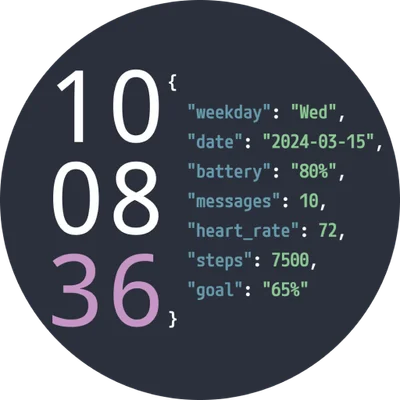
Digital, straight out of a code editor: CELEST5508 Cyber Watch stacks the time in bold numerals down the left and prints everything else as a JSON object on the right, syntax highlighting and all.
Hours, minutes, and seconds run top to bottom in a clean monospace face, big enough to read without looking twice. Beside them sits the data block — weekday, date, battery, messages, heart rate, steps, goal progress — laid out as key-value pairs in braces, keys in one color and values in another, exactly the way your editor would render it. Nine background colors drawn from popular IDE themes set the mood, twelve color combinations control the content on top of them, and three optional circular complications add whatever else you track.
⌨️ Features
- Digital time stacked in monospace numerals
- Live data printed as a syntax-highlighted JSON object
- Weekday, date, battery, messages, heart rate, steps, and goal progress
- Three optional circular complications
🎨 Customization
- 9 background colors inspired by popular IDE themes
- 12 color combinations for the watch face content
- 3 optional circular complications
✅ Compatible Devices
- Google Pixel Watch/2/3/4/5
- OnePlus Watch 2/2R/3/4
- Oppo Watch X2/X3
- Samsung Galaxy Watch 4/4 Classic/5/5 Pro/6/6 Classic/7/8/8 Classic/9/FE/Ultra (2024)/(2025)/Ultra 2
- Xiaomi Watch 2/2 Pro/5
🎁 BOGO Promotion: https://celest-watches.com/bogo/
✨ Explore the complete CELEST collection in one place — including all Wear OS, HUAWEI, and Apple Watch faces, along with our apps and tools — with the CELEST Catalog app: https://play.google.com/store/apps/details?id=com.celestwatches.catalog
🔧 Installation Help
Having trouble? We've got you covered:
- Use the dropdown menu next to "Install" on your phone to select your watch model or install directly from your watch's Play Store app.
- Updating weather data (if the watch face shows weather) may take time after installation but switching to another watch face and switching back or restarting both the watch and phone usually helps.
- Check out our installation and troubleshooting guide: https://celest-watches.com/installation-troubleshooting/
- Contact us at info@celest-watches.com for quick support
📞 Support & Community
📧 Support: info@celest-watches.com
📱 Follow @celestwatches on Instagram and subscribe to our newsletter to get notified of new releases and deals: https://celest-watches.com/newsletter/
Data safety
What CELEST Watches declares on Google Play about the data this app collects and shares.
- No data shared with third partiesLearn more about how developers declare sharing
- No data collectedLearn more about how developers declare collection
What’s new
Aug 5, 2026
Updated to target Android 16 (API 36).
Developer contact
- Websitecelest-watches.com
- Emailinfo@celest-watches.com
- Privacy policycelest-watches.com
- AddressBudapest ERZSEBET UTCA 32 04. 5 em. 28 a. 1041 Hungary
Information
- Offered by
- CELEST Watches
- Category
- Personalization
- Updated
- Aug 5, 2026
- Released
- Mar 15, 2024
- Age rating
- Everyone
- Price
- $1.00
- Package name
- com.watchfacestudio.celest5508