CELEST5547 Analog Watch
CELEST WatchesContains ads
- EveryoneAge rating
- PersonalizationCategory
- Aug 5, 2026Updated
- $1.00Price
Links to the official Google Play listing of com.watchfacestudio.celest5547. Last checked on Nov 25, 2026.
About this app
Analog watch face with raised subdials, day, date & 24-hour registers.
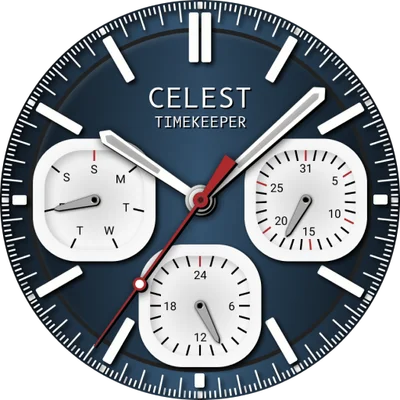
Analog, with the registers lifted off the dial: CELEST5547 Analog Watch sets three pale, rounded-square subdials over a deep sunray base — the weekday at nine, the date at three, the 24-hour scale at six — so they sit above the surface rather than being printed into it. For Wear OS 5+ devices, including Galaxy Watch and Pixel Watch.
That raised treatment is what distinguishes it. Light catches the edge of each register, the shadow beneath separates it from the base, and the contrast between pale subdials and a dark dial makes all three readable without enlarging them. Applied polished markers ring the outer edge, the date scale carries red accents at its quarters, and a slim red-tipped seconds hand crosses the whole arrangement. Printed branding sits under twelve.
⌚ Features
- Three raised subdials: weekday, date, and 24-hour time
- Pale registers over a dark sunray dial
- Applied polished hour markers with a fine minute track
- Red accents on the date scale and the seconds hand
🎨 Customization
- 10 background color variations, from navy to white
✅ Compatible Devices
- Google Pixel Watch/2/3/4/5
- OnePlus Watch 2/2R/3/4
- Oppo Watch X2/X3
- Samsung Galaxy Watch 4/4 Classic/5/5 Pro/6/6 Classic/7/8/8 Classic/9/FE/Ultra (2024)/(2025)/Ultra 2
- Xiaomi Watch 2/2 Pro/5
🎁 BOGO Promotion: https://celest-watches.com/bogo/
✨ Explore the complete CELEST collection in one place — including all Wear OS, HUAWEI, and Apple Watch faces, along with our apps and tools — with the CELEST Catalog app: https://play.google.com/store/apps/details?id=com.celestwatches.catalog
🔧 Installation Help
Having trouble? We've got you covered:
- Use the dropdown menu next to "Install" on your phone to select your watch model or install directly from your watch's Play Store app.
- Updating weather data (if the watch face shows weather) may take time after installation but switching to another watch face and switching back or restarting both the watch and phone usually helps.
- Check out our installation and troubleshooting guide: https://celest-watches.com/installation-troubleshooting/
- Contact us at info@celest-watches.com for quick support
📞 Support & Community
📧 Support: info@celest-watches.com
📱 Follow @celestwatches on Instagram and subscribe to our newsletter to get notified of new releases and deals: https://celest-watches.com/newsletter/
Data safety
What CELEST Watches declares on Google Play about the data this app collects and shares.
- No data shared with third partiesLearn more about how developers declare sharing
- No data collectedLearn more about how developers declare collection
What’s new
Aug 5, 2026
Updated to target Android 16 (API 36).
Developer contact
- Websitecelest-watches.com
- Emailinfo@celest-watches.com
- Privacy policycelest-watches.com
- AddressBudapest ERZSEBET UTCA 32 04. 5 em. 28 a. 1041 Hungary
Information
- Offered by
- CELEST Watches
- Category
- Personalization
- Updated
- Aug 5, 2026
- Released
- Nov 19, 2024
- Age rating
- Everyone
- Price
- $1.00
- Package name
- com.watchfacestudio.celest5547