Christmax Time Watch face
Malith Wimalarathna- EveryoneAge rating
- PersonalizationCategory
- Nov 9, 2026Updated
- $1.49Price
Links to the official Google Play listing of com.mpw.christmaxtime. Last checked on Nov 19, 2026.
About this app
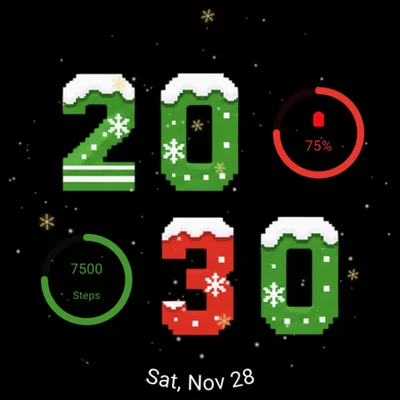
Festive Christmas digits, falling snow, your photo and 2 complications
Christmas Time brings festive, snow-capped digits to your wrist. Every time the watch face turns on, a short snowfall drifts across the screen, then settles so you can read the time at a glance.
FEATURES
• Big festive digital time with snow-capped, sweater-style digits
• Date display
• Snow animation that plays each time the watch face turns on
• 2 customizable complications – show steps, battery, heart rate, weather or other data from your watch apps
• Photo slot – add your own picture from your phone
• Always On Display – a dimmed, low-power version that keeps the time and date visible
CUSTOMIZE
1. Touch and hold the watch face.
2. Tap Customize.
3. Choose the data for each complication.
To add your photo, open the watch face settings in your watch's companion app on your phone and pick an image from your gallery.
INSTALLATION
Install from Google Play on your phone and choose your watch as the install target, or install directly from Google Play on your watch. Then touch and hold your current watch face, swipe to Christmas Time and tap to apply.
COMPATIBILITY
For Wear OS smartwatches running Wear OS 4 or later. This is a watch face only; it does not change your phone's screen. Complication data depends on the apps installed on your watch.
Data safety
What Malith Wimalarathna declares on Google Play about the data this app collects and shares.
- No data shared with third partiesLearn more about how developers declare sharing
- No data collectedLearn more about how developers declare collection
Developer contact
- Emailmalithmpw@gmail.com
- Privacy policysites.google.com
- AddressGurugala Imbulana Ruwanwella 71313 Sri Lanka
Information
- Offered by
- Malith Wimalarathna
- Category
- Personalization
- Version
- 1.0.1
- Updated
- Nov 9, 2026
- Released
- Nov 9, 2026
- Age rating
- Everyone
- Price
- $1.49
- Package name
- com.mpw.christmaxtime