Clair – Digital Watch Face
Magic apps & games- EveryoneAge rating
- PersonalizationCategory
- Oct 10, 2026Updated
- $1.89Price
Links to the official Google Play listing of com.observatoire.clair. Last checked on Nov 14, 2026.
About this app
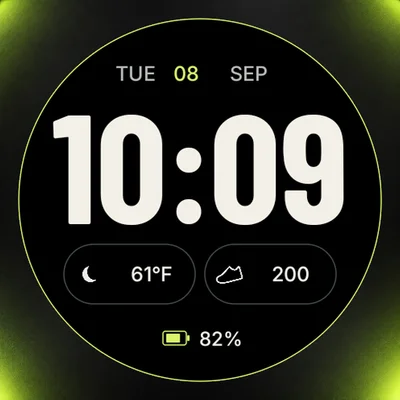
Bold time, steps and battery in a clean design with four colour palettes.
Clair puts the time first. Large digits, a black dial and two understated cards create a readable Wear OS watch face, with a colour accent that suits your style.
EVERYDAY DETAILS
• Large digital time following your watch’s 12-hour or 24-hour setting.
• Day and date in English or French.
• Step count supplied by the system complication.
• Watch battery percentage and charge indicator.
• Four palettes: Signature, Sand, Glacier and Lavender.
• Minimal Always-On Display with time and date on black.
WEATHER
Temperature and the weather symbol use native Wear OS weather data when the system provides it to the watch face. Clair shows a dash when usable data is unavailable. Support depends on your watch, software and weather service; installing another weather app does not guarantee weather data in Clair.
INSTALLATION AND COMPATIBILITY
For Wear OS 5 or later watches supporting Watch Face Format 2. Install and select the face on your watch. Not compatible with watches running other operating systems, including Tizen, or fitness bands.
Step data and complication tap actions depend on the configured system provider. Clair does not count steps itself. Your watch displays its own data.
PURCHASE AND SUPPORT
One-time purchase. No advertising, subscriptions, in-app purchases or publisher account. No phone companion app is required. Data providers may have their own permissions and terms.
Support: abdo.elgomri@gmail.com
https://abdogomri.github.io/watch-faces/help/?lang=en
Privacy: https://abdogomri.github.io/watch-faces/privacy/?lang=en
Data safety
What Magic apps & games declares on Google Play about the data this app collects and shares.
- No data shared with third partiesLearn more about how developers declare sharing
- No data collectedLearn more about how developers declare collection
What’s new
Version 1.0.1 · Oct 10, 2026
Refined typography, weather symbols and data display, with an updated watch face preview.
Developer contact
- Websiteabdogomri.github.io
- Emailabdo.elgomri@gmail.com
- Privacy policyabdogomri.github.io
- Address52 Rue de Syracuse appartement 115 Appt 115 34000 Montpellier France
Information
- Offered by
- Magic apps & games
- Category
- Personalization
- Version
- 1.0.1
- Updated
- Oct 10, 2026
- Released
- Oct 10, 2026
- Age rating
- Everyone
- Price
- $1.89
- Package name
- com.observatoire.clair