CNRwatch005
CNRwatch- EveryoneAge rating
- PersonalizationCategory
- Jul 30, 2024Updated
- $0.99Price
Links to the official Google Play listing of com.watchfacestudio.cnrwatch005. Last checked on Nov 14, 2026.
About this app
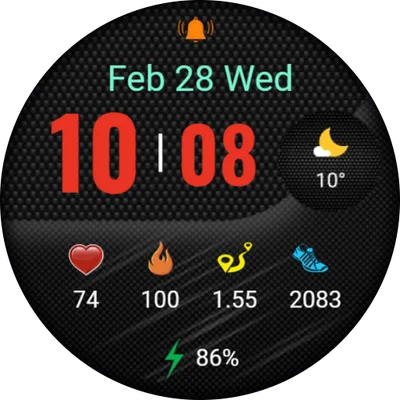
Digital watch for Wear OS
Digital Watch
Steps shortcut
Heart shortcut
Battery shortcut
Calories shortcut
1 Complication
Digital clock 5 color options
INSTALLATION MANUAL ↴
You may encounter various problems when trying to install a watch face from the official Google Play Android app.
In cases where the watch face is installed on your phone but not on your watch, the developer has added a helper app to improve visibility in the Play Store. You can uninstall the helper app from your phone and look for a triangular icon next to the Install button in the Play Store app (https://i.imgur.com/OqWHNYf.png). This symbol indicates a drop-down menu where you can select your watch as the installation destination.
Alternatively, you can try opening the Play Store in a web browser on your laptop, Mac or PC. This will allow you to visually select the correct device for installation (https://i.imgur.com/Rq6NGAC.png).
[If you have followed the instructions mentioned above and the watch face still does not appear on your watch, open the Galaxy Wearable app. Go to the Downloads section of the app and you will find the watch face there (https://i.imgur.com/mmNusLy.png). Simply click on it to start the installation.
Data safety
What CNRwatch declares on Google Play about the data this app collects and shares.
- No data shared with third partiesLearn more about how developers declare sharing
- No data collectedLearn more about how developers declare collection
What’s new
Version 1.0.0 · Jul 30, 2024
CNR Watch Faces ( wear OS )
Developer contact
- Emailhircingokhan@gmail.com
- Privacy policyfreeprivacypolicy.com
- AddressGoncalar Mh. 6029 sokak No : 22 35650 Izmir Türkiye
Information
- Offered by
- CNRwatch
- Category
- Personalization
- Version
- 1.0.0
- Updated
- Jul 30, 2024
- Released
- Feb 18, 2024
- Requires
- Android 11 or later
- Age rating
- Everyone
- Price
- $0.99
- Package name
- com.watchfacestudio.cnrwatch005