[무료] 일일계획결산
TIMEFLIK- EveryoneAge rating
- PersonalizationCategory
- Aug 25, 2025Updated
- FreePrice
Links to the official Google Play listing of com.apposter.dailyreport_original. Last checked on Nov 13, 2026.
About this app
Automatic translation by Google from Korean (South Korea).
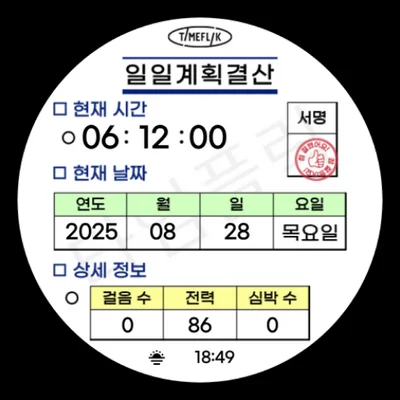
This is a free daily plan summary watch face created by Timeflick.
#How to Install a Watch Face
- After purchasing, launch the Daily Planner Companion app installed on your smartphone.
- Tap the Watch Face Download button and complete the watch face installation on your watch.
- You can delete the companion app after installing the watch face.
#How to Link a Phone Battery Complication:
Install the Phone Battery Complication app below on both your phone and watch.
https://play.google.com/store/apps/details?id=com.weartools.phonebattcomp&hl=ko
#Information and Features
- Digital Clock (12/24 Hours)
- Date
- Battery Status (Watch)
- Current Steps
- Heart Rate
- Always on Display
#Customization
- Change 10 theme colors
- 2 complications
*This watch face supports Wear OS devices.
Show the original text
#워치페이스 설치 방법
- 구매 후 스마트폰에 설치된 일일계획결산 컴패니언 앱을 실행해 주세요.
- 워치페이스 다운로드 버튼을 누른 후 워치에서 워치페이스 설치를 완료해 주세요.
- 워치페이스 설치 후 컴패니언 앱은 삭제하셔도 무방합니다.
#폰 배터리 컴플리케이션 연동 방법:
아래의 폰 배터리 컴플리케이션 앱을 휴대폰과 워치 양쪽에 모두 설치해주세요.
https://play.google.com/store/apps/details?id=com.weartools.phonebattcomp&hl=ko
#제공 정보 및 기능
- 디지털 시계 (12/24시간)
- 날짜
- 전력 상태(워치)
- 현재까지 걸음 수
- 심박수
- Always on Display
#커스터마이즈
- 10종류의 테마 컬러 변경
- 2종류의 컴플리케이션
*This watch face supports wear OS devices.
----
개발자 연락처 :
(주)앱포스터 대한민국 서울특별시 마포구
마포구 성암로 189, 7층 705호 (상암동,중소기업 DMC 타워)
03929 1078739753 2013-서울마포-1337 서울특별시 마포구청
Data safety
What TIMEFLIK declares on Google Play about the data this app collects and shares.
- No data shared with third partiesLearn more about how developers declare sharing
- No data collectedLearn more about how developers declare collection
Developer contact
- Websiteapposter.com
- Emailhelp@apposter.com
- Privacy policyweb.timeflik.com
- Address대한민국 서울특별시 마포구 마포구 성암로 189, 7층 705호 (상암동,중소기업 DMC 타워) 03929
Information
- Offered by
- TIMEFLIK
- Category
- Personalization
- Updated
- Aug 25, 2025
- Released
- Aug 22, 2024
- Age rating
- Everyone
- Price
- Free
- Package name
- com.apposter.dailyreport_original