한글 시계 모음
SSABSE- EveryoneAge rating
- PersonalizationCategory
- Nov 7, 2026Updated
- FreePrice
Links to the official Google Play listing of com.jsoh.theme.hangul. Last checked on Nov 20, 2026.
About this app
Automatic translation by Google from Korean (South Korea).
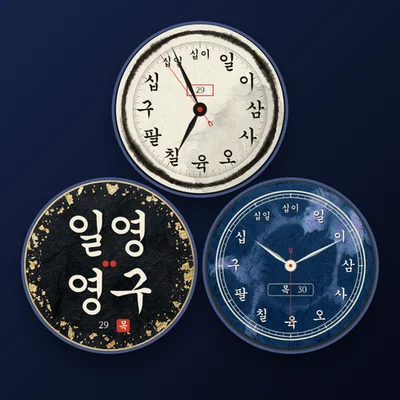
6 Korean watch faces that display the time using Korean numbers. Preview them and install them on your watch.
Hangeul Watch Collection is an app that guides you through the process of browsing 6 Hangeul watch faces featuring traditional Korean colors—such as Hanji, Ink and Gold Leaf, Indigo, Constellations, Dancheong, and Celadon—all in one place, and installing them on your Wear OS watch.
[What You Need to Know]
- 6 at a Glance: Hangeul Analog, Hangeul Digital, Hangeul Ring, Constellation Chart, Dancheong, Celadon
- Face Comparison Chart: Compare styles, step counts, and required Wear OS versions on a single screen
- 3-Step Application Guide and Confirmation Checklist
- Theme Collection: Collect your installed watch faces by checking them off yourself
- Direct access to the Play Store screen for each watch face
[How to Use]
1. Choose a watch face you like.
2. Click the 'Install on Watch' button to open the Play Store screen and install it on your connected watch.
3. Press and hold the watch screen to select from the list to apply it.
[Note]
- This app is a guide app that introduces watch faces on your mobile phone. Each watch face is purchased and installed as a separate app from the Play Store.
- Available on watches running Wear OS 4 or higher.
- Some watch faces request physical activity permissions to display step counts (indicated in the relevant watch face guide). This hub app does not request permissions and does not collect personal information.
- Installation is not automatically checked; the user manually confirms the installation.
Show the original text
한글 시계 모음은 한지, 먹빛 금박, 쪽빛, 별자리, 단청, 청자 같은 우리 색을 담은 한글 워치페이스 6종을 한곳에서 둘러보고, 내 Wear OS 워치에 설치하는 방법을 안내하는 앱이에요.
[이런 점이 좋아요]
- 6종을 한눈에: 한글 아날로그, 한글 디지털, 한글 링, 별자리 천문도, 단청, 청자
- 페이스 비교표: 스타일, 걸음 수 표시, 필요한 Wear OS 버전을 한 화면에서 비교
- 적용 3단계 안내와 적용 확인 체크리스트
- 테마 컬렉션: 설치한 워치페이스를 직접 체크하며 모아 보세요
- 각 워치페이스의 Play 스토어 화면으로 바로 이동
[사용 방법]
1. 마음에 드는 워치페이스를 고릅니다.
2. '워치에 설치' 버튼으로 Play 스토어 화면을 열고 연결된 워치에 설치합니다.
3. 워치 화면을 길게 눌러 목록에서 선택하면 적용돼요.
[알아두세요]
- 이 앱은 휴대폰에서 워치페이스를 소개하는 안내 앱입니다. 워치페이스는 각각 별도 앱으로 Play 스토어에서 구매·설치합니다.
- Wear OS 4 이상 워치에서 사용할 수 있어요.
- 일부 워치페이스는 걸음 수 표시를 위해 신체 활동 권한을 요청합니다(해당 워치페이스 안내에 표시). 이 허브 앱은 권한을 요청하지 않으며 개인 정보를 수집하지 않습니다.
- 설치 여부는 자동으로 확인하지 않고 사용자가 직접 표시합니다.
----
개발자 연락처 :
오진세 장자울길 135
파주시, 경기도 10865
South Korea 8663002026 0 0
Data safety
What SSABSE declares on Google Play about the data this app collects and shares.
- No data shared with third partiesLearn more about how developers declare sharing
- No data collectedLearn more about how developers declare collection
Developer contact
- Websitedotjelly-watch.web.app
- Emailssangyongtt@gmail.com
- Privacy policydotjelly-watch.web.app
- Address장자울길 135 파주시, 경기도 10865 South Korea
Information
- Offered by
- SSABSE
- Category
- Personalization
- Version
- 1.0.0
- Updated
- Nov 7, 2026
- Released
- Nov 7, 2026
- Requires
- Android 8.0 or later
- Age rating
- Everyone
- Price
- Free
- Package name
- com.jsoh.theme.hangul