Corgi Dog Days
Unlimited Dreams Eleven- EveryoneAge rating
- PersonalizationCategory
- Nov 25, 2026Updated
- $1.69Price
Links to the official Google Play listing of com.ud11.watchface.corgi. Last checked on Nov 26, 2026.
About this app
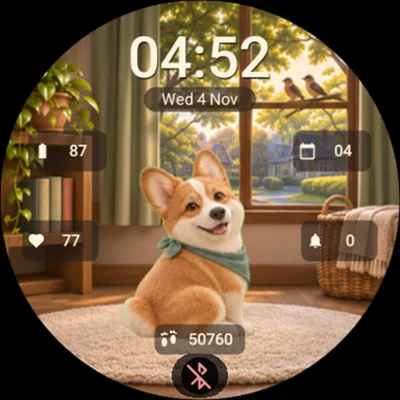
A cozy Corgi by the window, six scenes and five customizable data slots.
Share a cozy home with a Corgi beside the window.
In the morning, your Corgi watches birds and wags its tail. During the day it relaxes by the window. In the evening it lies down to watch passing cars, and at night it curls up to sleep. Rain and snow bring their own window-watching scenes.
Wake the display or tap the scene to see a happy greeting, then your Corgi returns to its activity. You can turn the greeting off in the watch-face settings.
Make the face yours:
• Five customizable complication slots for compatible data sources you choose.
• Automatic scenes based on local time and available system weather.
• Manual Morning, Day, Evening, Night, Rain and Snow scene selection.
• Time and date, with a simple dark ambient display.
The watch face requires a compatible Wear OS 5 or newer watch (Android API 34+). The Android phone companion includes six static previews, English/Thai setup help, an Install to wearable button and a connection refresh button. Choose a connected watch to open its Google Play listing, then finish installing on the watch. If no watch is available, use the phone Play listing or the installation help. Connection status does not confirm compatibility or installation. The phone app does not change watch-face settings. Garmin and other watch systems are not supported by this release.
Choose your data sources in the watch-face editor. Initial defaults are battery, date, heart rate, notifications and steps. Every slot can be changed or cleared. Available sources, icons, data and permissions depend on your watch and installed apps. Heart-rate and step values in store images are emulator examples, not medical readings.
Automatic rain and snow scenes require fresh weather supplied by the watch system. If suitable weather is unavailable, the scene follows the time of day. You can always choose a scene manually.
Tap the scene away from the data slots for a greeting. Tapping a data slot uses that provider's action. Animation is disabled in ambient mode.
Support: ud11.support@gmail.com
Data safety
What Unlimited Dreams Eleven declares on Google Play about the data this app collects and shares.
- No data shared with third partiesLearn more about how developers declare sharing
- No data collectedLearn more about how developers declare collection
What’s new
Nov 25, 2026
Updated AndroidX Activity and Fragment libraries in the phone companion.
Developer contact
- Emailud11.support@gmail.com
- Privacy policyunlimited-dreams-eleven.github.io
- Address72/397 kanchannapisek Road Bangmaenang, Bangyai นนทบุรี 11140 Thailand
Information
- Offered by
- Unlimited Dreams Eleven
- Category
- Personalization
- Updated
- Nov 25, 2026
- Released
- Nov 21, 2026
- Age rating
- Everyone
- Price
- $1.69
- Package name
- com.ud11.watchface.corgi