DepthBezel Diver Watch Face
Iovion- EveryoneAge rating
- PersonalizationCategory
- Oct 17, 2026Updated
- $1.89Price
Links to the official Google Play listing of com.iovion.wf.depthbezel. Last checked on Nov 13, 2026.
About this app
Analogue diver watch face with bezel for Wear OS — elegant, customisable
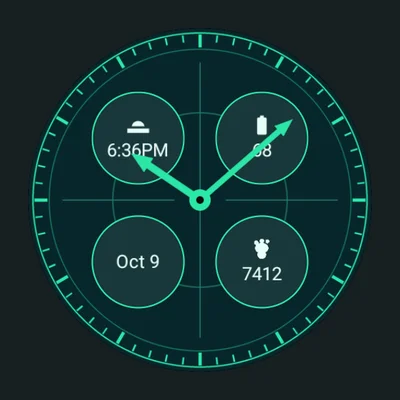
DepthBezel-IOV is an elegant, customisable watch face for Wear OS. An analogue diver's dial: diving bezel, luminous indices and four small subdials, one per quadrant.
The readings/metrics come from apps on your watch. The watch face only displays them, and with your watch's health and fitness app as well as a weather or calendar app there are more values to choose from.
These settings can be made either from the app or on the watch itself.
Setting them on the watch can cause trouble (metrics/data/complications pick their own tappable area) and those areas can overlap. In that case the settings have to be made from the app.
An illustrated step-by-step guide for both ways is here:
https://iovion.com/watchFaces/wearOs/settings
Features:
- Three complication slots: three of the four subdials; the one at the bottom left carries the date, fixed
- Every slot takes any provider that delivers short text
- Nothing to set up first: out of the box sunset and battery stand at the top, and at the bottom right the dial reads steps itself
- Colour settings with eighteen colours each plus an "As Designed" reset
- Eight selectable hand shapes and three hub styles, plus the "As Designed" reset
- Always-on display: only the hands stay visible, dimmed — everything else steps back
- No permissions, no network access, no data collection
Requires Wear OS 4 or newer.
If you would like more to configure, leave a message via the contact form and we will add it.
Data safety
What Iovion declares on Google Play about the data this app collects and shares.
- No data shared with third partiesLearn more about how developers declare sharing
- No data collectedLearn more about how developers declare collection
What’s new
Version 1.31 · Oct 17, 2026
2026-10-17 - 1.31
- Fixed: some settings jumped back to their old value when changed in the customization screen
- New color "True Black": on AMOLED watches the background switches off completely, only the dial lights up
2026-09-29 - 1.30
- The hands can now be switched off
- The date can now be shown or hidden
2026-09-21 - 1.24
- New color settings for Clock and Data Icons
2026-09-13 - 1.22
- First release
Developer contact
- Websiteiovion.com
- Emailsupport@iovion.com
- Privacy policyiovion.com
- AddressRendsburger Landstr. 148 24113 Kiel Germany
Information
- Offered by
- Iovion
- Category
- Personalization
- Version
- 1.31
- Updated
- Oct 17, 2026
- Released
- Sep 9, 2026
- Age rating
- Everyone
- Price
- $1.89
- Package name
- com.iovion.wf.depthbezel