Digital Basic 8e Wear OS 5+
OQ Watchfaces- EveryoneAge rating
- PersonalizationCategory
- Jul 28, 2026Updated
- $0.99Price
Links to the official Google Play listing of com.watchfacestudio.db8e. Last checked on Nov 13, 2026.
About this app
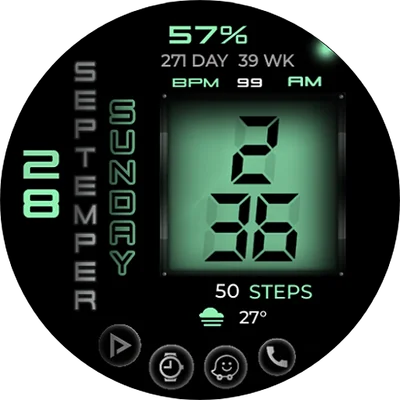
A Unique Stylish modern Digital Watchface with many color style options
=======================================================
NOTICE: READ THIS ALWAYS BEFORE AND AFTER DOWNLOADING OUR WATCH FACE TO AVOID ANY SITUATION YOU DON'T LIKE.IF YOU BOUGHT THE WATCH FACE AND THINK ITS A MISTAKE AND AFTER REFUNDING ONCE GOOGLE PLAY DOES NOT SHOW REFUND WHEN YOU TRIED AGAIN JUST EMAIL AT MY DEVELOPER EMAIL ADDRESS AND GET A REFUND FROM ME.
=======================================================
a.The watch face supports both 12H and 24H Modes. Please Note that to use mode of your choice you have to select it on the phone your watch is connected. And If you are using an LTE watch and it is not connected to the phone then go to watch settings and then change time mode from there.
b. The font used for the hours and minutes text displayed is a special created font with numbers from 1 to 10 with shadows behind each number. it is not a digital font So no you cannot change the font for it.
c. The Days , and Month Text text are basically images of each day and month created as png graphics file to get perfect alignment so no you cannot have more languages for it ONLY English is supported.
d. DO NOT PAY TWICE FROM WATCH PLAY STORE . READ The Install Guide Image again. See 3 x methods 100 percent working to install both phone app and watch app .
=======================================================
FEATURES AND FUNCTIONS
=======================================================
This watch face for WEAR OS 5+ has following features:-
1. Tapping on phone icon will open watch dial app on your watch.
2. Tapping on message icon on left of phone icon open watch messages app.
3. Tapping on watch icon will open watch alarm settings
4. Tapping on icon left of watch icon with a play icon will open the watch play store app on your watch.
5. Tap On BPM Text or Reading and it will ope Bpm Heart Rate Counter on the watch.
6. Tap on Battery icon or text to open watch battery settings menu.
7. The Frame around Hour and Minutes digits is also customizable via customization menu.
8. 30 x Color Styles are available in Customization menu for user.
9. Dim Mode is available for Main and Always on Display as well separately in customization menu.
Data safety
What OQ Watchfaces declares on Google Play about the data this app collects and shares.
- No data shared with third partiesLearn more about how developers declare sharing
- No data collectedLearn more about how developers declare collection
What’s new
Jul 28, 2026
V1.00 First Release.
Developer contact
- Emailosmanqadir78@gmail.com
- Privacy policysites.google.com
- AddressHouse no 307 Sector C Street 12 Askari X Lahore Cantt, 54810 Pakistan
Information
- Offered by
- OQ Watchfaces
- Category
- Personalization
- Updated
- Jul 28, 2026
- Released
- Sep 28, 2025
- Age rating
- Everyone
- Price
- $0.99
- Package name
- com.watchfacestudio.db8e