Digital Diver Watch Face
CMDN Studio- EveryoneAge rating
- PersonalizationCategory
- Oct 27, 2026Updated
- $1.99Price
Links to the official Google Play listing of gil.cmdnstudio.diver02. Last checked on Nov 24, 2026.
About this app
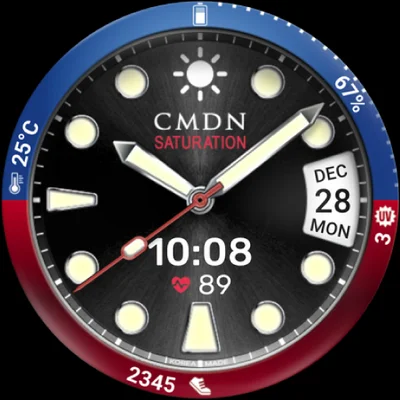
Realistic analog diver watch face with a digital readout, ten presets.
A realistic analog diver watch with a digital readout.
Digital Diver Watch Face puts luminous dot markers and sword hands over a
black, white, cream, navy or green dial, and adds a digital display that shows what the day actually
needs: the time in hours and minutes, weather, UV index, step count,
battery and heart rate.
TEN PRESETS
- Black dial with a blue and red bezel
- Black dial with a black and blue bezel
- Black dial with a black and green bezel
- Black dial with a black and orange bezel
- Black dial with a black and yellow bezel
- White dial with a blue and red bezel
- Cream dial with a black and blue bezel
- White dial with a black and orange bezel
- Navy dial with a silver bezel
- Green dial with a lime bezel
Start from any of the ten, then change the bezel, dial, seconds hand,
index and hour and minute hands on their own in the watch face settings.
SATURATION
Named for saturation diving, where divers live under pressure for days
breathing helium mixtures. Helium atoms are small enough to seep through
seals that stop water, so those watches carry a valve to let the gas back
out on the way up. It is the deepest end of what a diver watch was built
for.
FEATURES
- Black, white, cream, navy or green dial with luminous dot and trapezoid markers
- Soft shadows under the hands and markers for depth
- Slim seconds hand in eight colours
- Battery gauge on the bezel, with the percentage riding along its edge
- Step count that moves along the bezel as the day adds up
- Digital hours and minutes, in 12 or 24-hour format following your
watch setting
- Current weather icon and temperature in Celsius or Fahrenheit,
following your setting
- UV index
- Heart rate
- Month, date and day window, always in English whatever your watch language
- Dedicated always-on display, with the seconds hand hidden
- Four hidden app shortcuts at twelve, three, six and nine, each set to an app of your choice
- Phone app: tap Install on watch to open the Play Store on your watch
HOW TO INSTALL
1. Open this page in a web browser, tap Install and choose your watch as
the device — or search for cmdn in the Play Store on your watch
2. On the watch, press and hold the current watch face
3. Swipe to find Digital Diver and tap to select
This is a watch face. It does not run on phones.
Weather, step and heart rate readings come from your watch. If a reading
is not available the display shows dashes.
Designed and built by CMDN in Korea.
Data safety
What CMDN Studio declares on Google Play about the data this app collects and shares.
- No data shared with third partiesLearn more about how developers declare sharing
- No data collectedLearn more about how developers declare collection
What’s new
Oct 27, 2026
Month and weekday now always read in English, whatever your watch language.
Four app shortcuts sit hidden on the dial at twelve, three, six and nine. Touch and hold the watch face, open Customize and go to the complications to set an app for each slot. To change an app later, clear the slot first, then choose an app shortcut again.
The phone app shows the updated dial and clearer help cards.
Developer contact
- Websitewatch.cmdn.pro
- Emailcmdnstudio@naver.com
- Privacy policywatch.cmdn.pro
- Address수색로 100 DMC 래미안 e편한세상, 103동 403호 서대문구, 서울특별시 03709 South Korea
Information
- Offered by
- CMDN Studio
- Category
- Personalization
- Updated
- Oct 27, 2026
- Released
- Oct 6, 2026
- Age rating
- Everyone
- Price
- $1.99
- Package name
- gil.cmdnstudio.diver02