Digital Tracker WatchFace
jigu watchfaceContains ads
- EveryoneAge rating
- PersonalizationCategory
- Aug 21, 2026Updated
- FreePrice
Links to the official Google Play listing of com.watchface.wearos.digitaltrackerwatchface. Last checked on Nov 15, 2026.
About this app
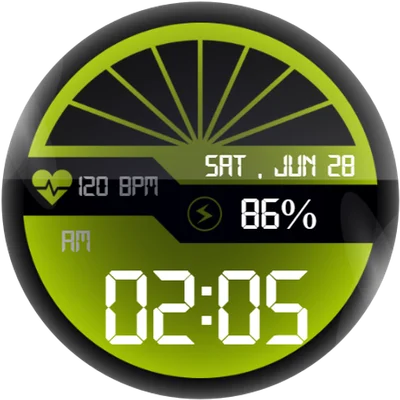
Track time, heart rate, and battery with this bold digital Wear OS face.
Stay on top of your day with the Digital Tracker Watch Face—a sleek and modern design for Wear OS devices that combines function with futuristic flair. With a sharp digital time display, heart rate monitor, battery percentage, and date, it's built to keep you informed at a glance.
🧠 Perfect For: Tech-savvy users, fitness enthusiasts, and anyone who values clean, info-rich watch faces.
⚡ Ideal for: Daily wear, workouts, or casual tech style lovers.
Key Features:
1)Bold digital time display in high contrast for easy reading.
2)Tracks heart rate (BPM), date, and battery percentage.
3)Supports Ambient Mode & Always-On Display (AOD).
4)Designed for optimal performance across all Wear OS devices.
Installation Instructions:
1)Open the Companion App on your phone.
2)Tap "Install on Watch." On your watch, select Digital Tracker Watch Face from your settings or watch face gallery.
Compatibility:
✅ Compatible with all Wear OS devices API 33+ (e.g., Google Pixel Watch, Samsung Galaxy Watch).
❌ Not suitable for rectangular watches.
Upgrade your wrist with smart tracking and clear digital style!
Data safety
What jigu watchface declares on Google Play about the data this app collects and shares.
- No data shared with third partiesLearn more about how developers declare sharing
- This app may collect these data typesApp activity, App info and performance, and Device or other IDs
- Data is encrypted in transit
- Data can’t be deleted
Developer contact
- Websitejiguwatchface.blogspot.com
- Emailjigsdevganiya12345@gmail.com
- Privacy policyjiguwatchface.blogspot.com
- AddressIndia
Information
- Offered by
- jigu watchface
- Category
- Personalization
- Updated
- Aug 21, 2026
- Released
- Jun 7, 2025
- Age rating
- Everyone
- Price
- Free
- Package name
- com.watchface.wearos.digitaltrackerwatchface