Digital watchface for Juggluco
Jaap Korthals Altes- EveryoneAge rating
- ToolsCategory
- Jun 13, 2026Updated
- FreePrice
Links to the official Google Play listing of tk.glucodata.watchfacepush.watchface3. Last checked on Nov 14, 2026.
About this app
Watchface for displaying the glucose value received from Juggluco
Juggluco is an Android and WearOS app for receiving data from glucose sensors: https://play.google.com/store/apps/details?id=tk.glucodata
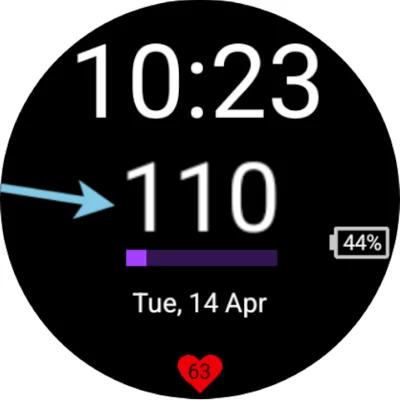
The WearOS version of Juggluco contains glucose complications that can be placed in watch faces with a (preferably SMALL_IMAGE) complication slot.
This watch face was designed so that the complication slots are well-placed to display these complications:
- A complication for the glucose value in the middle of the display
- A complication for the rate of change arrow at the left of it
- A complication representing how long ago the glucose measurement was made, below the glucose value. The same way as the purple coloring of the sensor id below the glucose value in the Juggluco app itself, it increases in size as the measurement gets older, reaching its maximal size after 5.5 minutes. After 5.5 minutes, Juggluco itself changes the glucose value complication, so that instead of a glucose value, "No value" is displayed.
In addition to these three complications, the watch face has three other complications.
Without making use of complications, the watch face can also display your heart rate, battery charge level and the date. In the configuration settings, you can select a position for each of these elements or choose not to display it.
This watch face doesn't need to be used in combination with Juggluco; you can also use the complication slots intended for the arrow or the value for other purposes.
An analog watch face for Juggluco can be found at https://play.google.com/store/apps/details?id=tk.glucodata.watchfacepush.watchface2
Data safety
What Jaap Korthals Altes declares on Google Play about the data this app collects and shares.
- No data shared with third partiesLearn more about how developers declare sharing
- No data collectedLearn more about how developers declare collection
What’s new
Version 1.0.0 · Jun 13, 2026
The reading age complication didn't work on OnePlus Watch 3. This update makes use of a new reading age complication that does work on that watch. Juggluco needs to be updated as well.
Developer contact
- Websitejuggluco.nl
- Emailjaapkorthalsaltes@gmail.com
- Privacy policyjuggluco.nl
- AddressNetherlands
Information
- Offered by
- Jaap Korthals Altes
- Category
- Tools
- Version
- 1.0.0
- Updated
- Jun 13, 2026
- Released
- Apr 14, 2026
- Age rating
- Everyone
- Price
- Free
- Package name
- tk.glucodata.watchfacepush.watchface3