Digital X3
Freiberg watches- EveryoneAge rating
- PersonalizationCategory
- Aug 9, 2026Updated
- $1.99Price
Links to the official Google Play listing of com.watchfacestudio.DigitalX3. Last checked on Nov 21, 2026.
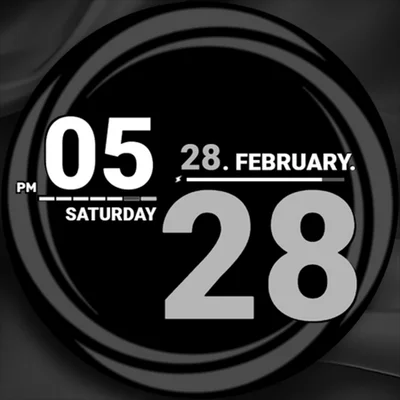
About this app
Wear OS watch.
Wear OS watch
Wear OS watch screen companion app for Phone:
Immediately after installing the mobile application, a message will appear when you open the application.
You need to tap on the watch face image to start the process of installing the watch face on your watch (To speed up connection and loading, open the GALAXY WEARABLE app or other clock management program. Downloading to your watch will begin immediately.).
Once the installation process is complete, the companion app can be deleted.
After installation, browse the watch face library to find the screen face.
IMPORTANT AFTER INSTALLATION - after installation, the phone will open a refund link that will be visible on the watch. To find a watch face don't press refund and browse the watch face library to find a watch face.
Main Features:
- AM/PM marker
- Digital watch face switchable to 12/24 hour via Phone Settings
- The background image rotates counter-clockwise. One round for 60 seconds.
- Date
- Battery level status
- Changeable colors (tap & hold to customize & change colors)
- Customizable display ( Tap and hold to customize and change.)
- Weekday indicator
- Quick access to Alarm
- Quick access to the calendar
- Quick access to the battery
- Quick access to 4 custom shortcuts(Tap & hold to customize & change shortcut to your chosen action).
- One hidden customizable shortcut(Tap & hold to customize & change shortcut to your chosen action).
- Always on display
Note:
Email for feedback and suggestions ===> freibergclockfaces@gmail.com
Data safety
What Freiberg watches declares on Google Play about the data this app collects and shares.
- No data shared with third partiesLearn more about how developers declare sharing
- No data collectedLearn more about how developers declare collection
- Committed to follow the Play Families Policy
Developer contact
- Emailfreibergclockfaces@gmail.com
- Privacy policysites.google.com
- AddressKokneses pagasts, Burtnieki Aizkraukles novads, Latvija, LV-5113 Latvia
Information
- Offered by
- Freiberg watches
- Category
- Personalization
- Updated
- Aug 9, 2026
- Released
- Jan 13, 2023
- Age rating
- Everyone
- Price
- $1.99
- Package name
- com.watchfacestudio.DigitalX3