Disk & Storage Analyzer [PRO]
Mobile Infographics Tools- EveryoneAge rating
- ProductivityCategory
- Sep 28, 2026Updated
- $2.99Price
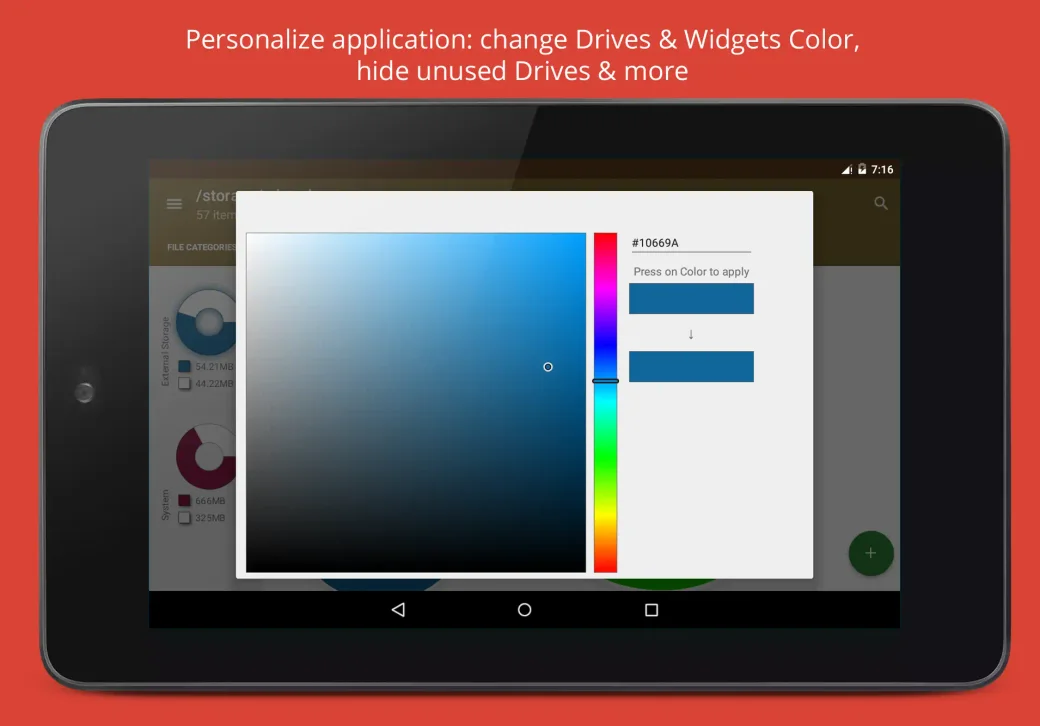
Links to the official Google Play listing of com.mobile_infographics_tools.mydrive_ext. Last checked on Nov 26, 2026.

About this app
Device's storage information in a simple and clear graphical form (infographics)
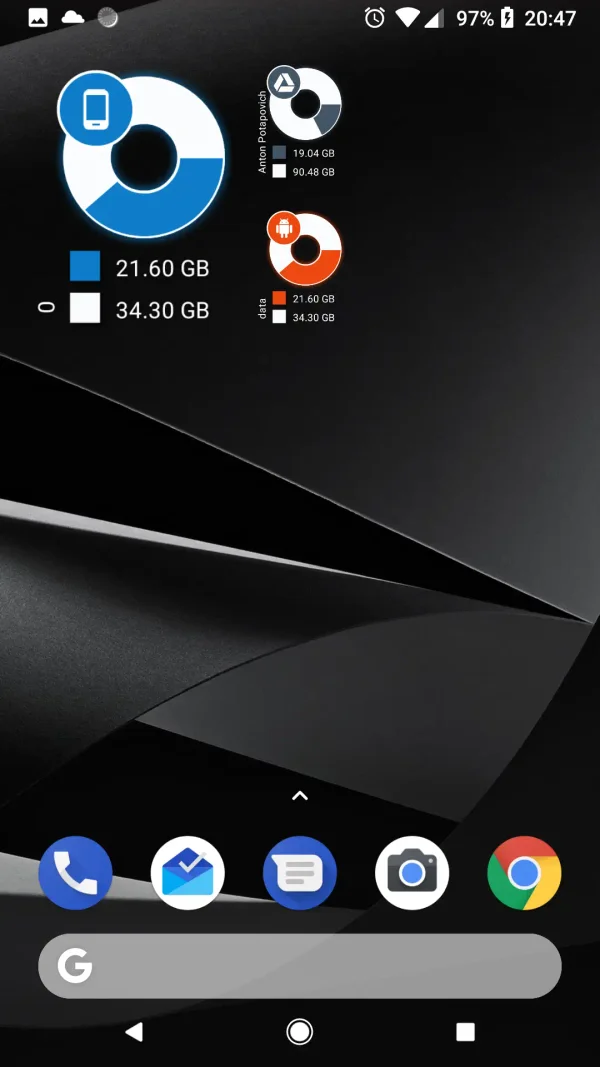
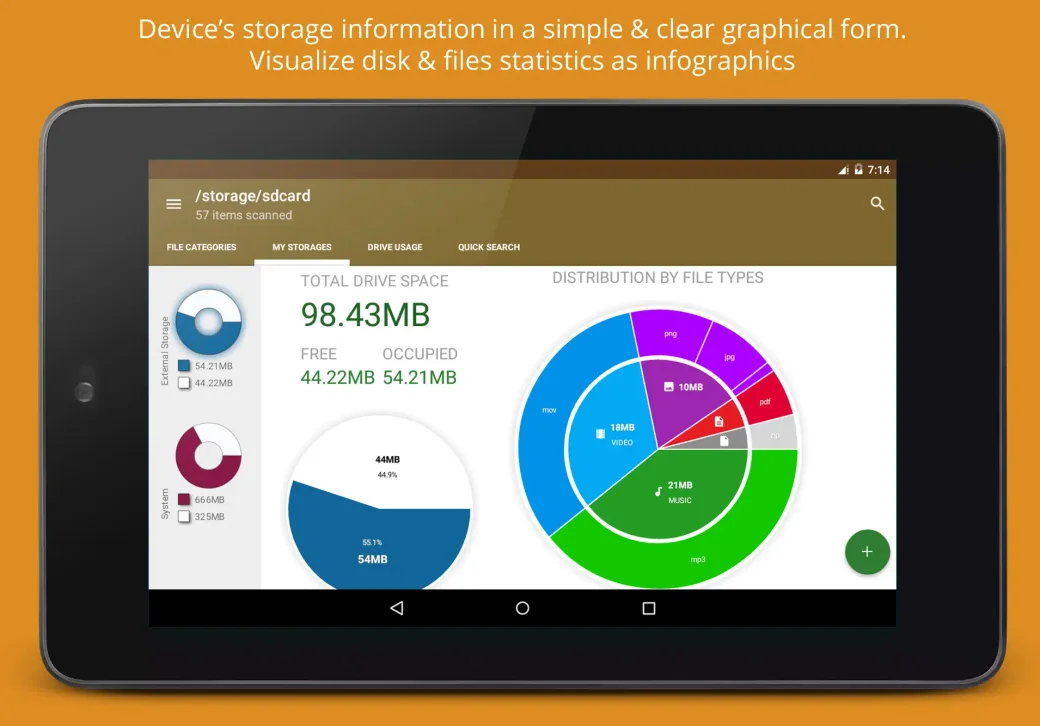
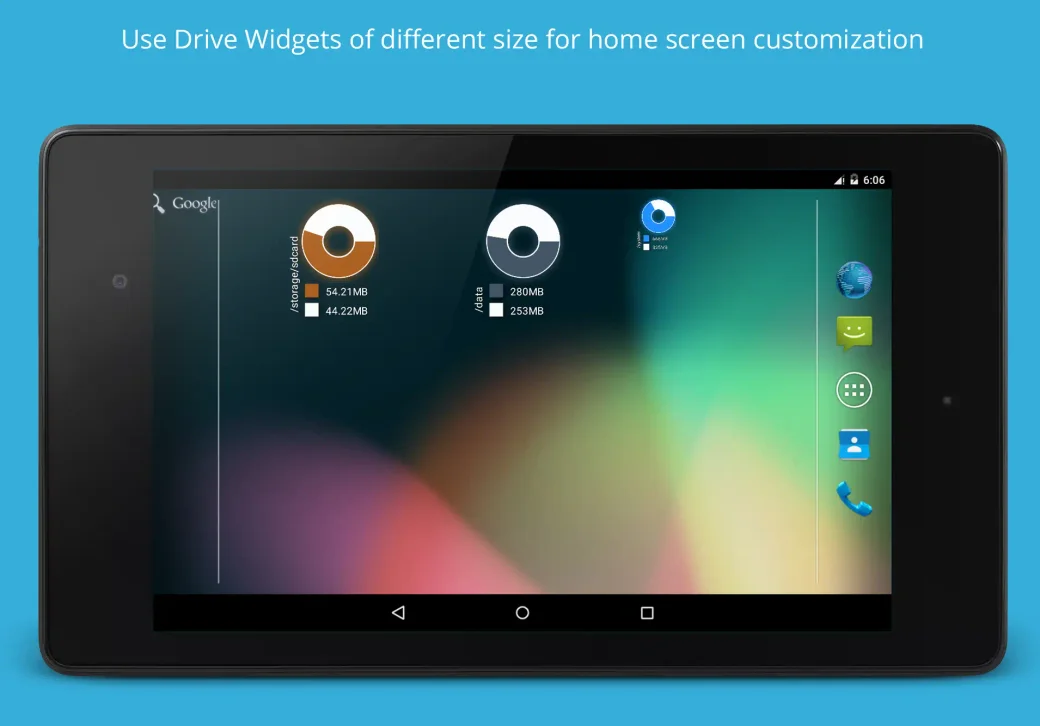
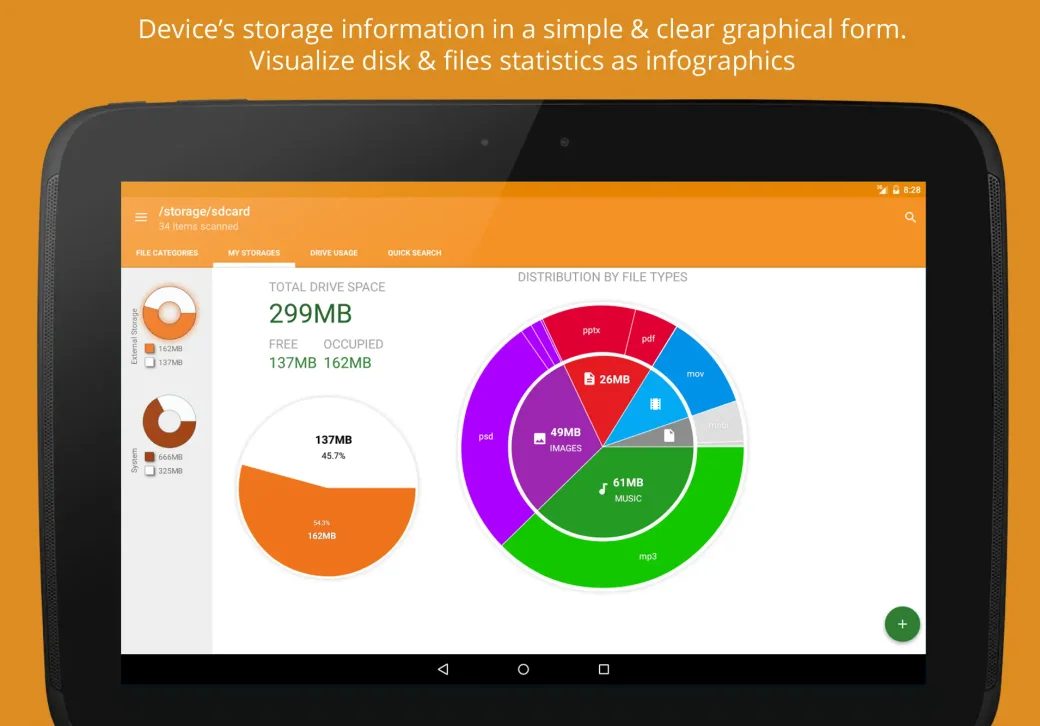
DISK & STORAGE ANALYZER [PRO] displays information on sdcard, usb devices, external and internal storage in a simple and clear graphical form (infographics).
■ It's the MOST ADVANCED and INTERACTIVE DISK SPACE VISUALIZATION on Google Play.
■ “Finds lost cache files. It helps me to free up disk space by quickly finding and deleting big files.”
■ “This application is an essential addition to any file browser. it is very simple and convenient tool to search for files by size.”
● VISUALIZATION
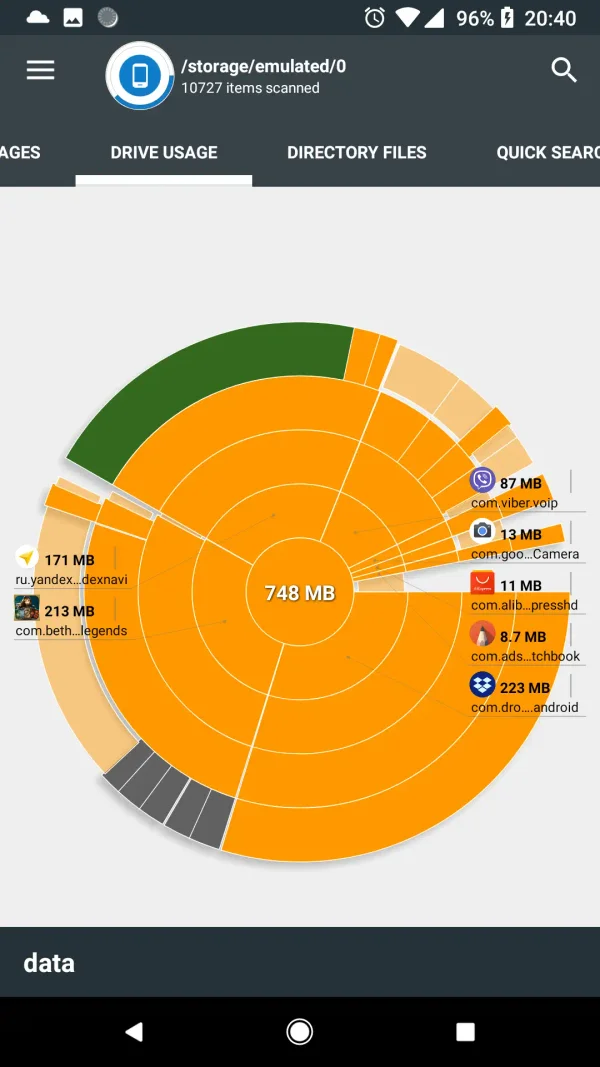
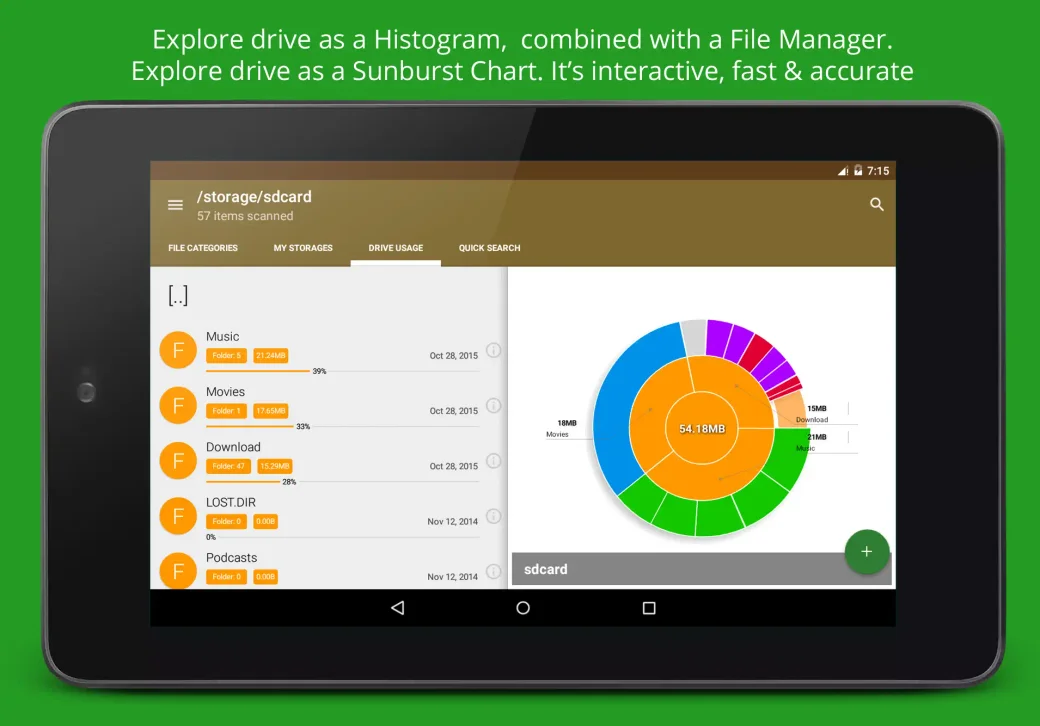
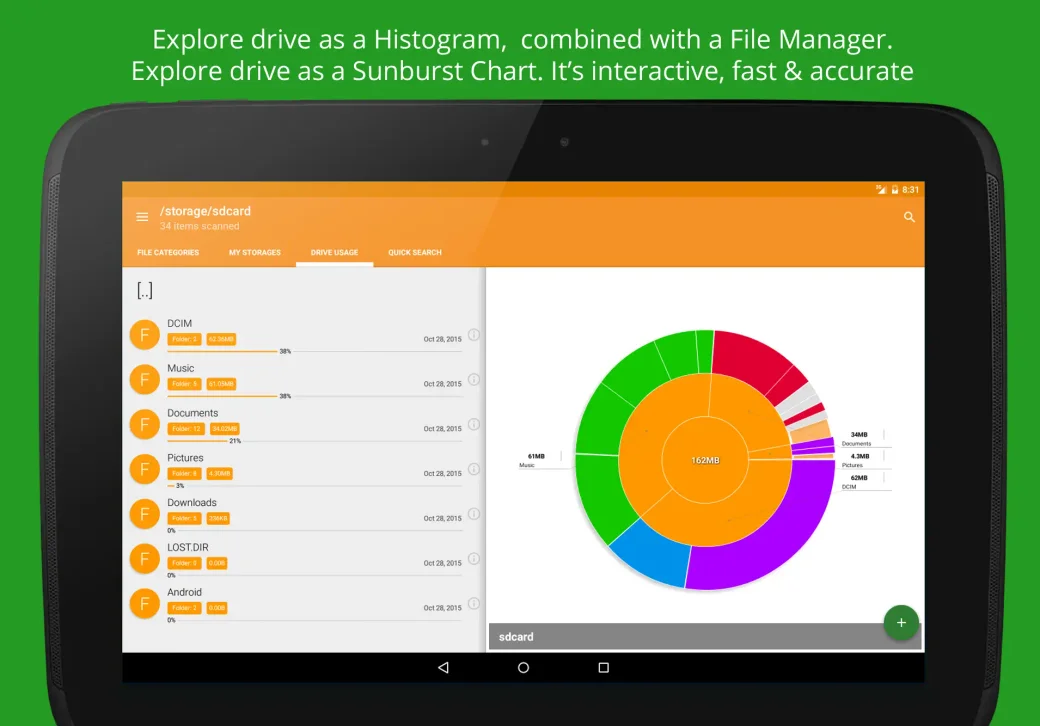
Folders and Files are represented as a Sunburst chart and sorted by their size.
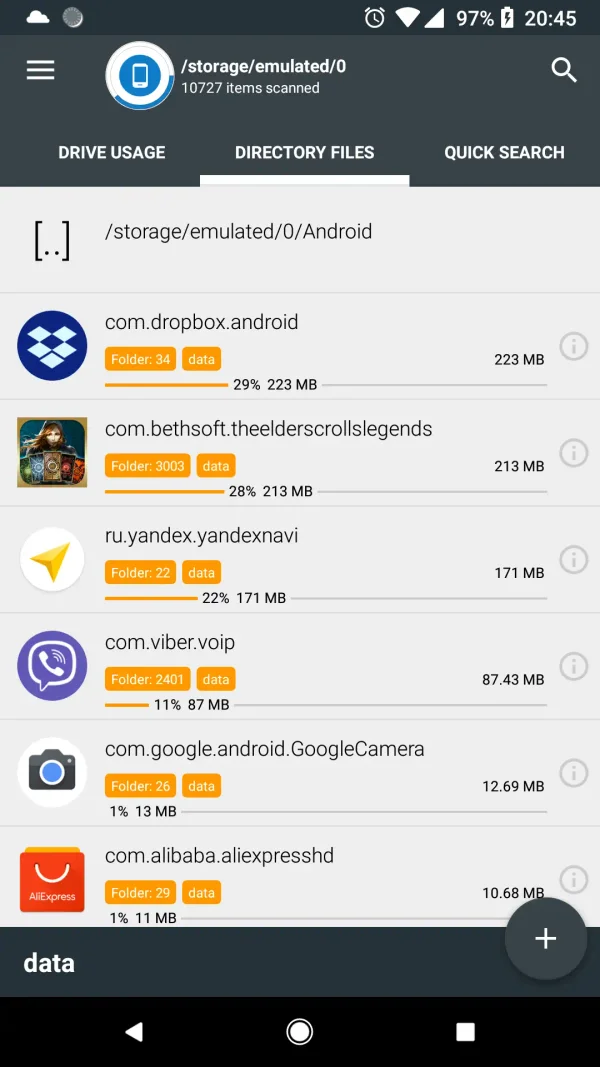
Сentral chart sector is a current directory. Its represented by a circle. The rest of the sector is the subfolders and files. Click on the sector and we go deeper. Application draws nested levels with a head of previously selected sector.
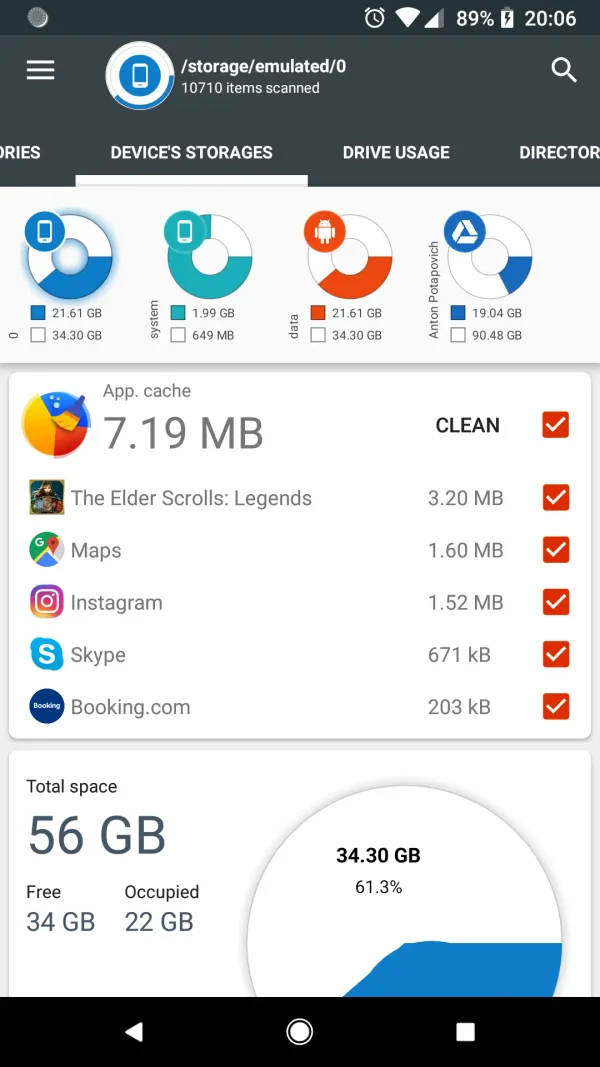
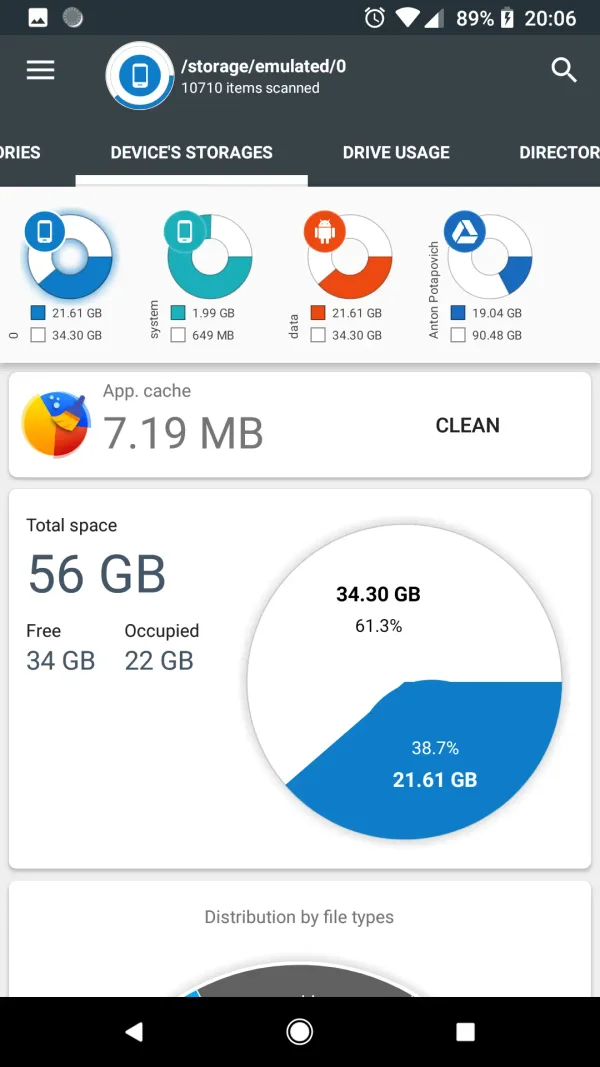
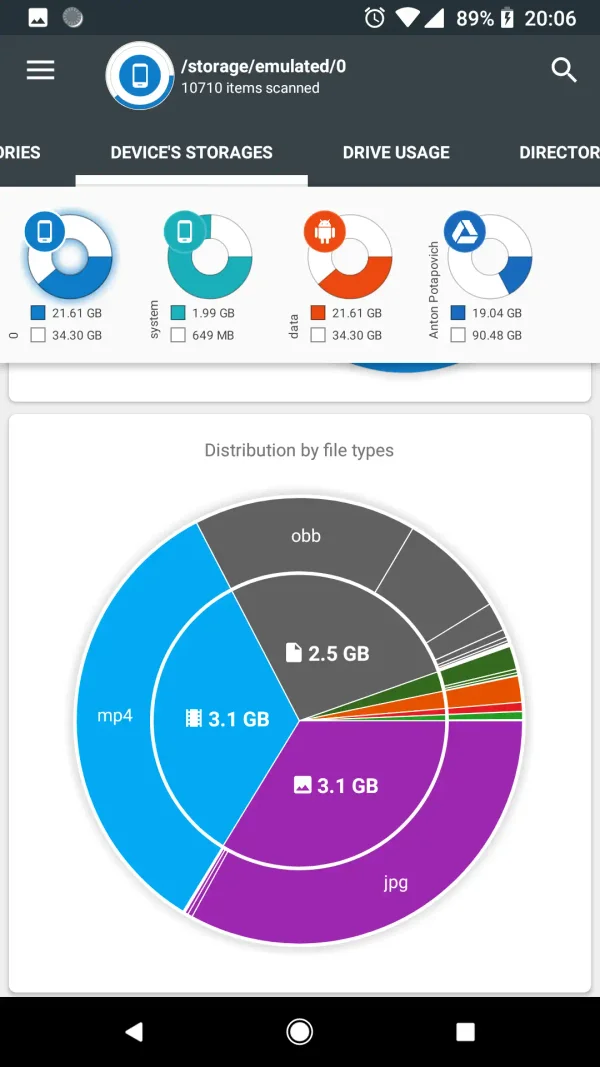
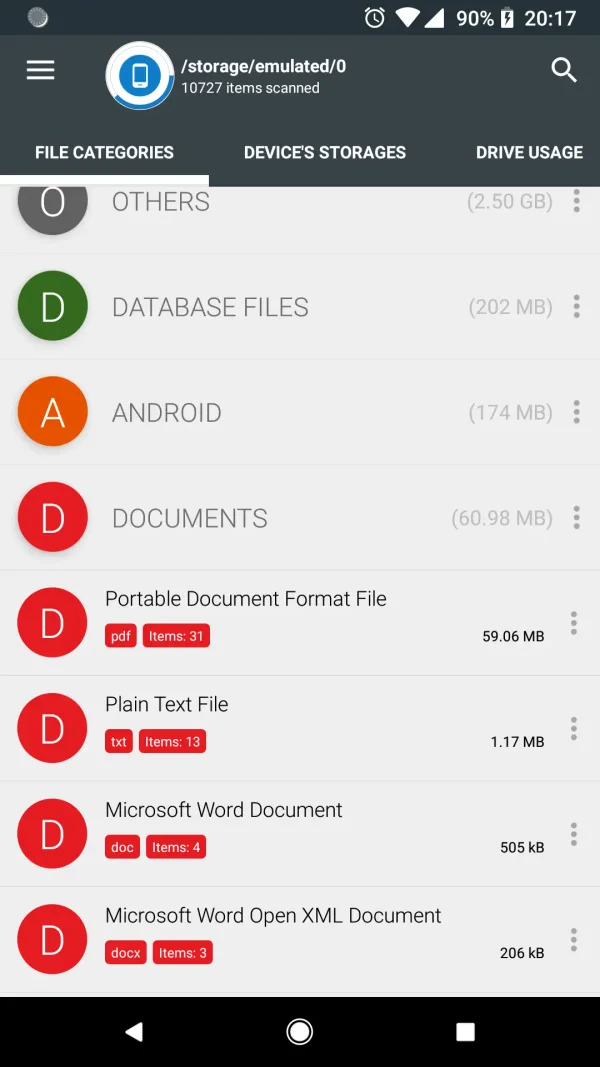
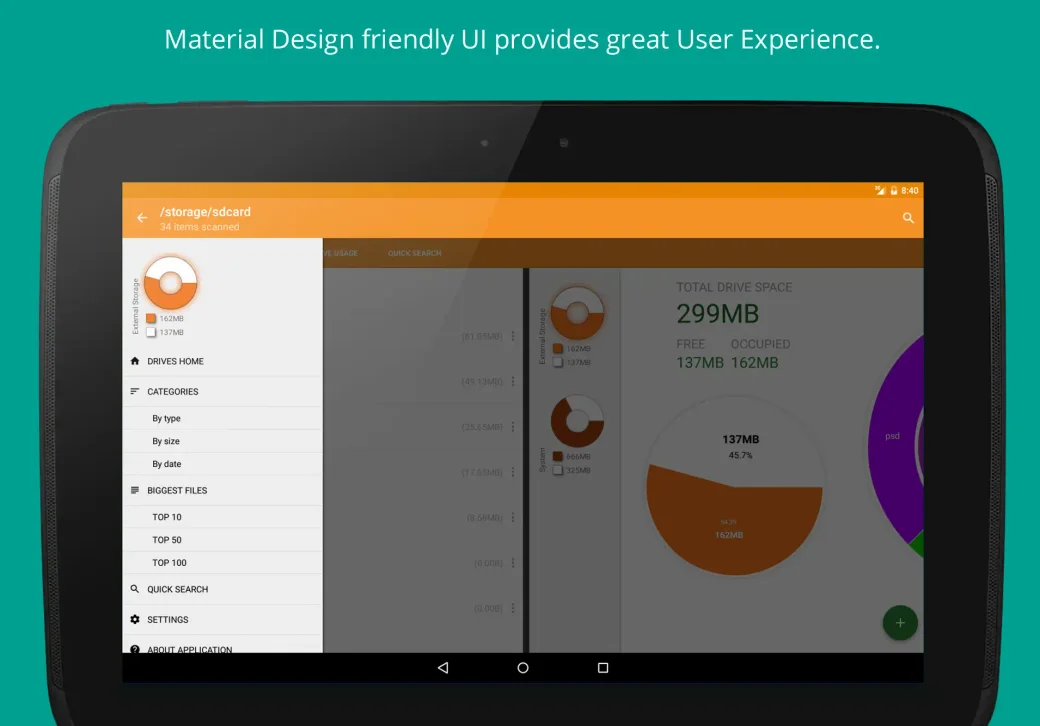
Disk & Storage Analyzer [PRO] displays mount points as a pie chart with a free and available space and the distribution of files by category (documents, images, videos, music, etc.) and extensions (for example, the distribution of the Music has subcategory mp3, wma, ogg, etc.)
Data on available storages taken from mount points of the vold.fstab file.
● STRONG SEARCH CAPABILITIES
All contents of the device is indexed at run. Full drive search can be done in a second. Founded files are displayed on the Quick Search page after entering a search query.
● FINDING BIG FILES EASILY
Global Top Ten largest files mode is available. Using this application you can easily clean up device and free a lot of space.
● INTUITIVE USER INTERFACE
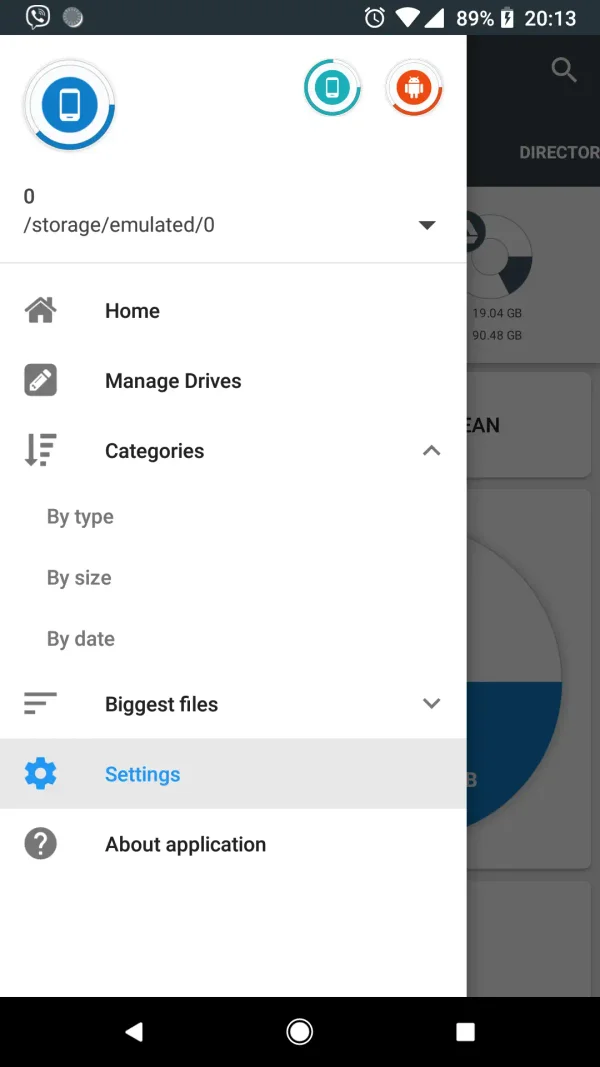
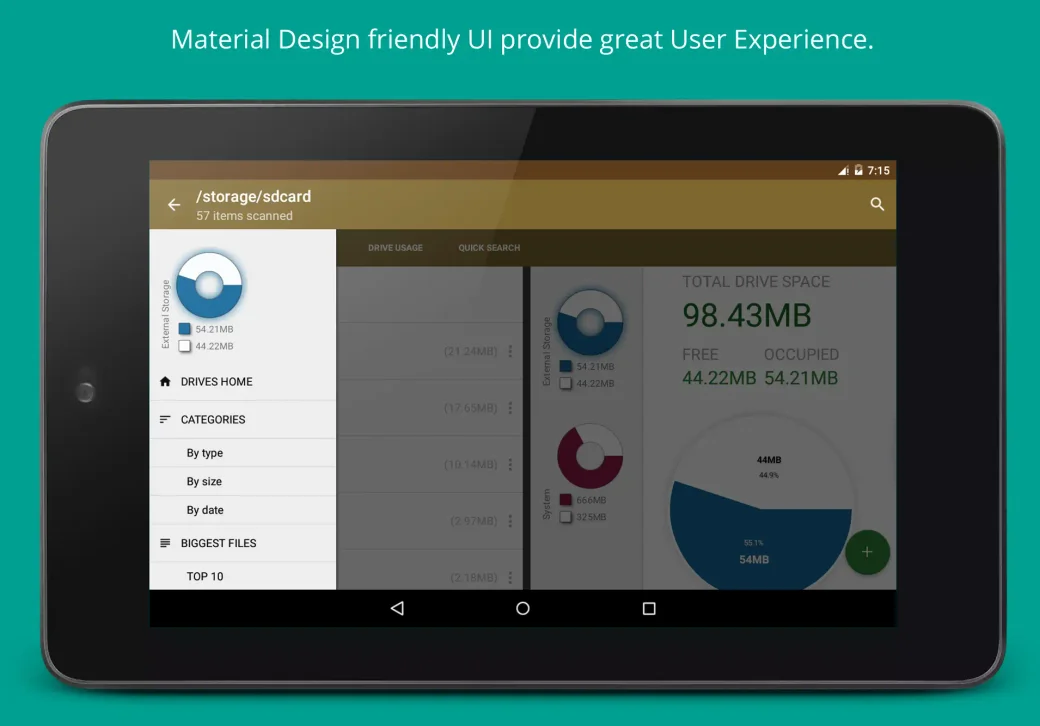
User-friendly interface allows you quickly switch between modes and pages. Like Google Play application My Device Storage Analyser uses view pager.
Context Action Mode is now available for selected sectors (only for Anroid API 3.0 and higher). It's very simple to select files and perform operations on it.
You have the following pages in the application:
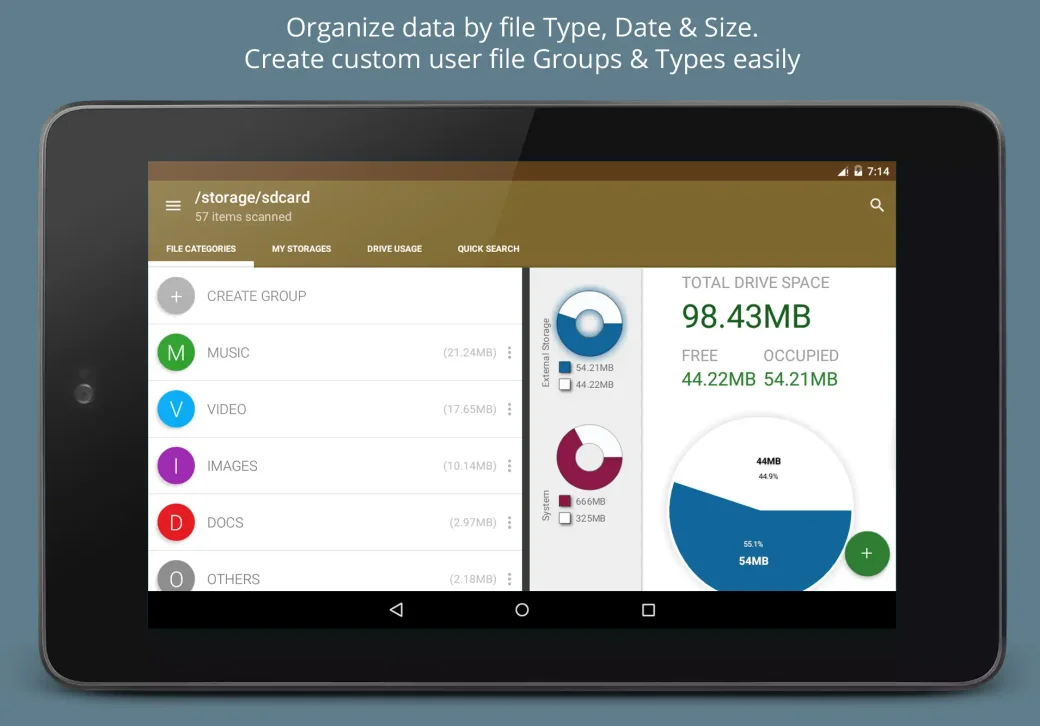
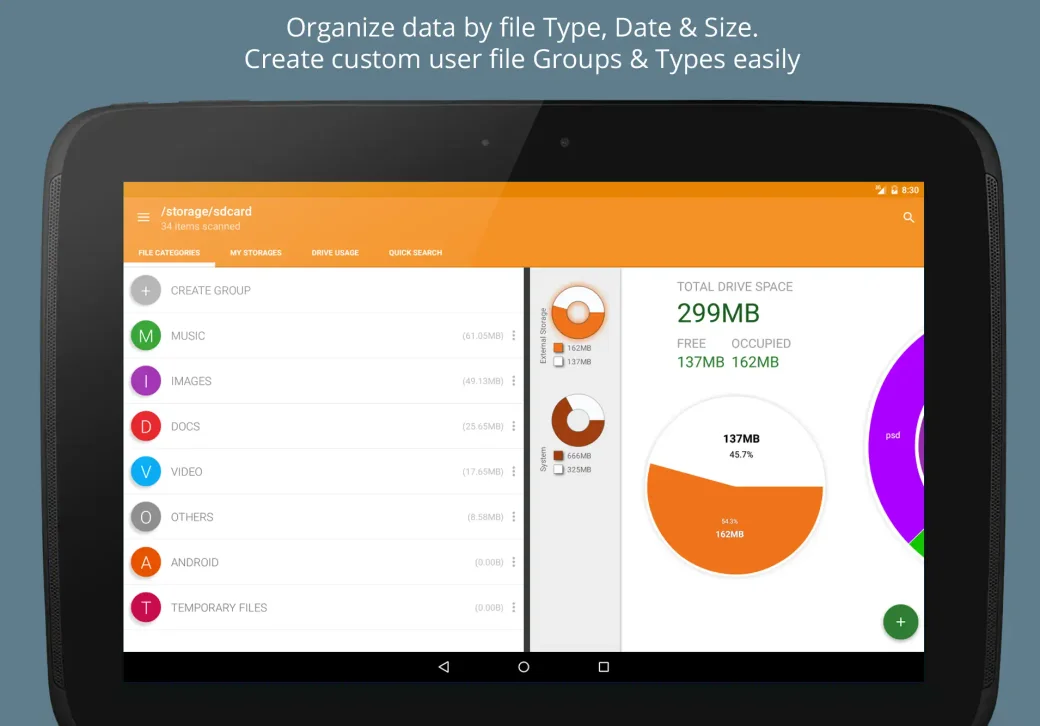
● FILE CATEGORIES. All files in internal and external storage, SD card or USB device are presented in a structured way:
By category (documents, videos, music, etc.)
By file size (large, large, medium, etc.).
By file date (today and yesterday, earlier this week, last week, earlier this month and etc)
● MY STORAGES page displays the summary statistics for available storage.
● DRIVE USAGE Sunburst is an Intuitive and effective way to display the data on the device. Simply drill-in and you will discover inner data universe.
● TOP 10 Files mode shows you where all the free space on the device has disappeared
● QUICK SEARCH mode shows the result of search or a content of a chosen category.
Clicking on the file shows context menu with a open or delete the document, discover its properties.
Long click on the category or extension will put contained files to the Quick Search page.
# Application is still in development, so there may be unexpected force closes. Better FEEDBACK than low rating. Thank you!
Try free version DISK & STORAGE ANALYZER first.
Data safety
What Mobile Infographics Tools declares on Google Play about the data this app collects and shares.
- No data shared with third partiesLearn more about how developers declare sharing
- No data collectedLearn more about how developers declare collection
What’s new
Version 6.0.0.4.pro.release · Sep 28, 2026
+ Browse SMB network folders — find shared drives on your local network
+ Bin and storage clean-up — review and free up space on your device
+ Statistics dashboard
+ Copy and move files
• Refreshed Material 3 design
• Improved stability
+ Bin and storage clean-up — review and free up space on your device
+ Statistics dashboard
+ Copy and move files
• Refreshed Material 3 design
• Improved stability
Developer contact
- Websitestorage-analyzer.mobile-infographics.workers.dev
- Emailmobile.infographics@gmail.com
- Privacy policydocs.google.com
- AddressГорный переулок 8 Минск Минская область 220005 Belarus
Information
- Offered by
- Mobile Infographics Tools
- Category
- Productivity
- Version
- 6.0.0.4.pro.release
- Updated
- Sep 28, 2026
- Released
- Aug 31, 2013
- Requires
- Android 7.0 or later
- Age rating
- Everyone
- Price
- $2.99
- Package name
- com.mobile_infographics_tools.mydrive_ext
Similar apps
-

Resideo Connect
Lifestyle
-

ASTRO File Manager & Cleaner
Tools
-
CompTIA Security+ Prep 2026
Education
-

Control+
Tools
-

Robokiller - Spam Call Blocker
Communication
-

MobiSaver: Data&Photo Recovery
Tools
-

Deleted Photo & Video Recovery
Tools
-

Kiren by F-Secure
Tools
-

Ever Accountable – Quit Porn
Productivity
-

Storage Analyzer: Disk Cleaner
Productivity
-

Building Tools
Tools
-

PRIVARY Secure Photo Vault
Photography
![Disk & Storage Analyzer [PRO] screenshot 1](https://imgresize.dlostc.com/27xeSb6m4UpP6mpjtWXcN7oucuTCsxRrclc-LUwxNFo/rs:fit:600:1300/fn:disk-storage-analyzer-pro-android-screenshot-1/czM6Ly9pbWFnZXMvcGxheWltZy81Ni9iNi81NmI2MmRiM2JiZmZkODBiOTM2YjZmMmM1OGVkN2QzZDc1Y2I0OTA3NzJjYWE0Mzk2NTNmZTg3NzMzYmM1NGJlLndlYnA.webp)
![Disk & Storage Analyzer [PRO] screenshot 2](https://imgresize.dlostc.com/gkqasqElLRcjedHB-rdbyJGXZrMRNNlQ00GgxNtio6w/rs:fit:600:1300/fn:disk-storage-analyzer-pro-android-screenshot-2/czM6Ly9pbWFnZXMvcGxheWltZy9jMi82OC9jMjY4NmM0NTAzZGU1Yzg5YjUzZDk5NTUwOTgzMTU2MzBhNmI5YzMyMWI3OGE1ZTVjZjhlMTI5NWU3MDE3Zjg1LndlYnA.webp)
![Disk & Storage Analyzer [PRO] screenshot 3](https://imgresize.dlostc.com/9oXlIQFx7VSApFZKiBgy7XG1E_ONE4wuJfJzBec9VlA/rs:fit:600:1300/fn:disk-storage-analyzer-pro-android-screenshot-3/czM6Ly9pbWFnZXMvcGxheWltZy83YS8xMS83YTExY2Y5ZWY2MzFkNTc3MzlhMTI5M2MwOTEzOWVmNzcwZjVjMWUyMmM3NTYwMGU3YmJiMDYzYTUzMjk3NDVkLndlYnA.webp)
![Disk & Storage Analyzer [PRO] screenshot 4](https://imgresize.dlostc.com/vuwXmu8zldtKmBLqnw3KDZU_PZhlQCKme-efcKaTQfI/rs:fit:600:1300/fn:disk-storage-analyzer-pro-android-screenshot-4/czM6Ly9pbWFnZXMvcGxheWltZy9kOS80My9kOTQzN2Q2NTA1ZmEzZjdhMThlZmUwN2QwNjlkZTRlOTZlM2JiNjJmZGY5MjRmMTVkODg2OGZjY2JiZjFhNjBlLndlYnA.webp)
![Disk & Storage Analyzer [PRO] screenshot 5](https://imgresize.dlostc.com/WMfCbaR6ZDALyZTe_RTgsUhFCl62RdxT2E1FWfXyl78/rs:fit:600:1300/fn:disk-storage-analyzer-pro-android-screenshot-5/czM6Ly9pbWFnZXMvcGxheWltZy81Yi8xOC81YjE4NmY0YzJiZGE3MTI3ZmViYWIzNmVmYTQ4MmJlMmQ4NzI1MjY0ODQ5ZTFhOTMzMGVjYzA5NTdhZDk2YmUzLndlYnA.webp)
![Disk & Storage Analyzer [PRO] screenshot 6](https://imgresize.dlostc.com/NSKFIqTFsIcZXN3FN2QQ0e5r193OIkuMlqoDzUmMirg/rs:fit:600:1300/fn:disk-storage-analyzer-pro-android-screenshot-6/czM6Ly9pbWFnZXMvcGxheWltZy84ZS9lMi84ZWUyY2Y2ZmEyOTNhY2IwOWI4ZGYzMmI5Y2RlMTZmNTVlOGE2MzJmN2Q4YTU1MTdkNDE4MTlmNjllMDM4ZmI1LndlYnA.webp)
![Disk & Storage Analyzer [PRO] screenshot 7](https://imgresize.dlostc.com/HwIohiKTgRXurZVC7BtNTbITktFp2IHXftnfoA0uySs/rs:fit:600:1300/fn:disk-storage-analyzer-pro-android-screenshot-7/czM6Ly9pbWFnZXMvcGxheWltZy9hZi84NC9hZjg0ZmIxOTQ4ODBjNGI3OWE0NTU0Y2MzOWUzMzVlNjRlODA3NWU3ZDg3MGQzMGI5N2RjNmM0ZGRlM2EzNGY0LndlYnA.webp)
![Disk & Storage Analyzer [PRO] screenshot 8](https://imgresize.dlostc.com/sKnwyi888uc7U6_bu8g1ydsgJkyelma-ZkTy53RRa0o/rs:fit:600:1300/fn:disk-storage-analyzer-pro-android-screenshot-8/czM6Ly9pbWFnZXMvcGxheWltZy8yNy83Mi8yNzcyNWNhMTcwYzA3Yjc2NTEyOTc2NDYwY2YyMTA0MmVjYjg3NzAyZGRlMzMxMjY0ZjU4MWNlYWQ2MTBiNzM1LndlYnA.webp)
![Disk & Storage Analyzer [PRO] screenshot 1](https://imgresize.dlostc.com/B13PsCn_CQSC8UyxOeLuKDcHJSwBX4Ue71VUV4v-6oU/rs:fit:1040:780/fn:disk-storage-analyzer-pro-android-tablet-screenshot-1/czM6Ly9pbWFnZXMvcGxheWltZy80NS85NS80NTk1YTMwYWFiYTg2MDAyMDJmYjQ0MmFiZGMyYjhhNmFlYTIyYmIzMzllMWNkNzgzMjRhZjEyNDIxMWExZjJkLndlYnA.webp)
![Disk & Storage Analyzer [PRO] screenshot 2](https://imgresize.dlostc.com/BugEU2Mx4yNhkVkMr7UaitNdmmB359qk2VnuhLe91EA/rs:fit:1040:780/fn:disk-storage-analyzer-pro-android-tablet-screenshot-2/czM6Ly9pbWFnZXMvcGxheWltZy84NS84Yy84NThjYTNhNzg0MGMzYTlkZThlMTJmMmM3YjNkMzY1NDk5MGI2YmM5NjdmMzU3NGU3ZjJhZDVmZTBhZGM4YTUyLndlYnA.webp)
![Disk & Storage Analyzer [PRO] screenshot 3](https://imgresize.dlostc.com/qhuCQ8kQN59dYiD5ZGdaMM4owOzBisTZrg6m39AWABs/rs:fit:1040:780/fn:disk-storage-analyzer-pro-android-tablet-screenshot-3/czM6Ly9pbWFnZXMvcGxheWltZy8xZS9lOC8xZWU4NmIxZDBjMTUzNzM5NmFjOTdhOTQzZjI3MDZlZGNjZDhiMWU4MTA3NTQ1N2VkMjNjOTAzZjdkYzAyMDE5LndlYnA.webp)
![Disk & Storage Analyzer [PRO] screenshot 4](https://imgresize.dlostc.com/dfv7E4fiz1t5TElGAlvIKJAD6mDXspYFYqEgDTZpge0/rs:fit:1040:780/fn:disk-storage-analyzer-pro-android-tablet-screenshot-4/czM6Ly9pbWFnZXMvcGxheWltZy9lMi82OS9lMjY5Yjc5ZmZkMGUyMDZmYTVmNGI5ZmI4Yzc1Y2E1NDk3ZjhmODEwMWRkYmM3NGZhNGUzNWZiODU2YmM3ZDg0LndlYnA.webp)
![Disk & Storage Analyzer [PRO] screenshot 5](https://imgresize.dlostc.com/mzmNJce7rdecq-vng-FnYqpEPgUHgB0J_BUWI2-kYyI/rs:fit:1040:780/fn:disk-storage-analyzer-pro-android-tablet-screenshot-5/czM6Ly9pbWFnZXMvcGxheWltZy84NC81OS84NDU5ODhmZjI0ZTE3YWEwODk3NjEzODVmYzQ0NjJiN2IzZTg1NGYwZTJkMDE5NWNhMTlhMTBmZGQ0NDFjNzEwLndlYnA.webp)
![Disk & Storage Analyzer [PRO] screenshot 6](https://imgresize.dlostc.com/fSAJDsd4IGOhjl4Ti4Sw2FMYt9IHzqLS-ytODs5F0zI/rs:fit:1040:780/fn:disk-storage-analyzer-pro-android-tablet-screenshot-6/czM6Ly9pbWFnZXMvcGxheWltZy9kOS9hZC9kOWFkYzIyYTUyNTJjMTNkYWExODNmZWQ4OTk1MTc1NTY0YTAxMzVkOTUwZWU3MWE0ZTc0YmFhOTRhZGY3YjljLndlYnA.webp)
![Disk & Storage Analyzer [PRO] screenshot 7](https://imgresize.dlostc.com/PjCzZLiT2QjsF6WgsRmVnR3gd1fTjCUgTvw4T_l6dYw/rs:fit:1040:780/fn:disk-storage-analyzer-pro-android-tablet-screenshot-7/czM6Ly9pbWFnZXMvcGxheWltZy8xYi83Ni8xYjc2NmNmNDljYWJkNDI2MjQ1MmJiZGIzZTJlN2E0NTNkOGViMWNhZGRhN2EwNjA3NTFkYWZlZWM0MjlhMzhiLndlYnA.webp)
![Disk & Storage Analyzer [PRO] screenshot 8](https://imgresize.dlostc.com/bqZgw8a35MCEE2BHqu0cFnYadNJFU2yaTDkhwPHY4vA/rs:fit:1040:780/fn:disk-storage-analyzer-pro-android-tablet-screenshot-8/czM6Ly9pbWFnZXMvcGxheWltZy80ZS9iOC80ZWI4MTIyZWRmMWExY2ZhYmMxYmU1MDcwZjU0OTAyMTk3MGQ4NDc1ZTJiZjcwZDY4Mzg0OGU5ZWU4Mzg5YTAxLndlYnA.webp)
![Disk & Storage Analyzer [PRO] screenshot 9](https://imgresize.dlostc.com/6jmukfkrLK2Ipcd-HvqSqgUZoXzsaOG7e-Humq4e04Y/rs:fit:1040:780/fn:disk-storage-analyzer-pro-android-tablet-screenshot-9/czM6Ly9pbWFnZXMvcGxheWltZy85NC85Mi85NDkyZWE1MWU4OTBmZjJhZDU2OWE3ZTA1ZWYzOTlmODVhY2U1MjQ1OTcxYmM2MWE1YmIwMDBkNzVjZGZhOTBlLndlYnA.webp)
![Disk & Storage Analyzer [PRO] screenshot 10](https://imgresize.dlostc.com/C8JzXbjCDWopxd2G5hYolghX0AQYaz6aMetDv7-jyzs/rs:fit:1040:780/fn:disk-storage-analyzer-pro-android-tablet-screenshot-10/czM6Ly9pbWFnZXMvcGxheWltZy9iMi82OS9iMjY5YjA1MTIxZDk4YzE0YjdkN2U2YzA4YTE3NzA1YWRiYTJkNjhiNjcyYzM4YTAwYmVhODMzZTkwNWU4NzJlLndlYnA.webp)