DRM03 Cyber Watch Digital
DiDreams- EveryoneAge rating
- PersonalizationCategory
- Oct 31, 2025Updated
- $0.99Price
Links to the official Google Play listing of com.didreams.awakencyber03. Last checked on Nov 22, 2026.
About this app
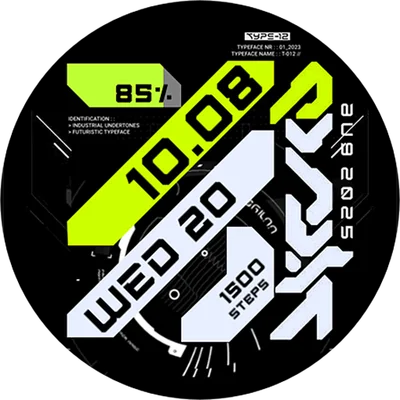
DRM03 Cyber Watch Digital is a cyberpunk-themed digital watchface for Wear OS.
Step into the digital age with DRM03 Cyber Watch Digital, a bold and futuristic watchface for Wear OS. This cyberpunk-themed watchface combines a sleek, modern design with cutting-edge digital readouts, delivering all the information you need at a glance.
Inspired by futuristic UIs and industrial aesthetics, DRM03 presents essential data like time, date, battery status, and step count in a distinct, high-contrast display. Its striking visuals and precise digital presentation make it the perfect companion for those who embrace technology and style.
DRM03 Cyber Watch Digital for Your Watch. Supports Galaxy Watch 7 Series and Wear OS watches with API 30+.
On the "Available on more devices" section, tap the button beside your watch on the list to install this watch face.
Features :
- Dynamic Digital Display: Clear and precise digital readouts for time and data.
- Essential Complications: Integrated battery indicator and step counter for convenient tracking.
- 12/24 Hour Support: Choose your preferred time format.
- Always On Display (AOD): Maintain a low-power, always-visible display.
- Futuristic Aesthetic: A unique design that stands out.
After the watch face is installed, activate the watch face by these steps :
1. Open watch face selections (tap and hold the current watch face).
2. Scroll to the right and tap "add watch face".
3. Scroll down on the downloaded section.
4. Tap the newly installed watch face.
Data safety
What DiDreams declares on Google Play about the data this app collects and shares.
- No data shared with third partiesLearn more about how developers declare sharing
- No data collectedLearn more about how developers declare collection
What’s new
Oct 31, 2025
Initial Release
Developer contact
- Emailaldinocaturrahmanto@gmail.com
- Privacy policyprivacydrm.vercel.app
- AddressJl. Kolonel Sugiono 3b no 125 RT 02 RW 04 Mergosono Kedungkandang Malang Malang Jawa Timur 65134 Indonesia
Information
- Offered by
- DiDreams
- Category
- Personalization
- Updated
- Oct 31, 2025
- Released
- May 27, 2025
- Age rating
- Everyone
- Price
- $0.99
- Package name
- com.didreams.awakencyber03