FastMediaSorter Watch Face
S.Z.A.- EveryoneAge rating
- ToolsCategory
- Nov 12, 2026Updated
- FreePrice
Links to the official Google Play listing of com.sza.fastmediasorter.watchface. Last checked on Nov 23, 2026.
About this app
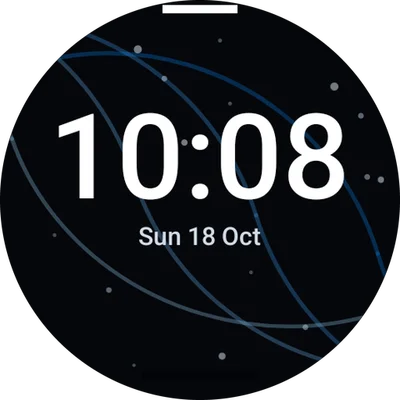
Big clear time over living waves and particles, with FastMediaSorter buttons.
A calm watch face in the FastMediaSorter style.
- Large, clear time in the centre, with the date beneath it.
- Layered waves across the lower half and particles that drift slowly and follow the tilt of your wrist.
- Two thin battery bars: one for the watch and one for your phone.
- Six round buttons around the dial. In the watch face editor you give each button a data source from your watch.
- A quiet always-on mode: a thinner time, the date and one still wave line.
- Tap the time to open the FastMediaSorter watch app.
The buttons show data from any app or system source you pick in the watch face editor. FastMediaSorter shortcuts and the phone battery bar appear when the sideload edition of the FastMediaSorter watch app, installed outside Google Play, is on the watch. Until you pick a source the buttons stay hidden, and the face shows the time, the date, the watch battery, the waves and the particles.
Needs Wear OS 6 or newer. The face is built with Watch Face Format, so no app code runs on your watch to draw it.
The face is made for FastMediaSorter, the media sorting app for Android phones, and for its FastMediaSorter watch app for Wear OS. The app is on Google Play: https://play.google.com/store/apps/details?id=com.sza.fastmediasorter
Data safety
What S.Z.A. declares on Google Play about the data this app collects and shares.
- No data shared with third partiesLearn more about how developers declare sharing
- No data collectedLearn more about how developers declare collection
What’s new
Version 2.61.1121.733 · Nov 12, 2026
Small maintenance update of the FastMediaSorter watch face.
Developer contact
- Websitesza.od.ua
- Emailserzhyale@gmail.com
- Privacy policyserzhyale.github.io
- AddressTriq L-Arzella, 1,1 Bahar-ic-Caghaq NXR1080 Malta
Information
- Offered by
- S.Z.A.
- Category
- Tools
- Version
- 2.61.1121.733
- Updated
- Nov 12, 2026
- Released
- Sep 30, 2026
- Age rating
- Everyone
- Price
- Free
- Package name
- com.sza.fastmediasorter.watchface