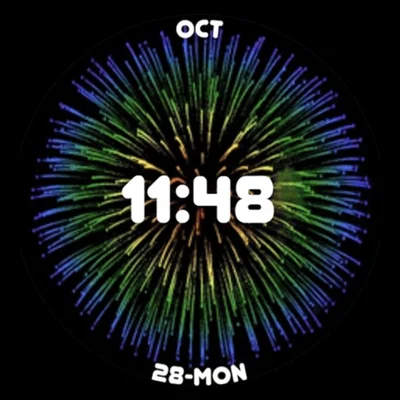
Fire Cracker Watch Face SAM-33
SMA Design Watch Faces- EveryoneAge rating
- PersonalizationCategory
- Oct 17, 2024Updated
- $0.49Price
Links to the official Google Play listing of com.smadesign.fire_cracker. Last checked on Nov 25, 2026.
About this app
Celebrate the festival of lights with firecracker-themed GIF Wear OS watch face!
Festive Animation: Watch faces feature vibrant, animated firecracker displays, capturing the spirit of Diwali.
Bright and Colorful: Explosions of colorful fireworks and sparkles light up your watch screen, creating a lively, festive atmosphere.
Cultural Celebration: Perfectly reflects the essence of Diwali, the Festival of Lights, bringing joy and excitement to your wrist.
Unique Design: Stand out with eye-catching, dynamic watch faces that blend tradition with modern technology.
Perfect for All Occasions: Whether you're celebrating with family or out with friends, these watch faces add a festive touch to your outfit.
Constant Festive Reminder: A quick glance at your watch keeps the joyful spirit of Diwali alive throughout the festival days.
Easy to Set: Simple to install and set, ready to brighten up your smartwatch for the festival.
Why Choose Us:
Innovative Design: Our team of designers and engineers are committed to providing you with the latest in smartwatch technology and aesthetics.
Reliable Performance: Enjoy a watch face that not only looks great but performs flawlessly, keeping you updated with the most accurate information.
Upgrade your smartwatch experience today with our watch face app. Stay connected, stay informed, and stay stylish.
Download Now and take the first step towards a smarter, more elegant watch face experience.
★ FAQ
Q: Do your watch faces support Samsung Active 4 and Samsung Active 4 Classic?
A: Yes, our watch faces support WearOS smartwatches.
Q: How to install the watch face?
A: Follow these steps:
1. Open the Google Play Store app on your watch
2. Search for the watch face
3. Press the install button
Q: I bought the app on my phone, do I have to buy it again for my watch?
A: You should not have to buy it again. Sometimes the Play Store takes a bit longer to figure out that you already bought the app. Any additional order will automatically be refunded by Google, you will receive the money back.
Q: Why I can not see steps or activity data in a built-in complication?
A: Some of our watch faces come with Built-in steps and Google Fit steps. If you select built-in steps, ensure that you grant activity recognition permission. If you select Google Fit steps complication, please use the watch face companion app where you can grant permission on Google Fit to log your data.
Note also that Google Fit sometimes won’t show your real-time data due to its caching sync issues. We are also working to implement Samsung Health for Samsung phone devices
Data safety
What SMA Design Watch Faces declares on Google Play about the data this app collects and shares.
- No data shared with third partiesLearn more about how developers declare sharing
- No data collectedLearn more about how developers declare collection
Developer contact
- Emailsmawatchface@gmail.com
- Privacy policyprivacypolicies.com
- Address1/97, Ganesh Nagar, Yerawada Opp. Dr Suhas Patil Nr. Vijay Auto Service Center Pune, Maharashtra 411006 India
Information
- Offered by
- SMA Design Watch Faces
- Category
- Personalization
- Updated
- Oct 17, 2024
- Released
- Oct 17, 2024
- Requires
- Android 11 or later
- Age rating
- Everyone
- Price
- $0.49
- Package name
- com.smadesign.fire_cracker