GRBL Flowers 3
Grubel- EveryoneAge rating
- PersonalizationCategory
- Oct 7, 2026Updated
- $0.99Price
Links to the official Google Play listing of com.grbl.flowers3. Last checked on Nov 13, 2026.
About this app
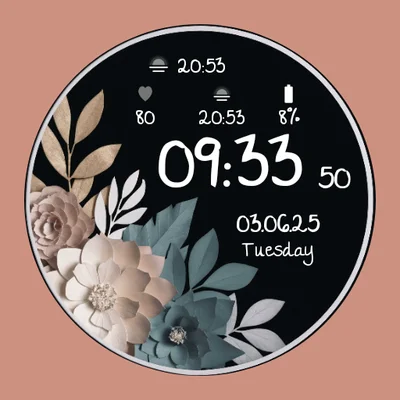
Elegant floral watch face with vibrant blossom
🌸 Supports AM/PM and 12H/24H format
🌸 4 custom complications
🌸 9 themes
🌸 Date (format change base on user's locale)
🌸 AOD with theme matching color
🌸 5 styles
Designed for Wear OS
If you face any problem, please reach out to us at grubel.watchfaces@gmail.com. We’ll gladly provide screenshots and step-by-step instructions to help you install the watch face.
Watch faces do not change automatically after installation. To set it up, return to the home display, tap and hold, swipe to the end, and tap ‘+’ to add the watch face. Use the bezel to find it.
Samsung Developers offer a helpful video showing multiple ways to install a Wear OS watch face:
https://youtu.be/vMM4Q2-rqoM
PLEASE KEEP IN MIND THAT THE COMPANION APP DOESN'T INSTALL WATCHFACE ON THE WATCH. PLEASE READ INSTRUCTIONS BELOW.
There are two ways to install this watchaface to your WearOS device:
From PLAY STORE APP:
1. Use the drop-down menu and select the target
device on the PLAY STORE APP:
after a few minutes the watch face will transferred on
watch.
2- ACTIVATE WATCH FACE:
Once installed, you need to activate the watch face.
Long press screen, swipe left and tap "ADD WATCH
FACE" to activate it.
From PLAY STORE WEBSITE:
1 - Go to the watch face link through a Web Browser on
PC / Mac such as Chrome, Safari (etc.). You can search
the watch face name on Play Store.
Click on "Install on more devices" and select the target
device:
after a few minutes the watch face will transferred on
watch.
2- ACTIVATE WATCH FACE:
Once installed, you need to activate the watch face.
Long press screen, swipe left and tap "ADD WATCH
FACE" to activate it.
Please keep in mind that any issues on this side are
not caused by the developer/watchface. I have no
control over Google's issues.
Before drop a negative feedback (1 star) on Play Store
for these reasons, please read the guide carefully or
contact me:
grubel.watchfaces@gmail.com
for API 34+
Remember , if you want your watch to show phone's battery status, you should install Phone Battery Complication app
Disclaimer:
Each device offers different custom complications, and selection varies by third-party apps. Custom complications shown in store screenshots come from third-party app - Phone Battery Complication
Before drop a negative feedback (1 star) on Play Store
for any reasons, please read the guide carefully or
contact me:
grubel.watchfaces@gmail.com
Data safety
What Grubel declares on Google Play about the data this app collects and shares.
- No data shared with third partiesLearn more about how developers declare sharing
- No data collectedLearn more about how developers declare collection
Developer contact
- Websitegrubelwatchfaces.com
- Emailgrubel.watchfaces@gmail.com
- Privacy policysites.google.com
- AddressJuliana Tuwima 20/8a 90-002 Łódź Poland
Information
- Offered by
- Grubel
- Category
- Personalization
- Version
- 1.0.1
- Updated
- Oct 7, 2026
- Released
- Jun 4, 2025
- Age rating
- Everyone
- Price
- $0.99
- Package name
- com.grbl.flowers3