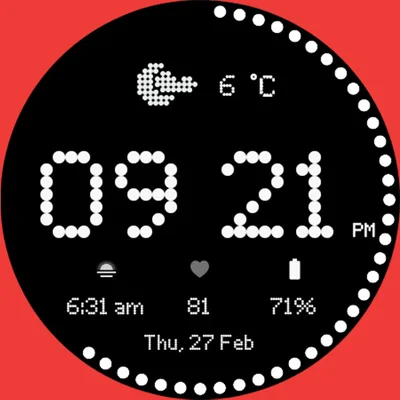
GRBL Nothing Weather Watchface
Grubel- EveryoneAge rating
- PersonalizationCategory
- Oct 6, 2026Updated
- $1.99Price
Links to the official Google Play listing of com.grubel.grblnothingweather. Last checked on Nov 13, 2026.
About this app
Modern watch face with custom weather icons Designed for Wear OS
🌟 Nothing OS Inspired Watch Face for Wear OS
Upgrade your Wear OS smartwatch with a sleek, minimalistic watch face inspired by Nothing OS. Perfectly designed to blend style and functionality, it gives you quick access to time, date, weather, and custom complications.
Why You’ll Love It:
✅ Elegant AM/PM & 12H/24H time formats
✅ 3 fully customizable complications
✅ 11 unique weather icons for instant forecasts
✅ Date adapts automatically to your locale
✅ Always-On Display (AOD) with theme-matching colors
✅ 15 eye-catching themes to match your style
Quick Tips for Weather Complications:
Update weather manually after installing.
If it doesn’t appear, switch to another watch face and back.
Fahrenheit users: initial sync may show high temperatures; it updates automatically.
Installation Made Simple:
From your Play Store app:
Select your watch from the drop-down menu and install.
Long press your watch screen → swipe left → tap ‘ADD WATCH FACE’ to activate.
From your Play Store website:
Open the watch face listing on your PC/Mac browser.
Click “Install on more devices” → choose your watch.
Long press your watch screen → swipe left → tap ‘ADD WATCH FACE’ to activate.
📹 Samsung Developers video with installation tips: Watch Here
Note:
The companion app opens the Play Store listing only; it does not install the watch face automatically.
For phone battery status on your watch, install the Phone Battery Complication app.
Custom complications may vary by third-party apps.
Need Help?
Email us at grubel.watchfaces@gmail.com
. We provide screenshots and step-by-step guidance to ensure smooth setup.
Data safety
What Grubel declares on Google Play about the data this app collects and shares.
- No data shared with third partiesLearn more about how developers declare sharing
- No data collectedLearn more about how developers declare collection
Developer contact
- Emailgrubel.watchfaces@gmail.com
- Privacy policysites.google.com
- AddressJuliana Tuwima 20/8a 90-002 Łódź Poland
Information
- Offered by
- Grubel
- Category
- Personalization
- Updated
- Oct 6, 2026
- Released
- Feb 28, 2025
- Age rating
- Everyone
- Price
- $1.99
- Package name
- com.grubel.grblnothingweather