h1603 Customizable Space Line
Happy Watch Faces- EveryoneAge rating
- PersonalizationCategory
- Oct 15, 2026Updated
- $4.49Price
Links to the official Google Play listing of com.AAA.h1603. Last checked on Nov 13, 2026.
About this app
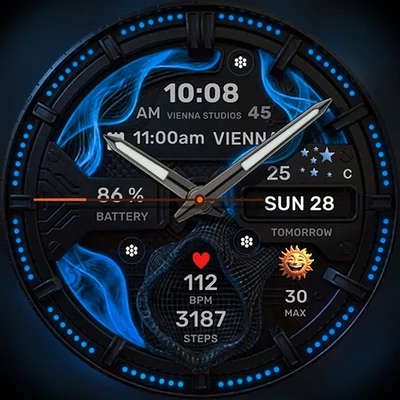
Hybrid Wear OS watch face: 5 flame themes, weather, next event, heart rate
h1603 is a hybrid watch face for Wear OS with glowing flame designs in 5 themes. Analog hands and a clear digital time come with the current weather, tomorrow's forecast, your next calendar event, heart rate, steps and battery – in 10 color themes. Designed and made in Austria by Vienna Studios.
⌚ Features
• Hybrid design: analog hands with smooth sweeping second hand + digital time
• 12h / 24h digital format with AM/PM (follows your phone settings)
• Digital seconds
• Day of the week and date
• Current weather icon (day and night) and temperature
• Tomorrow's forecast with max temperature and weather icon
• Heart rate (BPM)
• Daily step counter
• Battery level (%)
• Always-On Display mode
🧩 Complication & shortcuts
• 1 customizable complication – default: next calendar event
• Possible data, e.g. next event, sunrise / sunset, world clock, alarm or timer
• 3 customizable app shortcuts – open your favorite apps with one tap
• Available options depend on your watch model, software version and installed apps
🎨 Customization
• 5 flame themes: blue, green, orange, red and rainbow
• 10 color themes for time and data
• Touch and hold the watch face, then tap "Customize"
🌦️ Weather not showing or not updating?
1. Make sure location is enabled on your phone and watch.
2. Open the Weather app on your watch and refresh it (e.g. tap "Last updated" or pull down).
3. Switch to another watch face for a few seconds, then switch back – this often refreshes the weather data.
4. Wait a few minutes for the data to sync.
❤️ Heart rate not showing?
Allow the "Sensors / Body sensors" permission when asked, and check that heart rate measuring is turned on in your health app (e.g. Samsung Health).
📅 Calendar event not showing?
Make sure your watch has a calendar app with synced events and allow the calendar permission when asked. You can also choose another complication.
📲 How to install
1. Make sure your watch is connected to your phone (Galaxy Wearable or Pixel Watch app) and uses the same Google account.
2. On your phone, open the Play Store, tap the arrow next to "Install" and select your watch.
3. Or open the Play Store directly on your watch and search for "h1603".
4. After installation, touch and hold your current watch face, swipe to the end, tap "+" and select h1603.
Tip: It can take a few minutes until the watch face appears on your watch.
⌚ Supported devices
Compatible with all Wear OS 5+ smartwatches (API level 34+), including:
• Samsung Galaxy Watch 4, 5, 6, 7, 8, Classic and Ultra series
• Google Pixel Watch 1, 2, 3 and 4
• Other Wear OS 5+ watches
Not compatible with Tizen (Galaxy Watch 3 or older) or Apple Watch.
💬 Support
Questions or problems? Please write to us before leaving a review – we are happy to help!
📩 luxury.watch.face@gmail.com
🌐 www.viennastudios.com
💛 Thank you for choosing Happy Watch Faces by Vienna Studios!
We hope this design brightens your day and your wrist 😊
Data safety
What Happy Watch Faces declares on Google Play about the data this app collects and shares.
- No data shared with third partiesLearn more about how developers declare sharing
- No data collectedLearn more about how developers declare collection
Developer contact
- Websiteviennastudios.com
- Emailluxury.watch.face@gmail.com
- Privacy policyviennastudios.com
- AddressPierlstraße 1/4 9020 Klagenfurt am Wörthersee Austria
Information
- Offered by
- Happy Watch Faces
- Category
- Personalization
- Updated
- Oct 15, 2026
- Released
- Jun 17, 2026
- Age rating
- Everyone
- Price
- $4.49
- Package name
- com.AAA.h1603