Handheld Console Watch Face
PIXELMORE- EveryoneAge rating
- PersonalizationCategory
- Oct 25, 2026Updated
- FreePrice
Links to the official Google Play listing of com.hfc.cadranp.retroconsole. Last checked on Nov 17, 2026.
About this app
Retro handheld console, green LCD screen, big pixel digits. No advertising.
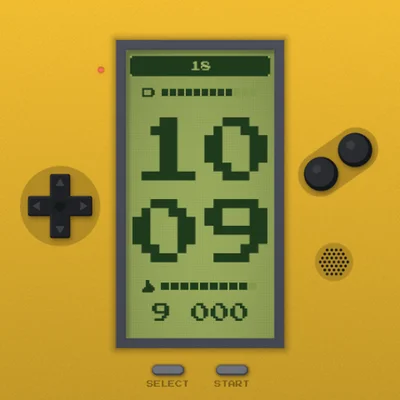
Retro Console puts a retro handheld game console on your wrist: a green LCD screen in the middle, in its gray frame, between two vintage grips. On the left, the black directional pad and the red power light; on the right, two big round buttons set diagonally and the round speaker. Below the screen, the plastic joins the two handles and holds the select and start buttons. Eight vintage plastics change the look of the console: Red, Gray, Cream, Blue, Yellow, Green, Translucent Purple and Black.
The time fills the screen in very large dark green pixel digits, hours above minutes. Above it: the date on a single line, in light green on a dark banner, then a gauge of 12 LCD segments that shows the watch battery, one segment per 8%. Below it: a gauge of 10 segments, one per 1,000 steps up to a 10,000-step goal, and today's step count. Unlit segments stay faintly visible, like on a real LCD screen.
Pick the console color among 8 and the color of the time among 49 colors (long-press the watch face, then Customize).
The always-on display keeps only the time, in large pixel digits, on pure black.
- Original retro handheld game console: green LCD screen between two grips
- Directional pad, two round buttons, select and start, power light and speaker
- 8 console colors: Red, Gray, Cream, Blue, Yellow, Green, Translucent Purple, Black
- Time in very large pixel digits, hours above minutes
- Date on a banner: day of the week, day and month
- LCD segment gauges: the battery (12 segments) and the step goal (10 segments)
- Today's step count
- 49 colors for the time
- Clean always-on display: time only, on pure black
- No ads
- Made with Watch Face Format for Wear OS watches: Galaxy Watch, Pixel Watch and more
Data safety
What PIXELMORE declares on Google Play about the data this app collects and shares.
- No data shared with third partiesLearn more about how developers declare sharing
- No data collectedLearn more about how developers declare collection
What’s new
Version 1.0 · Oct 25, 2026
LCD screen moved lower under a plastic band, bigger buttons, and the top bar now shows the watch battery: 12 segments, one per 8%.
Developer contact
- Emailcadran@pixelmore.app
- Privacy policyhugo291.github.io
- Address60 RUE FRANCOIS IER 75008 PARIS France
Information
- Offered by
- PIXELMORE
- Category
- Personalization
- Version
- 1.0
- Updated
- Oct 25, 2026
- Released
- Aug 16, 2026
- Age rating
- Everyone
- Price
- Free
- Package name
- com.hfc.cadranp.retroconsole