iMDC 100 Cascade Watchface
iMDC- EveryoneAge rating
- PersonalizationCategory
- Nov 9, 2026Updated
- $1.99Price
Links to the official Google Play listing of com.watchfacestudio.imdc100. Last checked on Nov 19, 2026.
About this app
Bold digital watch face with scrolling date strips, 5 complications & AOD
iMDC 100 CASCADE | Every Moment in Motion
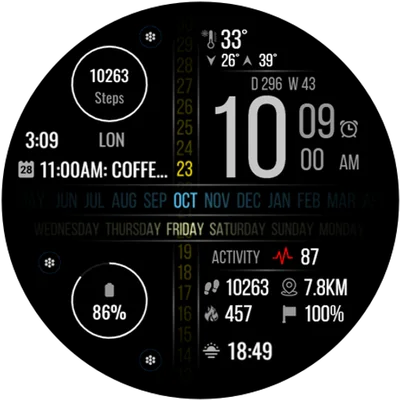
A bold digital watch face for Wear OS built around a large, easy-to-read time. Scrolling date, month and weekday strips show where you are in the calendar at a glance, with your key stats and weather close by.
━━━━━━━━━━━━━━━━━━━━
ON-SCREEN INFORMATION
━━━━━━━━━━━━━━━━━━━━
• Large digital time with AM/PM/24H indicator
• Alarm Setting Icon
• Second time zone (complication slot)
• Current temperature, plus daily high and low
• Day of year and week number (e.g. D 296 W 43)
• Next calendar event (complication slot)
• Scrolling month strip, with the current month highlighted
• Scrolling date strip, with today highlighted
• Weekday strip, with the current day highlighted
• Step counter with progress ring (complication slot)
• Battery level with progress ring (complication slot)
• Activity / heart rate readout
• Steps count
• Distance (mi/km according to user system)
• Calories
• Goal progress (%)
• Sunrise / sunset time (complication slot)
━━━━━━━━━━━━━━━━━━━━
KEY FEATURES
━━━━━━━━━━━━━━━━━━━━
3 App Shortcuts
Tap the shortcut zones to open your favorite apps instantly.
5 Complication Slots
Put the data that matters to you in the slots, such as steps, battery, calendar, weather or sunrise/sunset.
4 Dimmable Options for AOD
Choose the Always-On Display brightness that suits you. Save battery while keeping the time clear.
Multi-Color Options
Several color themes let you match the face to your outfit, strap or mood.
━━━━━━━━━━━━━━━━━━━━
HOW TO CUSTOMIZE
━━━━━━━━━━━━━━━━━━━━
1. Press and hold the watch face.
2. Tap "Customize" to change colors, AOD brightness and complications.
3. Tap a complication slot to choose the data you want to show.
━━━━━━━━━━━━━━━━━━━━
COMPATIBILITY
━━━━━━━━━━━━━━━━━━━━
This watch face is compatible with Wear OS devices. Please ensure your device is running the latest software version. Only install on Wear OS 6+ with API Level 34+ and above.
━━━━━━━━━━━━━━━━━━━━
DISCLAIMER
━━━━━━━━━━━━━━━━━━━━
This watch face displays information provided by your Wear OS device. It does not add any new health-related functionality or track any health data itself. It is not a dive computer and should not be used for underwater timing or safety.
━━━━━━━━━━━━━━━━━━━━
SUPPORT
━━━━━━━━━━━━━━━━━━━━
Questions or issues? Contact us before leaving a review and we'll gladly help.
Data safety
What iMDC declares on Google Play about the data this app collects and shares.
- No data shared with third partiesLearn more about how developers declare sharing
- No data collectedLearn more about how developers declare collection
What’s new
Nov 9, 2026
iMDC 100 Companion App
Developer contact
- Websitesites.google.com
- Emaildcsj.work@gmail.com
- Privacy policysites.google.com
- AddressJALAN SS2/46 23 47300 PJ Selangor Malaysia
Information
- Offered by
- iMDC
- Category
- Personalization
- Updated
- Nov 9, 2026
- Released
- Nov 9, 2026
- Age rating
- Everyone
- Price
- $1.99
- Package name
- com.watchfacestudio.imdc100