JW203 jwstudio
JWstudio- EveryoneAge rating
- PersonalizationCategory
- Jul 27, 2025Updated
- $1.49Price
Links to the official Google Play listing of com.watchfacestudio.jwstudio_a_203. Last checked on Nov 13, 2026.
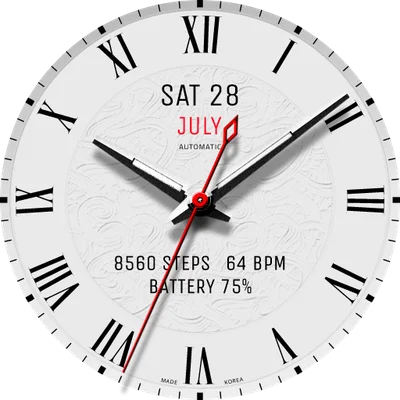
About this app
High-quality watchfaces for Wear OS 5.0 of higher
This watch face supports all Wear OS devices with API level 30 or higher, such as Samsung Galaxy Watch 4, 5, 6, 8, Pixel Watch, etc.
+++++++++++++++++++++++++++++++++++++++++++++++
[How to install]
Before pressing the payment button, make sure your watch is selected.
Select your watch by pressing the small triangle next to the payment button.
Select the menu at the top right of the Play Store app (three dots) > Share > Chrome browser > Install on other devices > Clock and proceed.
After installation, select it from the download list, register it as a favorite, and use it. You can view the download list by clicking 'Add Watch Screen' on the far right of the favorites list that appears when you press the watch screen.
+++++++++++++++++++++++++++++++++++++++++++++++
[function]
- 2 preset app shortcut
- 8 customizable shortcut keys
- Changeable background color, hands, index
+++++++++++++++++++++++++++++++++++++++++++++++
[Custom]
1 - Touch and hold the display.
2 - Tap on Custom Options
For inquiries, please contact the email below.
jenniferwatches@gmail.com
Data safety
What JWstudio declares on Google Play about the data this app collects and shares.
- No data shared with third partiesLearn more about how developers declare sharing
- No data collectedLearn more about how developers declare collection
What’s new
Jul 27, 2025
v1.2 update
- Support Android Target SDK 33 (Wear OS 5)
- Support Companion app Target API level 35
Developer contact
- Websiteinstagram.com
- Emailjenniferwatches@gmail.com
- Privacy policypages.flycricket.io
- Address인의동 여헌로7길 8 인동2차서한이다음, 203동 208호 구미시, 경상북도 39433 South Korea
Information
- Offered by
- JWstudio
- Category
- Personalization
- Updated
- Jul 27, 2025
- Released
- Jul 22, 2024
- Age rating
- Everyone
- Price
- $1.49
- Package name
- com.watchfacestudio.jwstudio_a_203