Key WF40 Digital Watch Face
Key Watch FaceContains ads
- EveryoneAge rating
- PersonalizationCategory
- Aug 15, 2026Updated
- $0.99Price
Links to the official Google Play listing of com.watchfacestudio.keywf40. Last checked on Nov 29, 2026.
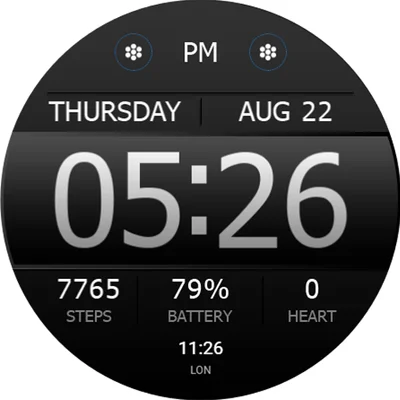
About this app
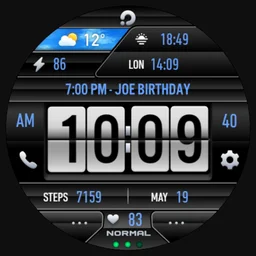
Key WF40 is a Digital Watch Face with a Simple Design for Wear OS
Buy One Get One, BOGO Promotion :
1. Buy any of our Watch Faces
2. Send email to syauqiyhidayah@gmail.com
3. Attach RECEIPT from Google to the email
4. Wait for the Coupon
5. You can not choose the free WF
Key WF40 is a Digital Watch Face with a Simple Design for Wear OS. Key WF40 displays a simple design but still looks futuristic with the addition of a very elegant color theme.
Features
- 12/24H digital time format
- Month, Date, and Day Name
- Heart Rate Information
- Step Count Information
- Battery Percent Information
- 2 Custom Shortcuts
- 1 short circle complications.
- Change the Background colours.
IMPORTANT!
This is a Wear OS Watch Face app. This app only supports smartwatch devices running with WEAR OS
AOD:
Display the digital clock on your smartwatch with all the information you need.
Color adjustments:
1. Press and hold your finger at center on the watch display.
2. Press the button to adjust.
3. Swipe left or right to switch between the different customizable items.
4. Swipe up or down to change the options/color of the items.
Data safety
What Key Watch Face declares on Google Play about the data this app collects and shares.
- No data shared with third partiesLearn more about how developers declare sharing
- No data collectedLearn more about how developers declare collection
Developer contact
- Emailsyauqiyhidayah@gmail.com
- Privacy policykeysher.wordpress.com
- AddressJl Mawar No 88, 004/008 Srengseng, Kembangan Jakarta Barat Jakarta Barat DKI Jakarta 11630 Indonesia
Information
- Offered by
- Key Watch Face
- Category
- Personalization
- Updated
- Aug 15, 2026
- Released
- Aug 13, 2024
- Age rating
- Everyone
- Price
- $0.99
- Package name
- com.watchfacestudio.keywf40
Similar apps
-
 Nightrob
Personalization
-
 DADAM59: Digital Watch Face
Personalization
-
 SG-150
Personalization
-
 Active - Digital Watch Face
Personalization
-
 Battery Saver Minimal Watch
Tools
-
 Key066 Digital Watch Face
Personalization
-
 Key056 Digital Watch Face
Personalization
-
 DADAM53: Dashboard Watch Face
Personalization
-
 Key104 Digital Watch Face
Personalization
-
 Key WF35 Digital Watch Face
Personalization
-
 PRADO 30 Weather Watch Face
Personalization
-
 Key WF43 Digital Watch Face
Personalization