Lap Ring: Digital Watch Face
GRAMSHIFT- EveryoneAge rating
- PersonalizationCategory
- Nov 7, 2026Updated
- $1.99Price
Links to the official Google Play listing of com.gramshift.watchface.lapring. Last checked on Nov 26, 2026.
About this app
Big digital time with step, battery and 24-hour dials. 10 colors, one-time buy.
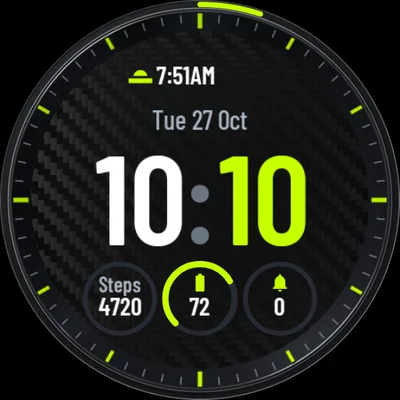
Lap Ring is a bold digital watch face for Wear OS. The hours and minutes sit on plates in sunken windows, big enough to read at a glance on a run, and a ring around the edge fills as the seconds pass. Below the time, three small dials show your steps, your battery and the hour of the day.
One-time purchase. No in-app purchases, no subscription and no phone app to install.
WHAT YOU GET
• Large digital time that follows your watch's 12 / 24-hour setting
• Seconds ring around the dial (turn it on or off)
• 10 accent colors: Volt, Orange, Cyan, Red, Pink, Purple, Blue, Mint, Gold, White
• LAP dial for your steps: one turn of the hand is your daily step goal, and the window shows which lap you are on
• Battery dial with a red zone from 0 to 20%
• 24-hour dial with moon and sun marks for night and day
• 4 complication slots you can change: one at the top and one over each small dial. They start empty, and a data source you pick takes the place of that dial. A value with a range, such as a goal, draws a progress arc in a dial slot. Sunrise and sunset can be shown by adding them to a slot
• Day and date above the time, in your watch's language or, if you prefer, in English
• Always-on mode: only a thin, dimmed time and the date stay lit
HOW TO INSTALL
Buy it in Play Store on your phone and choose your watch in the install menu, or open Play Store on your watch. It can take a few minutes to arrive on the watch. Then touch and hold your current watch face, swipe to the end and tap + to add Lap Ring. On a Galaxy Watch you can also choose it in the Galaxy Wearable app on your phone, under Watch faces.
Step-by-step pictures and fixes: https://gramshift.com/art/help/
HOW TO CUSTOMIZE
1. Touch and hold the watch face.
2. Tap Customize (the gear or pencil icon).
3. Swipe to Color, Seconds ring, Date language or Complications and pick what you want.
COMPATIBILITY
Made with the Watch Face Format for watches on Wear OS 4 or later (for example Pixel Watch and Galaxy Watch4 or newer). The design is round: on a square screen it shows as a circle with black corners.
LIMITATIONS
• What each complication shows (heart rate, weather, steps and so on) comes from your watch and the apps installed on it. If a data source is missing on your watch, choose another one in Customize.
• Text from complications, such as Steps, follows your watch's language. Only the date has an English option.
• Wear OS 3 and older watches cannot install it.
If something does not work as expected, write to contact@gramshift.com and we will help.
Data safety
What GRAMSHIFT declares on Google Play about the data this app collects and shares.
- No data shared with third partiesLearn more about how developers declare sharing
- No data collectedLearn more about how developers declare collection
What’s new
Version 1.2 · Nov 7, 2026
New, more realistic dial: a LAP subdial turns once per step goal and shows which lap you are on, plus a battery subdial with a red low zone and a 24-hour subdial. The time sits in recessed windows. All four complication slots start empty, ready for the data you choose.
Developer contact
- Websitegramshift.com
- Emailcontact@gramshift.com
- Privacy policygramshift.com
- Address1-10-8, DOGENZAKA SHIBUYA DOGENZAKA TOKYU BLDG. 2F.-C SHIBUYA-KU, 東京都 150-0043 Japan
Information
- Offered by
- GRAMSHIFT
- Category
- Personalization
- Version
- 1.2
- Updated
- Nov 7, 2026
- Released
- Oct 27, 2026
- Age rating
- Everyone
- Price
- $1.99
- Package name
- com.gramshift.watchface.lapring