LCD Digital Watch Face
CMDN Studio- EveryoneAge rating
- PersonalizationCategory
- Nov 22, 2026Updated
- $1.99Price
Links to the official Google Play listing of gil.cmdnstudio.digital01. Last checked on Nov 26, 2026.
About this app
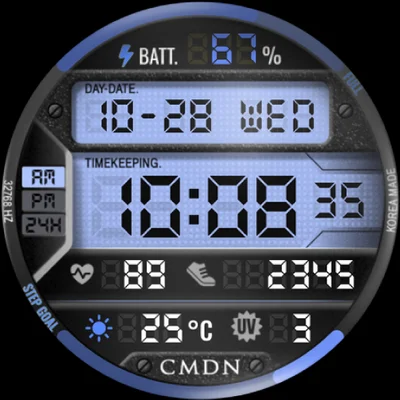
Realistic digital LCD watch face built like a real liquid crystal, 20 presets.
A realistic LCD watch face. There are no hands. The panel is the watch.
This face is drawn to behave like a real liquid crystal module rather than a
picture of one. The digits sit on a dot-matrix screen, the unlit segments stay
visible behind every number the way they do on an actual panel, and each window
is labelled by mode rather than by content — DAY-DATE., TIMEKEEPING. — the way
LCD watches have always labelled them. The 32768 HZ at nine is the number of
times a quartz crystal vibrates each second. Halve it fifteen times and you have
exactly one second. It is how a digital watch counts time, printed on the dial
as its name.
Two lit windows carry the readings. The upper one holds the date with its
weekday. The lower one sets the hour and minute in large segments, with the
seconds small beside them and a panel on the left showing whether the watch is
running on AM, PM or a 24-hour clock.
Everything else rings the dial. Battery percentage sits at the top. Heart rate
and the daily step count run below the time. Temperature and the UV index close
the face at the foot.
Two quarter arcs on the bezel work as gauges. The upper arc fills toward FULL as
the battery charges. The lower arc fills toward STEP GOAL as the day's steps add
up, so the progress reads without a number.
Every digit is set in CMDN Segment, a seven-segment typeface drawn for this face.
The panel comes in ten backlight colours — yellow, green, lime, amber, orange,
mint, blue, purple, pink and silver — and each also comes as a white panel
with the colour carried by the bezel arcs, icons and indicators, twenty presets
in all. When the screen dims, the face turns to a phosphor panel in the colour
you picked and keeps every reading except the seconds.
FEATURES
- Full LCD dial, no hands, on a dot-matrix panel
- 20 presets: ten backlight colours, each also as a white panel with
coloured accents
- Unlit segments left visible behind every digit
- Large hour and minute with small seconds
- AM / PM / 24-hour indicator, following your watch setting
- Date with weekday
- Battery percentage, with a quarter-arc gauge on the bezel
- Daily step count, with a quarter-arc gauge toward your goal
- Heart rate
- Temperature in Celsius or Fahrenheit, following your watch setting
- UV index
- Always-on screen in the colour you picked, keeping every reading but the
seconds
- Bezel and glass catch the light as you tilt your wrist
- Four hidden app shortcuts on the display
- Phone app: tap "Install on watch" to open the Play Store on your watch
APP SHORTCUTS
Four app shortcuts sit hidden on the display: the battery line, the date
window, the time window and the readings below. Touch and hold the watch face,
open Customize and go to the complications to set an app for each slot. To
change an app, clear the slot first, then choose an app shortcut again.
- No ads
- No in-app purchases
- No data collected
Made in Korea by CMDN.
Data safety
What CMDN Studio declares on Google Play about the data this app collects and shares.
- No data shared with third partiesLearn more about how developers declare sharing
- No data collectedLearn more about how developers declare collection
What’s new
Nov 22, 2026
Now 20 presets: ten backlight colours, each also as a white panel with coloured accents. The always-on screen now glows in the colour you pick.
Developer contact
- Websitewatch.cmdn.pro
- Emailcmdnstudio@naver.com
- Privacy policywatch.cmdn.pro
- Address수색로 100 DMC 래미안 e편한세상, 103동 403호 서대문구, 서울특별시 03709 South Korea
Information
- Offered by
- CMDN Studio
- Category
- Personalization
- Updated
- Nov 22, 2026
- Released
- Sep 30, 2026
- Age rating
- Everyone
- Price
- $1.99
- Package name
- gil.cmdnstudio.digital01