Material Favourite Apps Tile
Patrik Sebek- EveryoneAge rating
- PersonalizationCategory
- Sep 9, 2026Updated
- $1.29Price
Links to the official Google Play listing of com.patriksebek.materialfavouriteappstile. Last checked on Nov 27, 2026.
About this app
Six favourite apps and one shortcut, one swipe from your watch face.
Six apps, one swipe from your watch face — in the order you choose.
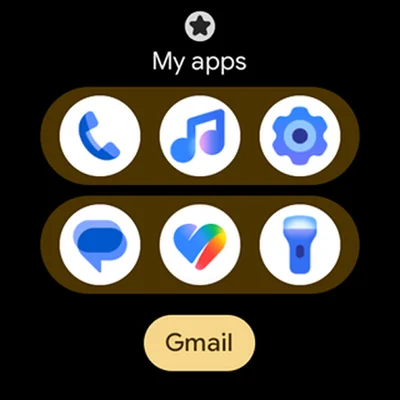
Material Favourite Apps Tile is a single tile that holds six apps you pick, laid out in two rounded blocks of three, in the order you set. Below them sits one text-only shortcut — a labelled pill with no icon — for the app you open by name.
FEATURES
- Choose any six installed apps for the grid
- Arrange them yourself, with no alphabetical sorting
- One labelled shortcut pill under the grid
- Nine colours that match the watch-face colour picker: grey, mint, lavender, sky, peach, butter, rose, coral and sage. Each tints both the icon blocks and the shortcut.
- Rename the tile from your wrist, using the keyboard, voice or handwriting
- A settings screen that previews the real tile as you edit it
HOW IT WORKS
Open the app once to pick your favourites and a colour. Then add the tile: press and hold the watch face, choose Tiles, tap the plus button and pick "Favourite Apps". Swipe to it from the watch face whenever you need it.
PRIVACY
The app works entirely on your watch. It has no account, makes no network connections and collects no data. It reads only the list of apps you can already launch, so it can show them to you.
Data safety
What Patrik Sebek declares on Google Play about the data this app collects and shares.
- No data shared with third partiesLearn more about how developers declare sharing
- No data collectedLearn more about how developers declare collection
What’s new
Version 1.0.5 · Sep 9, 2026
First release.
Developer contact
- Websitesebek.in
- Emailprojects@sebek.in
- Privacy policysebek.in
- AddressČertovská 1121/24 276 01 Mělník Czechia
Information
- Offered by
- Patrik Sebek
- Category
- Personalization
- Version
- 1.0.5
- Updated
- Sep 9, 2026
- Released
- Sep 9, 2026
- Requires
- Android 11 or later
- Age rating
- Everyone
- Price
- $1.29
- Package name
- com.patriksebek.materialfavouriteappstile