Matrix Digital WatchFace
JustWatchFace- EveryoneAge rating
- PersonalizationCategory
- Mar 9, 2026Updated
- $0.89Price
Links to the official Google Play listing of com.justwatch.matrix.digital.watchface. Last checked on Nov 14, 2026.
About this app
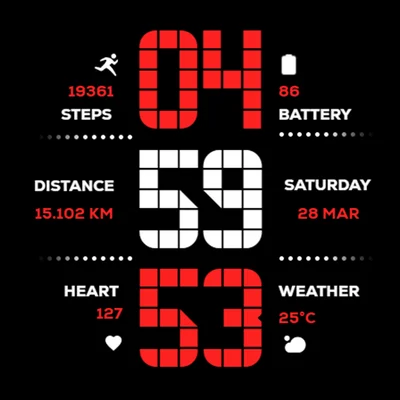
Modern Matrix-style digital watch face with 13 colors and health data.
Elevate your Wear OS experience with the perfect fusion of retro-digital aesthetics and high-performance functionality. Designed specifically for the modern user, this watch face brings a classic tech vibe to your wrist.
Timekeeping: Precise Digital clock with full support for both 12H and 24H formats.
Health & Fitness: * Detailed Step Counter for daily activity tracking.
Real-time Heart Rate monitoring to stay on top of your vitals.
Dedicated Distance Tracking displayed in Kilometers (KM).
Smart Info: Integrated Weather updates and Date display at a glance.
Battery Optimization: Features an Advanced Always-On Display (AOD) designed to maximize battery life without sacrificing style.
🎨 Customization Options
13 Vibrant Color Schemes: Match your watch face to your outfit or mood with a wide variety of colors.
Device Optimization: Specifically tuned for seamless performance on Samsung Galaxy Watch and Google Pixel Watch.
📥 Step-by-Step Installation Guide
Open Play Store: On your Wear OS smartwatch, navigate to the Google Play Store.
Search: Use the search icon and type "Matrix Digital WatchFace".
Install: Tap the Install button to download it directly to your device.
Set as Default: * Long-press your current watch face.
Swipe right to "Add Watch Face" or click the "+" icon.
Select Matrix Digital from the list to apply.
Personalize: Long-press the watch face again and tap "Customize" to choose from the 13 available color themes.
Data safety
What JustWatchFace declares on Google Play about the data this app collects and shares.
- No data shared with third partiesLearn more about how developers declare sharing
- No data collectedLearn more about how developers declare collection
What’s new
Mar 9, 2026
1.0
• Initial Release.
Developer contact
- Emailhello.justwatch@gmail.com
- Privacy policyjustwatchface.blogspot.com
- Address496, Rahmat masjid, rahmat nagar bavalchudi, banaskantha, Gujarat Chhapi, Gujarat 385210 India
Information
- Offered by
- JustWatchFace
- Category
- Personalization
- Updated
- Mar 9, 2026
- Released
- Mar 9, 2026
- Age rating
- Everyone
- Price
- $0.89
- Package name
- com.justwatch.matrix.digital.watchface