MD336 Digital watch face
Matteo Dini MD ® Watch Faces- EveryoneAge rating
- PersonalizationCategory
- Oct 28, 2026Updated
- $2.49Price
Links to the official Google Play listing of com.watchfacestudio.md336. Last checked on Nov 13, 2026.
About this app
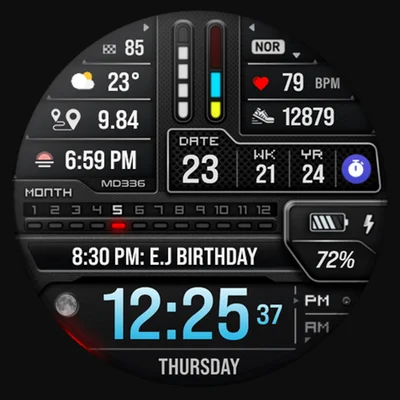
Informative digital watch face with many customizations for Wear OS devices.
New Watch Face Format.
Designed with the latest Watch Face Format required by Google Play, this premium digital watch face combines a modern futuristic dashboard with advanced customization, health data integration, and elegant LCD-inspired visuals.
Key Features:
- Premium futuristic digital dashboard design
- 4 Preset App Shortcuts + 1 Customizable Shortcut
- 4 Customizable Complications
- Full color customization
- Customizable LCD and UI colors
- Minimal & Full Always On Display modes
- Moon Phase
- Week of Year
Compatibility:
Supports all Wear OS devices with API Level 33+ (Wear OS 4 and later), including Samsung Galaxy Watch 4-8, Ultra, Pixel Watch and other Wear OS smartwatches.
Features at a Glance:
- 12/24hr Format (syncs with phone settings)
- Date
- Day
- Month
- Year
- Week of Year
- Moon Phase
- Heart Rate Monitoring + Intervals
- Steps + Daily Goals
- Battery Meter
Included App Shortcuts:
- Calendar
- Battery
- Heart Rate
- Alarm
Customization:
1. Touch and hold the display on your watch.
2. Tap “Customize”.
Customize independently:
- Time colors
- Date colors
- LCD colors
- UI colors
- Seconds colors
- Goal bars colors
- Heart interval colors
Complications:
Customize up to 4 complications with data such as:
- Weather
- Distance walked
- Calories burned
- UV index
- Chance of rain
- Barometer
- World clock
- And more
Some complication providers may require additional third-party apps installed on your watch.
Important Notes:
The Samsung Wearable app may occasionally fail to load complex watch faces during customization. This is a known Samsung companion app limitation and not a problem with the watch face itself.
For the best experience, customize the watch face directly on your watch:
Touch & Hold Screen → Customize
Installation & Troubleshooting:
https://www.matteodinimd.com/watchface-installation/
Support:
For support or installation help:
support@mdwatchfaces.com
Some features may not be available on all devices.
Stay Connected:
Newsletter:
http://eepurl.com/hlRcvf
FACEBOOK:
https://www.facebook.com/matteodiniwatchfaces
INSTAGRAM:
https://www.instagram.com/mdwatchfaces/
TELEGRAM:
https://t.me/mdwatchfaces
WEB:
https://www.matteodinimd.com
Thank you for supporting MD Watch Faces!
Data safety
What Matteo Dini MD ® Watch Faces declares on Google Play about the data this app collects and shares.
- No data shared with third partiesLearn more about how developers declare sharing
- No data collectedLearn more about how developers declare collection
What’s new
Oct 28, 2026
App updated to API 3.6
Developer contact
- Websitematteodinimd.com
- Emailsupport@mdwatchfaces.com
- Privacy policymatteodinimd.com
- AddressVIA DEGLI ULIVI 31 57014 COLLESALVETTI Italy
Information
- Offered by
- Matteo Dini MD ® Watch Faces
- Category
- Personalization
- Updated
- Oct 28, 2026
- Released
- Apr 16, 2024
- Age rating
- Everyone
- Price
- $2.49
- Package name
- com.watchfacestudio.md336