Modern Pilot With Complication
Cyrus Nielsen- EveryoneAge rating
- PersonalizationCategory
- Aug 9, 2026Updated
- $0.99Price
Links to the official Google Play listing of skrukketroll.pilot.II. Last checked on Nov 14, 2026.
About this app
A bold, aviation-inspired watch face for Wear OS with customizable complication
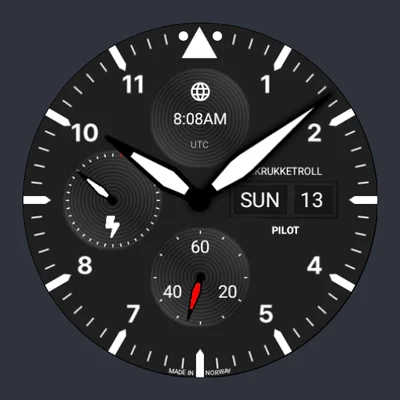
Take off with Skrukketroll Pilot II, a high-contrast, aviation-style Wear OS watch face built for clarity and performance. Inspired by classic pilot watches, this design features bold hour markers, a signature triangle at 12 o'clock, and sleek hands for easy readability in all conditions.
🔧 Features:
Customizable top complication – display world time, steps, heart rate & more
Analog second subdial with a red-tipped hand for precision
Battery indicator subdial styled with an electric theme
Day & date window for quick reference
Clean, professional layout with subtle branding
Optimized for round Wear OS smartwatches
Designed for precision and ready for your next mission.
Whether you’re a frequent flyer or just love pilot watch aesthetics, Skrukketroll Pilot II delivers timeless function on your wrist.
⚠️ Important: If the “Customize” screen does not open while Skrukketroll is currently in use on your watch, do this:
1- Select another watch face on the watch.
2- Open Customize and choose Skrukketroll to perform your changes.
3- After customizing, reselect Skrukketroll as your active face.
Alternatively, you can customize the face from the companion app (for example, Samsung Wear).
Data safety
What Cyrus Nielsen declares on Google Play about the data this app collects and shares.
- No data shared with third partiesLearn more about how developers declare sharing
- No data collectedLearn more about how developers declare collection
- Committed to follow the Play Families Policy
What’s new
Version 2.0.0 · Aug 9, 2026
Bug fixes and improvements
Developer contact
- Websiteskrukketrollwf.excellerise-as.com
- Emailcyrus.m.nielsen@gmail.com
- Privacy policyskrukketrollwf.excellerise-as.com
- AddressFinnsrudveien 14 1383 Asker Norway
Information
- Offered by
- Cyrus Nielsen
- Category
- Personalization
- Version
- 2.0.0
- Updated
- Aug 9, 2026
- Released
- Apr 12, 2025
- Age rating
- Everyone
- Price
- $0.99
- Package name
- skrukketroll.pilot.II