Moon Phase Watch Face Diamond
CMDN Studio- EveryoneAge rating
- PersonalizationCategory
- Oct 30, 2026Updated
- $1.99Price
Links to the official Google Play listing of gil.cmdnstudio.moonphase02. Last checked on Nov 17, 2026.
About this app
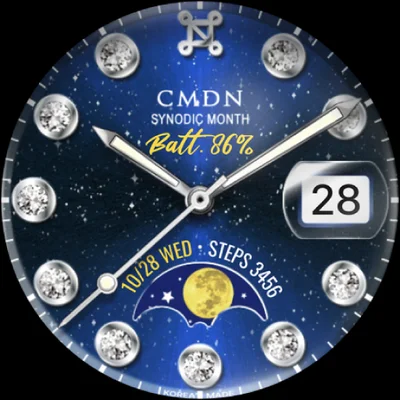
Realistic luxury moon phase watch face with diamond markers, starry sky.
A realistic moon phase dial under a sky full of stars, set with twelve diamond markers.
The moon at six follows the real synodic month — 29 days, 12 hours and 44
minutes, or 29.53 days from one new moon to the next. It is a calculated
phase, not a twelve-step picture, so the moon in the window matches the one in
the sky. Stars are scattered across the dial, and a slow band of light turns
through them so they glint as the seconds pass.
The rest of the dial stays quiet. A date window sits at three, the battery
level under the logo, and the date, weekday and daily steps curve along the
moon phase window.
SIX PRESETS
- Deep blue dial, silver hands and markers, gold moon
- Green dial, gold hands and markers, gold moon
- Deep blue dial, gold hands and markers, white text
- Black dial, gold hands and markers, gold moon
- Green dial, silver hands and markers, silver moon
- Black dial, silver hands and markers, silver moon, pink text
BUILD YOUR OWN
Start from a preset, then change any part on its own in the watch face
settings.
- Dial: deep blue, green or black
- Moon: gold or silver
- Hour, minute and seconds hands, each: silver or gold
- Diamond markers: silver or gold setting
- Date window: three styles
- Text: eleven colours — yellow, gold, white, green, mint, sky blue, violet,
pink, orange, red and grey
FEATURES
- Moon Phase on the real 29.53-day synodic month
- Starry dial with stars that glint as a band of light turns
- Twelve diamond markers
- Three dial colours and six presets
- Date window at three
- Battery level, date, weekday and daily steps
- Green lume always-on display, with the seconds hand hidden
- Four hidden app shortcuts on the dial
- Date, weekday, battery and steps always in English
- Phone app: tap "Install on watch" to open the Play Store on your watch
APP SHORTCUTS
Four app shortcuts sit hidden on the dial. Touch and hold the watch face,
open Customize and go to the complications to set an app for each slot. To
change an app, clear the slot first, then choose an app shortcut again.
HOW TO INSTALL
1. Open this page in a web browser, tap Install and choose your watch as
the device — or search for cmdn in the Play Store on your watch
2. On the watch, press and hold the current watch face
3. Swipe to find this one and tap to select
Presets and parts are under Customize in the watch face settings.
- No ads
- No in-app purchases
- No data collected
CMDN Studio
cmdn.pro
Data safety
What CMDN Studio declares on Google Play about the data this app collects and shares.
- No data shared with third partiesLearn more about how developers declare sharing
- No data collectedLearn more about how developers declare collection
What’s new
Oct 30, 2026
Shortcuts to the Wearable and Watch apps now sit at the bottom of the screen, and each tip card has a Copy button. On the watch face, four app shortcuts now sit hidden on the dial, and the date, weekday, battery and steps always read in English.
Developer contact
- Websitewatch.cmdn.pro
- Emailcmdnstudio@naver.com
- Privacy policywatch.cmdn.pro
- Address수색로 100 DMC 래미안 e편한세상, 103동 403호 서대문구, 서울특별시 03709 South Korea
Information
- Offered by
- CMDN Studio
- Category
- Personalization
- Updated
- Oct 30, 2026
- Released
- Oct 6, 2026
- Age rating
- Everyone
- Price
- $1.99
- Package name
- gil.cmdnstudio.moonphase02