Moon Steps Watch Face
N°- EveryoneAge rating
- PersonalizationCategory
- Sep 12, 2025Updated
- FreePrice
Links to the official Google Play listing of com.watchfacestudio.moonsteps. Last checked on Nov 13, 2026.
About this app
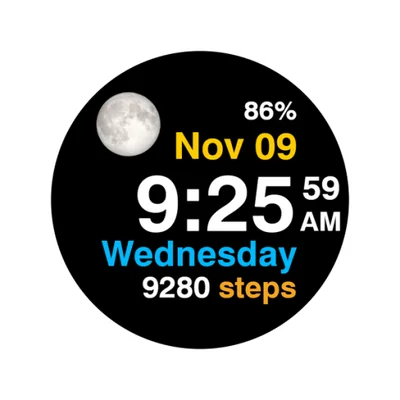
A Clear Wear OS watch face with a daily moon phase indicator and a steps counter
This is a bold and clear watch face for Wear OS smartwatches that is very easy to read with just a quick glance at the watch face.
This watch face displays:
1. Moon phase image (updated on a daily basis)
2. Watch battery percentage
3. Month and date
4. Digital Clock in 12-hour and 24-hour format (following the Time setting in your smartphone). To choose between 12-hour and 24-hour format please go to your smartphone's Time setting and enable or disable the 24-hour time format.
5. Days of the week (in English language only)
6. Steps counter (the amounts of steps you do in one day)
Data safety
What N° declares on Google Play about the data this app collects and shares.
- No data shared with third partiesLearn more about how developers declare sharing
- No data collectedLearn more about how developers declare collection
What’s new
Sep 12, 2025
Moon Steps Watch Face for Wear OS by N° Studio
Features:
1. Watch battery level
2. Month and date
3. Digital Clock in 12-hour and 24-hour format (following the Time setting of your smartphone). To choose between 12-hour and 24-hour format please go to your smartphone's Time setting and enable or disable the 24-hour time format.
4. Days of the week
5. Steps counter
Developer contact
- Websiten-degree.com
- Emailndegreewatch@gmail.com
- Privacy policyfreeprivacypolicy.com
- AddressUnit 18/13 Bowden Ct Nerang QLD 4211 Australia
Information
- Offered by
- N°
- Category
- Personalization
- Updated
- Sep 12, 2025
- Released
- Mar 19, 2022
- Age rating
- Everyone
- Price
- Free
- Package name
- com.watchfacestudio.moonsteps