MWD 2032 001
MW Design- EveryoneAge rating
- PersonalizationCategory
- Jan 17, 2023Updated
- $0.99Price
Links to the official Google Play listing of com.watchfacestudio.mdw2023001. Last checked on Nov 21, 2026.
About this app
Digital Watch Face by MWDesign
High Quality watch face designed by MW Design.
The watch face does not automatically measure and does not automatically display the HR result when installed.
To view your current heart rate data you’ll need to take a manual measurement. To do this, tap on the heart rate display area (see images). Wait a few seconds. The watch face will take a measurement and display the current result.
* Full Support for the new Galaxy Watch 4 Series.
* Supports Wear OS 2.0.
You can customize the complications
For example, you can select weather, steps, time zone, sunset/sunrise, barometer, next appointment and more.
***some features may not be available on some watches.
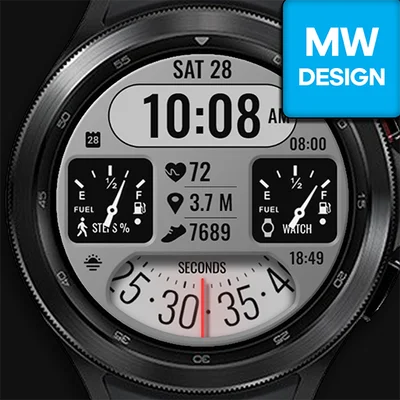
It contains 3 Preset App shortcuts, 2 customizable shortcuts, steps, heart rate, daily goals, date, 2 customizable complications where you can have the data you prefer such as "barometer", "weather".
Installation Notes:
1 - Make sure the watch is properly connected to the phone.
After a few minutes the watch face will transferred on watch : check the watch faces installed by the Wearable app on the phone.
or
2 - If you are having synchronization problems between your phone and Play Store, install the app directly from watch: search "MW" from Play Store on watch and hit on install button.
3 - Alternatively, try installing the watch face from web browser on your PC.
Please consider that any issues on this side are NOT developer dependent. The developer has no control over the Play Store from this side. Thank you.
This watch face supports all Wear OS devices with API Level 28+.
Watch face features:
* Customize Colors x 8
* 12/24H Automatic time.
* Customize Comps x2
* Distance Progress Miles/KM
* Steps Count and Steps Progress (10,000)
* Day Of Week, Day
* Battery %
* Steps %
* HR %
* AOD Mode.
*Heart Rate Notes:
The watch face does not automatically measure and does not automatically display the HR result when installed.
To view your current heart rate data you’ll need to take a manual measurement. To do this, tap on the heart rate display area (see images). Wait a few seconds. The watch face will take a measurement and display the current result.
After the first manual measurement, the watch face can automatically measure your heart rate every 10 minutes. Manual measurement will also be possible.
FAQ
Please contact us using email if you have any trouble with the app !!
You can visit my FB page for more details
https://www.facebook.com/MWGearDesigns
Data safety
What MW Design declares on Google Play about the data this app collects and shares.
- No data shared with third partiesLearn more about how developers declare sharing
- No data collectedLearn more about how developers declare collection
Developer contact
- Websitefacebook.com
- Emailmikewickens@gmail.com
- Privacy policysites.google.com
- Address33 Huntspill Street LONDON SW17 0AA United Kingdom
Information
- Offered by
- MW Design
- Category
- Personalization
- Version
- 1.0.0
- Updated
- Jan 17, 2023
- Released
- Jan 17, 2023
- Requires
- Android 9 or later
- Age rating
- Everyone
- Price
- $0.99
- Package name
- com.watchfacestudio.mdw2023001