NDW5X
NDAN WATCHFACES- EveryoneAge rating
- PersonalizationCategory
- Sep 9, 2022Updated
- $0.49Price
Links to the official Google Play listing of com.watchfacestudio.ndw5X. Last checked on Nov 27, 2026.
About this app
NDW5X - Fancy customizable Wear OS Watchface
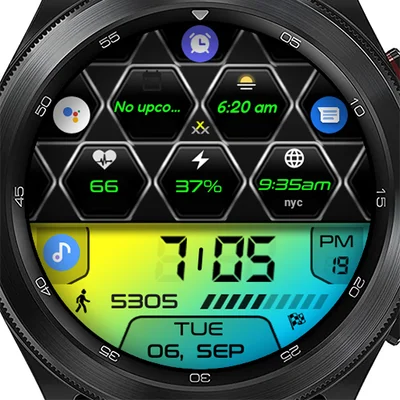
NDW5X is a fancy watch face for Wear OS with many customizations with hexagonal design at top and LCD look at bottom.
Offers many color styles options for both LCD portion and Hex design.
You can mix and match color styles to make it look as per your choice.
It supports AOD.
💠FEATURES:💠
- 12/24 hour + Calendar Info (support WearOS languages)
- 4 editable shortcuts
- 3 editable complications for data such as Barometer, Next event, World Clock, Weather etc.
- Step count along with progress tracker per thousand steps
- Heart Rate is shown (please see details below for HR)
- Watch Battery in %.
*** Heart Rate function ***
As the watch face does not automatically measure and does not automatically display the HR when installed, pls perform manual action.
To do this, tap on the heart rate display area (Tap to measure in the watch).
As the measurement is WIP, the HR Icon will turn Red and within few seconds, the HR measurement will be displayed.
Once done, it will measure Heart Rate every 10 min. You can always tap on HR Area to take manual measurements.
Follow comment and like
https://www.facebook.com/ndan.watchfaces
https://www.instagram.com/ndan.watchfaces/
Thank you for the showing the interest.
Data safety
What NDAN WATCHFACES declares on Google Play about the data this app collects and shares.
- No data shared with third partiesLearn more about how developers declare sharing
- No data collectedLearn more about how developers declare collection
What’s new
Version 1.0.0 · Sep 9, 2022
New watchface for Wear OS. Initial Release
Developer contact
- Websitefacebook.com
- EmailNdan.Watchfaces@Gmail.Com
- Privacy policysites.google.com
- AddressFL. No. 16, A/2, Suncity Phase I Pune, Maharashtra 411051 India
Information
- Offered by
- NDAN WATCHFACES
- Category
- Personalization
- Version
- 1.0.0
- Updated
- Sep 9, 2022
- Released
- Sep 9, 2022
- Requires
- Android 9 or later
- Age rating
- Everyone
- Price
- $0.49
- Package name
- com.watchfacestudio.ndw5X