NW138: Digital watch face
9INE watchfaces- EveryoneAge rating
- PersonalizationCategory
- Oct 5, 2026Updated
- $1.49Price
Links to the official Google Play listing of com.ninewatchface.nw138. Last checked on Nov 13, 2026.
About this app
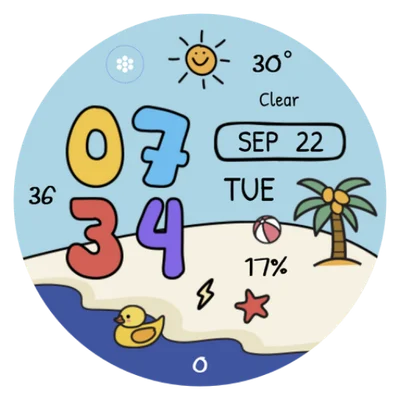
A cute beach on your wrist! Hand-drawn doodles & playful fonts summer watch face
[Escape to Your Personal Pocket Beach]
Take a refreshing dive into summer wherever you go! Featuring lovely hand-drawn doodle illustrations and rounded, bubbly fonts, this watch face brings a mini sandy coast directly to your Wear OS smartwatch. Let the adorable rubber duck, swaying palm tree, and smiling sun brighten up your screen every time you check the time.
✅ Whimsical Hand-Drawn Doodle Design
🔹 Adorable Beach Doodles: Enjoy beautifully placed illustrations of a palm tree, beach ball, red starfish, and a cute little rubber duck floating on the blue wave.
🔹 Playful Handwriting Typography: Ditch the boring, generic digital fonts! Bold, hand-written numbers elegantly display the time, steps, and temperature.
✅ Essential Daily Smart Info
🔹 Live Weather Intelligence: The smiling sun icon and clear text keep you updated on current temperature and weather conditions (e.g., Clear).
🔹 Daily Fitness & Status: Keep track of your daily Step Count and Battery percentage (%), perfectly integrated into the sandy shore background.
🔹 Always-On Visibility: A clean layout ensures you can always check the time, date, and day of the week at a single glance.
⚙️ [Quick Guide] How to Install the Watch Face
If the watch face does not download automatically, please use one of the methods below:
🔸 Via Smartphone App: Open the companion app downloaded on your phone and tap the 'Install on Watch' button.
🔸 Via Mobile Play Store: Tap the 'Available on more devices' dropdown menu at the top of this page, check your connected smartwatch, and tap install.
🔸 Via Web Browser (Highly Recommended): Open Google Play Store on your PC or phone browser (Chrome/Safari), log into your Google account, select your watch as the target device, and install.
🔸 Direct Search on Watch: Open the Play Store on your smartwatch, search for 'NW141' to download.
📌 How to Apply: Press and hold your watch screen, scroll all the way to the right, tap 'Add watch face (+)', and select the installed face.
📌 Download Delay: Depending on Google server conditions, it may take 5–10 minutes. If it delays, please use Method 3 (Web Browser) or Method 4 (Direct Search on Watch) for an instant installation.
⚠️ Important Notes & Configuration
🔹 Time Format: 12-hour/24-hour modes sync automatically with your connected smartphone's system settings.
🔹 Complication Setup: Please refer to the screenshot examples in the store page to configure your widgets.
🔹 Phone Battery Sync: To display your phone's battery level, you must install the third-party app 'Phone Battery Complication (Free)' from the Google Play Store on both your phone and watch.
📱 Community & Support
🔹 Instagram: https://www.instagram.com/9ine.watchface/
🔹 Contact Us: For support, bug reports, or custom inquiries, please email us. We will get back to you as soon as possible!
🔹 Email: 9inewatch@gmail.com
This watch face supports Wear OS devices.
Data safety
What 9INE watchfaces declares on Google Play about the data this app collects and shares.
- No data shared with third partiesLearn more about how developers declare sharing
- No data collectedLearn more about how developers declare collection
Developer contact
- Websiteinstagram.com
- Email9inewatch@gmail.com
- Privacy policy9inewatchface.blogspot.com
- Address양화로6길 9-14(서교동) B01호 마포구, 서울특별시 04044 South Korea
Information
- Offered by
- 9INE watchfaces
- Category
- Personalization
- Updated
- Oct 5, 2026
- Released
- Jul 16, 2026
- Age rating
- Everyone
- Price
- $1.49
- Package name
- com.ninewatchface.nw138