NW143한글: Digital watch face
9INE watchfaces- EveryoneAge rating
- PersonalizationCategory
- Aug 27, 2026Updated
- $1.79Price
Links to the official Google Play listing of com.ninewatchface.nw143_kr. Last checked on Nov 13, 2026.
About this app
Automatic translation by Google from Korean (South Korea).
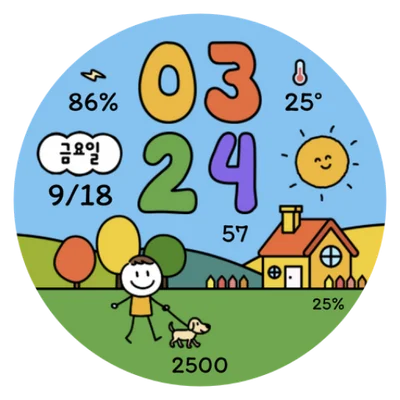
This is the NW143 digital watch face exclusively for Korean, produced by Nine Watch.
Enjoy a fun walk with your dog every day!
When you reach your step goal, it arrives right in front of your house and gives your dog a sweet petting.
✅ Features and Information
[Time & Date]
🔹 Digital Time (12/24H)
🔹 Date
🔹 Always on Display
[Information (Device, Health, Weather, etc.)]
🔹 Watch Battery
🔹 Steps To Date
🔹 Step Goal Achieved %
🔹 Current Weather
🔹 Current Temperature
[Customize]
🔹 10 Accelerated Colors
🔹 5 Instant App Opens
⚙️ [Easy] How to Install Watch Faces
If automatic download does not work, please install it using one of the methods below.
🔸 Install via Smartphone App: Open the Companion app downloaded on your smartphone and press the 'Install on Watch' button.
🔸 Install via Mobile Store: Check (V) your watch in the 'Select Device' or 'Available Devices' menu at the top of the Play Store, then install.
🔸 Install via Web Browser (Recommended): Access the Play Store via a web browser on your PC or phone, select your watch in the 'Select Device' menu, and install remotely.
🔸 Search Directly on Watch: Launch the Play Store on your smartwatch, search for 'NW139', and download it.
📌 Check Installation: Press and hold the watch screen for 2–3 seconds, then select the installed watch face from the 'Add Watch Face (+)' menu on the far right.
📌 If Download Delays: It may take 5–10 minutes depending on Google server conditions. If the installation is delayed, you can use Method 3 (Web Browser) or Method 4 (Search Directly on Watch) to install it immediately without waiting.
⚠️ Precautions and Setup Guide
🔹 Time Format: 12-hour/24-hour modes automatically sync with the system settings of the connected smartphone. 🔹 Complication Settings: Please refer to the screenshot examples on the app details page for instructions on how to arrange individual widgets.
🔹 Smartphone Battery Display: To synchronize phone battery levels, you must install the 'Phone Battery Complication (Free)' app from the Google Play Store on both your phone and watch.
📱 Community & Customer Support
🔹 Instagram: https://www.instagram.com/9ine.watchface/
🔹 Customer Inquiries: For usage inquiries, bug reports, or development inquiries, please send an email to the address below, and we will respond promptly.
🔹 Email: 9inewatch@gmail.com
*This watch face supports Wear OS devices.
Show the original text
매일 댕댕이와 함께하는 즐거운 산책!
목표 걸음을 달성하면 집 앞에 도착해 강아지를 다정하게 쓰다듬어줘요.
✅ 제공 정보 및 기능
[시간 및 날짜]
🔹 디지털 시간 (12/24H)
🔹 날짜
🔹 Always on Display
[정보(디바이스, 헬스, 날씨 등)]
🔹 워치 배터리
🔹현재까지 걸음수
🔹목표걸음달성 %
🔹 현재 날씨
🔹 현재 기온
[커스터마이즈]
🔹 10종류의 포인트 컬러
🔹 5종류의 앱 바로열기
⚙️ [간편] 워치페이스 설치 방법
자동 다운로드가 되지 않을 경우 아래 방법 중 하나로 설치해 주세요.
🔸 스마트폰 앱으로 설치: 스마트폰에 다운로드된 컴패니언 앱을 열고 '워치에 설치' 버튼을 누릅니다.
🔸 모바일 스토어에서 설치: 플레이 스토어 상단의 '기기 선택' 또는 '설치 가능 기기' 메뉴에서 사용 중인 워치를 체크(V)한 뒤 설치합니다.
🔸 웹 브라우저로 설치 (추천): PC나 폰의 웹 브라우저로 플레이 스토어 접속 후, 기기 선택에서 워치를 지정해 원격 설치합니다.
🔸 워치에서 직접 검색: 스마트워치에서 플레이 스토어 실행 후 'NW139'을 검색하여 다운로드합니다.
📌 설치 확인: 워치 화면을 2~3초간 길게 누른 뒤 오른쪽 끝 '워치페이스 추가(+)' 메뉴에서 설치된 페이스를 선택하세요.
📌 다운로드 지연 시: 구글 서버 상황에 따라 5~10분이 걸릴 수 있습니다. 설치가 지연되면 방법 3(웹 브라우저) 또는 방법 4(워치 직접 검색)를 이용하시면 기다리지 않고 즉시 설치됩니다.
⚠️ 주의사항 및 설정 가이드
🔹 시간 형식: 12시간/24시간 모드는 연결된 스마트폰의 시스템 설정과 자동으로 연동됩니다.
🔹 컴플리케이션 설정: 개별 위젯 배치 방법은 앱 상세 페이지의 스크린샷 예시 화면을 참조해 주세요.
🔹 스마트폰 배터리 표시: 폰 배터리 잔량 연동을 위해서는 구글 플레이 스토어에서 'Phone Battery Complication (무료)' 앱을 폰과 워치에 각각 반드시 추가 설치해야 합니다.
📱 커뮤니티 & 고객 지원
🔹 인스타그램: https://www.instagram.com/9ine.watchface/
🔹 고객 문의: 사용 방법 문의, 오류 제보, 제작 문의는 아래 이메일로 보내주시면 신속하게 답변해 드리겠습니다.
🔹 이메일: 9inewatch@gmail.com
*이 워치페이스는 Wear OS 디바이스를 지원합니다.
----
개발자 연락처 :
박진수 양화로6길 9-14(서교동)
B01호
마포구, 서울특별시 04044
South Korea 2011798876 2019-서울마포-0229 마포구청
Data safety
What 9INE watchfaces declares on Google Play about the data this app collects and shares.
- No data shared with third partiesLearn more about how developers declare sharing
- No data collectedLearn more about how developers declare collection
Developer contact
- Websiteinstagram.com
- Email9inewatch@gmail.com
- Privacy policy9inewatchface.blogspot.com
- Address양화로6길 9-14(서교동) B01호 마포구, 서울특별시 04044 South Korea
Information
- Offered by
- 9INE watchfaces
- Category
- Personalization
- Updated
- Aug 27, 2026
- Released
- Aug 21, 2026
- Age rating
- Everyone
- Price
- $1.79
- Package name
- com.ninewatchface.nw143_kr