Ocean Run Watch Face
zolawatchfaces- EveryoneAge rating
- SportsCategory
- Aug 9, 2026Updated
- $1.99Price
Links to the official Google Play listing of wear.watchfaces.oceanrunwatchface. Last checked on Nov 23, 2026.
About this app
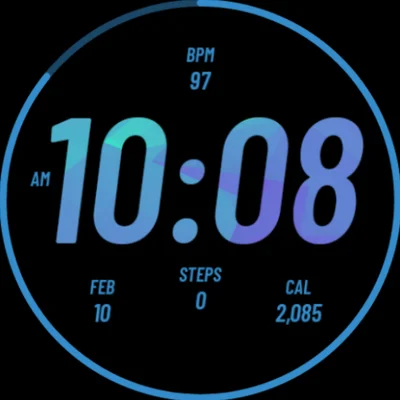
Digital sport watch face for Wear OS designed specifically for runners
Ocean Run Watch Face for Wear OS, a digital sport watch face designed specifically for runners. Experience the beauty of the ocean on your wrist while tracking your runs with this stylish and functional watch face.
Main Features:
- Easy to read digital time display
- 12/24 hours mode based on device settings
- AM/PM marker
- Battery level status
- Date
- Customizable widget complications: Add steps, heart rate, weather, and more.
- Customizable app shortcut
- Always on display mode for low-power visibility
- Built for Wear OS smartwatches
Custom Widget Complications:
- SHORT_TEXT complication
- SMALL_IMAGE complication
- ICON complication
Installation:
- Make sure the watch device is connected to the phone
- On the Play Store, select your watch device from the install drop-down button. Then tap install.
- After a few minutes the watch face will installed on your watch device
- Alternatively, you can install the watch face directly from on-watch Play Store by searching this watch face name between quotation marks.
Note:
Widget complications shown in the application description are for promotional only. Custom widget complications data depends on your installed applications and watch manufacturer software. The companion app is only to make it easier to find and install the watch face on your Wear OS watch device.
Data safety
What zolawatchfaces declares on Google Play about the data this app collects and shares.
- No data shared with third partiesLearn more about how developers declare sharing
- No data collectedLearn more about how developers declare collection
Developer contact
- Emailzolawatchfaces@gmail.com
- Privacy policysites.google.com
- AddressJL MELON NO 21 003/004 PERBON Tuban Jawa Timur 62310 Indonesia
Information
- Offered by
- zolawatchfaces
- Category
- Sports
- Updated
- Aug 9, 2026
- Released
- Feb 11, 2024
- Age rating
- Everyone
- Price
- $1.99
- Package name
- wear.watchfaces.oceanrunwatchface