Overclock: Neon Cyber Watch
Akyo- EveryoneAge rating
- PersonalizationCategory
- Oct 4, 2026Updated
- $1.69Price
Links to the official Google Play listing of com.ako.wfoverclock. Last checked on Nov 13, 2026.
About this app
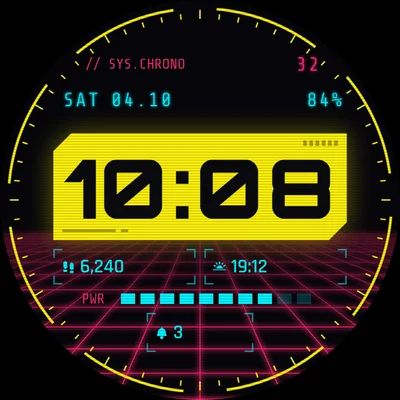
Neon sci-fi HUD watch face: big digital time, 3 complications, 6 themes.
Overclock turns your watch into a neon heads-up display from a rain-soaked future city. A huge digital time on a glowing panel, a synthwave grid, scanlines and live data readouts give your wrist a futuristic sci-fi look that is still easy to read at a glance.
FEATURES
- Large digital time (follows your 12/24-hour setting)
- 6 neon colour themes: Voltage, Synthwave, Ice, Toxic, Redline and Chrome
- 3 customizable complications: steps, sunrise/sunset, notifications, weather, heart rate or any app that provides one
- Segmented battery meter and battery percentage
- Day of the week and date
- Animated neon grid and glitch effect, only while the screen is on (can be turned off)
- Seconds counter, neon grid and scanlines that you can turn on or off
- Dedicated always-on mode that shows only the time and date, designed to keep power use and screen burn-in low
BATTERY FRIENDLY
Overclock is built with Google's Watch Face Format: no code runs on your watch, no background services, no tracking and no permissions.
COMPATIBILITY
Wear OS 4 or newer: Samsung Galaxy Watch4 and later (including Watch5 Pro, Watch6, Watch7, Watch8 and Ultra), Google Pixel Watch and other Wear OS watches. Not compatible with Apple Watch, Garmin, Fitbit OS or Tizen watches.
HOW TO INSTALL
Install it from Google Play on your watch, or from your phone choosing your watch as the install device. Then long-press your current watch face and select Overclock. Tap Customize to change the theme and complications.
Support and more watch faces: jonaszamora.com/watch-faces · info@jonaszamora.com
Data safety
What Akyo declares on Google Play about the data this app collects and shares.
- No data shared with third partiesLearn more about how developers declare sharing
- No data collectedLearn more about how developers declare collection
What’s new
Version 1.0.0 · Oct 4, 2026
First release.
Developer contact
- Websitejonaszamora.com
- Emailinfo@jonaszamora.com
- Privacy policyjonaszamora.com
- AddressCarrer Aligot, 2-4, Casa 6 08480 L'Ametlla del Vallès Spain
Information
- Offered by
- Akyo
- Category
- Personalization
- Version
- 1.0.0
- Updated
- Oct 4, 2026
- Released
- Oct 4, 2026
- Age rating
- Everyone
- Price
- $1.69
- Package name
- com.ako.wfoverclock