Pixel Pulse: Retro Watch Face
GenZync by GPhoenixContains ads
- EveryoneAge rating
- PersonalizationCategory
- Dec 11, 2025Updated
- $1.49Price
Links to the official Google Play listing of com.genzync.ledscreen. Last checked on Nov 19, 2026.
About this app
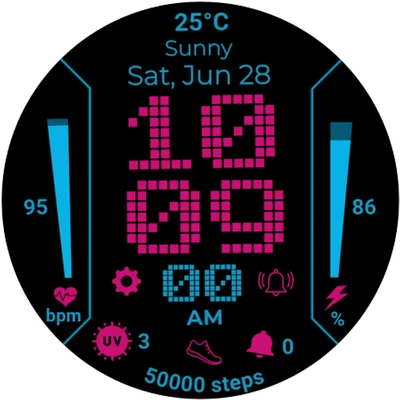
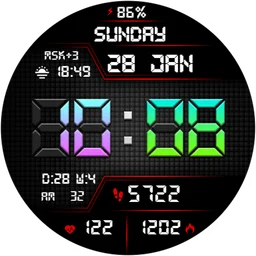
A vibrant, retro-futuristic LED watch face for Wear OS, packed with style.
Transform your Wear OS device with Pixel Pulse, a watch face inspired by the vibrant energy of 8-bit consoles and retro-futuristic design. Its high-contrast, dot-matrix style makes a bold statement while displaying your key information clearly.
Perfect for fans of pixel art, retro gaming, and unique cyberpunk aesthetics, Pixel Pulse merges nostalgic charm with the powerful functionality of a modern smartwatch.
✨ KEY FEATURES ✨
Bold Time Display:
-Large, pixelated numbers for hours and minutes.
-Classic dot-matrix display for seconds.
-Clear AM/PM indicator.
At-a-Glance Data Complications:
Date: Displays the current day of the week and date.
Health Metrics: Track your Heart Rate (BPM) and daily Step Count.
Watch Status: Monitor your watch's Battery Level with a percentage and progress bar.
Weather & More: Default complications include Weather, temperature, and UV Index.
Please Note: This watch face uses standard Wear OS complications. The data displayed (like weather, steps, heart rate) is powered by the apps you have installed on your watch. The appearance and availability of certain data points may vary depending on your device and installed apps.
-Design & Functionality:
-High-Contrast Readability:
-Customizable Shortcuts:
⌚ COMPATIBILITY ⌚
-Designed exclusively for Wear OS 3+ devices (e.g., Samsung Galaxy Watch 4/5/6/7, Google Pixel Watch, Fossil Gen 6).
NOT compatible with Tizen OS (older Samsung watches) or other operating systems.
🔧 INSTALLATION 🔧
-Ensure your watch is connected to your phone.
-From the Play Store, use the "Install" button's dropdown menu to select your watch device.
-After a few minutes, the watch face will transfer to your watch.
-To apply, long-press your current watch face, scroll to find Pixel Pulse, and select it. You can also apply it via your phone's companion app (e.g., Galaxy Wearable).
Download Pixel Pulse today and give your wrist an unforgettable retro-tech upgrade!
Data safety
What GenZync by GPhoenix declares on Google Play about the data this app collects and shares.
- No data shared with third partiesLearn more about how developers declare sharing
- No data collectedLearn more about how developers declare collection
- Data is encrypted in transit
Developer contact
- Websitee25af12fd.app-ads-txt.com
- Emailgphoenix.challenges@gmail.com
- Privacy policygphoenixapps.online
- AddressDGP Compound, Sitio 4, Bagumbayan, Sta. Cruz 4009 Philippines
Information
- Offered by
- GenZync by GPhoenix
- Category
- Personalization
- Updated
- Dec 11, 2025
- Released
- Jun 20, 2025
- Age rating
- Everyone
- Price
- $1.49
- Package name
- com.genzync.ledscreen
Similar apps
-
 DF031
Personalization
-
 Sity Flora Digital Watch Face
Personalization
-
 Pixel Art Watch Face
Personalization
-
 Ballozi PARTICLE Digital
Personalization
-
 Oogly Attivita
Personalization
-
 Fantasy Blue LCD For Wear OS
Personalization
-
 SH093 Watch Face, WearOS watch
Personalization
-
 IWF DL1 watch face
Personalization
-
 Pixel Vibe Watch Face: Retro
Productivity
-
 MEZATIN Watch face
Personalization
-
 KZY084
Personalization
-
 DIGI SARUMI Watch face
Personalization