PKG013
PKG WATCH FACE- EveryoneAge rating
- PersonalizationCategory
- Sep 26, 2024Updated
- $1.49Price
Links to the official Google Play listing of com.watchfacestudio.pkg013. Last checked on Nov 13, 2026.
About this app
Automatic translation by Google from Thai.
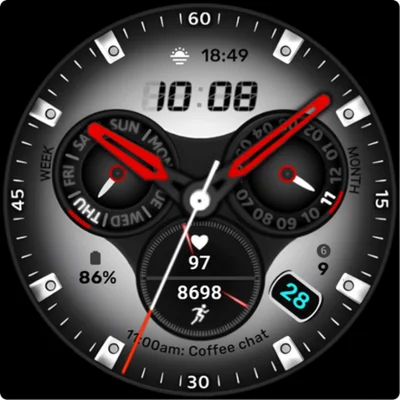
PKG Art of Combination Wear OS Watch faces
Wear Os Watch Face With Customizable Complications
WATCH FACE INSTALLATION NOTES:
How to install Watch Face To Wear OS Watch follow the link below.
https://drive.google.com/file/d/1zVQtEJK04vDV0vk4YBGonSJD5BAO0D4P/view?usp=drive_link
*Note: This watch face supports English.
Check your watch's compatibility with WEAR OS before proceeding with the installation. (Note: Galaxy Watch 3 and Galaxy Active are not WEAR OS devices.)
✅ Compatible devices include API level 30+ Google Pixel, Galaxy Watch 4, 5, 6, and other Wear OS models.
🚨 Watch faces don't automatically apply on your watch screen after the installation. That's why you MUST set it on your watch's screen.
Features:
- Analog and Digital Styles
- Date , Day of week , Month
- 2 Editable Complications
- The dial can be changed to 3 colors.
- Steps Count , Heart Rate , Battery Level , Next Event , Count message unread , Sunrise & Sunset time
* Note: This watch face supports English.
Customization:
1. Touch and Hold Display
2. Tap on Customize Option
Complications:
You can customize with the any data you want.
For example, you can select weather , world clock , sunset/sunrise , barometer etc.
**Some features may not be available on some watches.
For further support, please contact: meteetios@gmail.com
Thank you for Your support.
Show the original text
Wear Os Watch Face With Customizable Complications
WATCH FACE INSTALLATION NOTES:
How to install Watch Face To Wear OS Watch follow the link below.
https://drive.google.com/file/d/1zVQtEJK04vDV0vk4YBGonSJD5BAO0D4P/view?usp=drive_link
*Note: This watch face supports English.
Check your watch's compatibility with WEAR OS before proceeding with the installation. (Note: Galaxy Watch 3 and Galaxy Active are not WEAR OS devices.)
✅ Compatible devices include API level 30+ Google Pixel, Galaxy Watch 4, 5, 6, and other Wear OS models.
🚨 Watch faces don't automatically apply on your watch screen after the installation. That's why you MUST set it on your watch's screen.
Features:
- Analog and Digital Styles
- Date , Day of week , Month
- 2 Editable Complication
- The dial can be changed to 3 colors.
- Steps Count , Heart Rate , Battery Level , Next Event , Count message unread , Sunrise & Sunset time
* Note: This watch face supports English.
Customization:
1. Touch and Hold Display
2. Tap on Customize Option
Complications:
You can customize with the any data you want.
For example , you can select weather , world clock , sunset/sunrise , barometer etc.
**Some features may not be available on some watches.
For further support, please contact: meteetios@gmail.com
Thank you for Your support.
Data safety
What PKG WATCH FACE declares on Google Play about the data this app collects and shares.
- No data shared with third partiesLearn more about how developers declare sharing
- No data collectedLearn more about how developers declare collection
What’s new
Sep 26, 2024
PKG Art of Combination Wear OS Watch faces
Developer contact
- Emailmeteeitos@gmail.com
- Privacy policytermsfeed.com
- Address36/33 แขวงคลองถนน, เขตสายไหม กรุงเทพมหานคร 10220 Thailand
Information
- Offered by
- PKG WATCH FACE
- Category
- Personalization
- Updated
- Sep 26, 2024
- Released
- Sep 21, 2024
- Age rating
- Everyone
- Price
- $1.49
- Package name
- com.watchfacestudio.pkg013