Practical Component For WearOS
ZKin- EveryoneAge rating
- PersonalizationCategory
- Oct 7, 2026Updated
- $2.99Price
Links to the official Google Play listing of com.watchfacestudio.PracticalComponent. Last checked on Nov 21, 2026.
About this app
The dial supports running on Wear OS and also supports customization
Practical Component For WearOS
The dial supports running on Wear OS and also supports customization
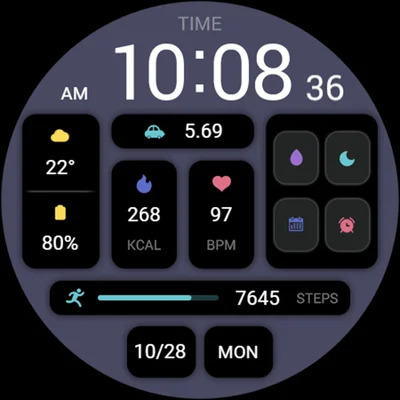
1. Top: morning and afternoon, time;
2. Central: Custom data, distance, calories, heart rate, custom app;
3. Bottom: Steps, Step Target Percentage Progress, Date, Week.
Compatible devices: Pixel Watch, Galaxy Watch 4/5/6/7 and above, and other devices
How do I install the watch face on WearOS ?
1. Install it from Google Play Wear Store on your watch
2. Install the companion app for fully customization (Android phone devices)
Data safety
What ZKin declares on Google Play about the data this app collects and shares.
- No data shared with third partiesLearn more about how developers declare sharing
- No data collectedLearn more about how developers declare collection
- Committed to follow the Play Families Policy
What’s new
Oct 7, 2026
Release a new watch companion to help quickly install watch face on mobile devices.
More watch faces: https://zkinwatchfaces.com/
Developer contact
- Email2567661790@qq.com
- Privacy policysites.google.com
- Address石城镇东山村 云安县, 云浮市, 广东省 China 527300
Information
- Offered by
- ZKin
- Category
- Personalization
- Updated
- Oct 7, 2026
- Released
- Nov 30, 2024
- Age rating
- Everyone
- Price
- $2.99
- Package name
- com.watchfacestudio.PracticalComponent