Predator's Watch | Illuminator
WatchBase- EveryoneAge rating
- PersonalizationCategory
- Oct 29, 2025Updated
- $0.79Price
Links to the official Google Play listing of wb.illuminator.predator. Last checked on Nov 13, 2026.
About this app
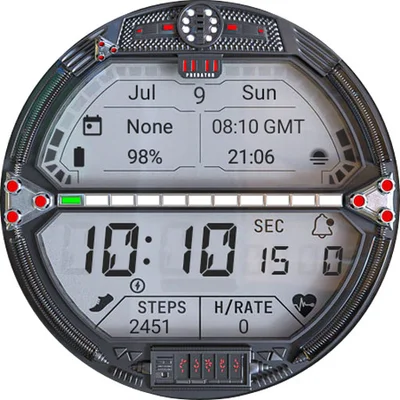
Predator inspired illuminator watch face
A Wear OS super realistic and easy to read Predator inspired style digital illuminator watch face with 3 custom complications and beautiful night modes.
NOTE: Please read the How to section and Installation section !!!
ⓘ Features:
- Realistic design.
- Predator inspired design.
- GMT Time.
- 3 custom complications.
- Auto 12h/24h mode.
- Night modes.
- Time and date.
- Battery indicator.
- Steps goal indicator.
- Notifications count.
- Alway On Display.
ⓘ How to:
- Long press (touch and hold) on the screen to customize hands color.
Want another SUPER REALISTIC watch face? Grab them here:
The ORIGINAL Illuminator watch face: https://play.google.com/store/apps/details?id=wb.illuminator.digital - ONLY 0.49$
Luna Benedicta: https://play.google.com/store/apps/details?id=wb.luna.benedicta
WatchBase. Illuminator: https://play.google.com/store/apps/details?id=wb.illuminator.hybrid
ⓘ Heart rate info
Heart rate is updated automatically every hour. It might show '0' when you first install and apply the watch face.
ⓘ Installation
How to install: https://watchbase.store/static/ai/
After installation: https://watchbase.store/static/ai/ai.html
If you have any issues installing the watch face, please note that we have no control over the installation process or any other Google Play / Watch processes. The most common issue that people face is after they buy the watch face and install it, they can't see/find it.
In order to apply the watch face after you install it, touch and hold on the main screen (your current watch face) the swipe left to look for it. If you can't see it, tap on the " + " sign at the end (add a watch face) and find our watch face there.
We use a companion app for the phone to make the installation process easier. If you buy our watch face, tap on the install button (on the phone app) you must check your watch.. a screen will appear with the watch face.. tap install again and wait for the installation to finish. If you already bought the watch face and it still asks you to buy it again on the watch, don't worry you will not be charged twice. This is a common synchronization issue, just wait a little or try to restart your watch.
Another solution for installing the watch face is to try to install it from a browser, logged with your account (google play account that you use on the watch).
JOIN WatchBase.
Facebook page:
https://www.facebook.com/WatchBase
Facebook group (General watch faces group):
https://www.facebook.com/groups/1170256566402887/
Instagram:
https://www.instagram.com/watch.base/
YouTube:
https://www.youtube.com/@WATCHBASE/videos
Google Play page:
https://play.google.com/store/apps/developer?id=WatchBase
SUBSCRIBE to our YouTube channel:
https://www.youtube.com/c/WATCHBASE?sub_confirmation=1
https://www.youtube.com/c/WATCHBASE
Data safety
What WatchBase declares on Google Play about the data this app collects and shares.
- No data shared with third partiesLearn more about how developers declare sharing
- No data collectedLearn more about how developers declare collection
Developer contact
- Emailsupport@belvek.com
- Privacy policywatchbase.store
- Address6 Prof. Georgi Bradistilov str./blvd. 1700 Sofia Bulgaria
Information
- Offered by
- WatchBase
- Category
- Personalization
- Updated
- Oct 29, 2025
- Released
- Jul 11, 2023
- Age rating
- Everyone
- Price
- $0.79
- Package name
- wb.illuminator.predator