Pulse Grid: Digital Watch Face
Magic apps & games- EveryoneAge rating
- PersonalizationCategory
- Oct 1, 2026Updated
- $2.29Price
Links to the official Google Play listing of com.observatoire.pulsegrid. Last checked on Nov 14, 2026.
About this app
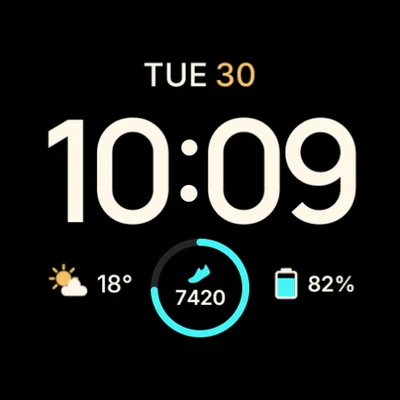
Large digits, steps, weather and battery. Eight color palettes for Wear OS.
Read the time instantly and keep your daily essentials in view. Pulse Grid is a digital Wear OS watch face that pairs oversized time with steps, weather and battery in a crisp layout on a black background.
YOUR ESSENTIALS AT A GLANCE
• Large numerals in your watch’s 12- or 24-hour format.
• Day of the week and date.
• Step count from a compatible source.
• A progress ring when the step data includes a valid goal or range.
• Temperature and weather conditions available on your watch.
• Battery percentage with a proportional indicator.
EIGHT WAYS TO MAKE IT YOURS
Choose Glacier, Orange, Champagne, Silver, Emerald, Blue, Lavender or Coral in the watch face settings. Colorful accents contrast with the black background and large digits. Always-on mode keeps only the time visible, in thin gray numerals.
DATA FROM YOUR WATCH
Steps and weather depend on compatible watch services, settings and permissions. Missing data appears as a dash. Without a supplied goal, the progress ring stays neutral. Temperature units follow the available weather source.
COMPATIBILITY AND SETUP
For compatible watches running Wear OS 5 or later. Install Pulse Grid on your watch from Google Play, then select it from your watch faces. Open its settings to choose your palette.
Support: abdo.elgomri@gmail.com
Explore our watch faces: https://abdogomri.github.io/watch-faces/
Data safety
What Magic apps & games declares on Google Play about the data this app collects and shares.
- No data shared with third partiesLearn more about how developers declare sharing
- No data collectedLearn more about how developers declare collection
What’s new
Version 1.0.3 · Oct 1, 2026
First release: large time display, date, battery, steps and weather when available. Eight color palettes and an always-on display.
Developer contact
- Websiteabdogomri.github.io
- Emailabdo.elgomri@gmail.com
- Privacy policyabdogomri.github.io
- Address52 Rue de Syracuse appartement 115 Appt 115 34000 Montpellier France
Information
- Offered by
- Magic apps & games
- Category
- Personalization
- Version
- 1.0.3
- Updated
- Oct 1, 2026
- Released
- Oct 1, 2026
- Age rating
- Everyone
- Price
- $2.29
- Package name
- com.observatoire.pulsegrid